A property marketing team launches a new 360° tour and watches the leads arrive. The banner appears, but GA4 records a session before the visitor chooses anything. A retargeting pixel loads inside the page, the embedded tour sends interaction data, and the lead form adds a contact to the CRM without carrying the visitor's privacy choice. The team has installed consent software, yet the site still behaves as though the banner were merely decorative.
That failure is common because user consent management isn't a single pop-up. It's a chain of decisions that must remain intact across the browser, the virtual tour embed, forms, tag managers, analytics tools, pixels, databases, and vendor systems. A polished banner can't compensate for scripts that ignore it.
Table of Contents
- Why User Consent Management Makes or Breaks Virtual Tours
- GDPR and CCPA Essentials for Tour Publishers
- Consent Features Every Virtual Tour Needs
- Setting Up Banners and Preference Centers That Work
- Wiring Consent to GA4 GTM Pixels and VirtualTourEasy Embeds
- Testing Auditing and Keeping Consent Compliant
Why User Consent Management Makes or Breaks Virtual Tours
Virtual tours create more interaction points than a static landing page. A visitor may open hotspots, change scenes, watch media, submit a viewing request, or move from an embedded tour to a lead form. Each interaction can create useful marketing data, but it can also activate analytics, advertising, or personal-data processing that the visitor hasn't authorized.
Consider a hotel using an embedded tour on several campaign pages. The visitor rejects marketing cookies, then opens a room scene. If the tour loads a marketing pixel independently of the site's consent layer, the rejection never reaches the actual tracking code. If the lead form later sends campaign identifiers into a CRM, the organization has created a second gap. The banner captured a choice, but the stack didn't enforce it.
The regulatory backdrop explains why this distinction matters. The modern consent-management market took shape after the GDPR was adopted in 2016 and became enforceable in 2018. Before enforcement began in May 2018, only around 5% of websites used a consent management platform, according to the cross-country academic analysis of consent interfaces and CMP adoption (the academic analysis of consent interfaces). The same research found that 67% of 254,148 websites across 31 European countries displayed a consent interface, but only 15% met minimum compliance criteria. A banner's presence, therefore, says very little about whether the implementation respects user choice.
The conversion cost of a careless implementation
Visitors notice when a tour feels intrusive. A request for a phone number can be reasonable when someone actively asks for a floor plan or callback. It feels different when the form is paired with unexplained tracking, hidden marketing consent, or a refusal path that's difficult to find.
Consent also affects reporting quality. If GA4 starts before the decision, the property team may count visitors who never agreed to analytics. If the team blocks all measurement after a refusal but fails to preserve consent status, analysts can't distinguish a genuine performance decline from a missing signal. Neither outcome supports sound campaign decisions.
A 2026 privacy-barometer dataset illustrates the measurement problem. Desktop users accepted 68.82% of banners and mobile users accepted 76.35%, while 47.01% of desktop visitors produced no consent signal at all (the 2026 consent-rate analysis). A team that only reports acceptance among people who clicked is missing the silent drop-off population.
Consent is infrastructure, not interface decoration. The banner, tour, form, analytics layer, CRM, and advertising vendors must all enforce the same decision.
A sound implementation gives visitors control without making the tour unusable. It loads necessary functionality, holds non-essential scripts until the relevant permission exists, records the choice with its context, and propagates withdrawal through every downstream system. That's the standard publishers should design for before selecting colors, button labels, or a CMP vendor.
GDPR and CCPA Essentials for Tour Publishers
Tour publishers need a practical distinction between consent-required processing, notice-based processing, and user-requested functionality. The exact legal position depends on the organization, visitor, data, vendor, and jurisdiction, so legal counsel should validate the final setup. Operationally, however, the decision filter is straightforward.
Under GDPR, consent for non-essential tracking must be freely given, specific, informed, and withdrawable. A visitor who wants to view a virtual tour shouldn't be forced to accept advertising cookies merely to access the content. Analytics, retargeting pixels, behavioral profiling, and enrichment that depend on personal data should remain inactive until the appropriate permission is recorded.
A lead form requires a separate analysis. The visitor's submission may be necessary to respond to a request, but optional marketing follow-up, advertising audience creation, or sharing with unrelated vendors can require a distinct choice. The form shouldn't bundle “send my inquiry” and “subscribe me to marketing” into one ambiguous checkbox.
GDPR in tour operations
A GDPR-ready flow should answer these questions before launch:
- What is collected: Does the tour record scene interactions, device information, location indicators, identifiers, or form details?
- Why it is collected: Is the purpose analytics, security, tour functionality, lead handling, advertising, or personalization?
- When it starts: Does the script or iframe transmit data before consent?
- How it stops: Can the visitor withdraw permission and cause future collection to stop?
- What is retained: Does the organization have a documented retention and deletion process?
The consent record should also preserve the version of the notice or preference configuration shown to the visitor. That record helps the publisher demonstrate what the user chose, rather than asserting that a banner existed.
CCPA and related California duties
California privacy rules use a different operational model. A business may need to provide clear disclosure and a readily accessible way to opt out of the sale or sharing of personal information, with additional consent requirements applying in particular situations. For a tour publisher, advertising pixels, audience synchronization, and vendor transfers deserve careful classification because the business may not control how each provider uses the resulting data.
The right implementation keeps the privacy notice, opt-out mechanism, and preference center connected. It also ensures that a visitor's opt-out reaches the same tags and vendors that would otherwise receive data. A useful primer for marketing teams building these workflows is data privacy for marketers, especially when campaign measurement and privacy obligations overlap.
Publishers should pair the banner with a clear privacy policy and cookie disclosure. The Virtual Tour Easy privacy policy is a relevant example of how a service can describe consent withdrawal rights and the process for exercising privacy requests.
Consent Features Every Virtual Tour Needs
A compliant banner is only the front door. The underlying system must control what loads, explain the purpose of each category, preserve the decision, and offer a simple route to change it. A useful audit evaluates two layers: interface presence and substantive choice quality. The cross-country research cited earlier found that many sites displayed interfaces without meeting minimum criteria, while a separate study of the top-ranked one million websites found that only 13.1% had adopted a CMP (the 2024 CMP adoption study).
The following table separates features that should be treated as operational requirements from features that may improve usability but can't replace enforcement.
| Feature | Why It Matters for Tours | Compliance Impact |
|---|---|---|
| Granular categories | Separates analytics for scene engagement from advertising and optional personalization | Supports specific, informed choices |
| Equal accept and reject pathways | Prevents the interface from steering visitors toward acceptance | Reduces dark-pattern risk |
| Persistent preference center | Lets visitors revisit choices from the tour page, footer, or privacy policy | Makes withdrawal practical |
| Pre-consent blocking | Prevents GA4, pixels, and optional embed calls from firing too early | Enforces the recorded decision |
| Consent record versioning | Connects a choice to the notice and categories shown at that time | Improves auditability |
| Browser-signal handling | Processes recognized privacy signals consistently with the organization's policy | Helps coordinate opt-out behavior |
| Multi-language support | Gives visitors understandable explanations in relevant markets | Improves informed choice |
| Visual customization | Keeps the consent layer aligned with the site's design | Helpful for trust, but not a compliance substitute |
Features that separate control from theater
Granularity matters. “Cookies” is too broad for a tour stack that uses necessary security functions, analytics, advertising, embedded media, and lead workflows. Categories should describe purpose in ordinary language, and optional categories should start inactive.
Blocking must happen before execution. Hiding a pixel after it fires isn't blocking. The implementation should prevent the script, request, or iframe from transmitting optional data until the required category is granted. Many custom banners fail to achieve this.
Withdrawal must be real. A preference link that only changes a browser label isn't enough if the CRM, server-side endpoint, or advertising vendor continues processing. Teams evaluating consent systems can use the discussion of Splash Access guest Wi-Fi consent as a useful comparison point for how consent collection and management extend beyond a single screen.
The 2026 audit-based coverage cited in the brief reports that 53% of CMPs lacked a working withdrawal mechanism and 80% failed disclosure checks around the technical consent record (the consent platform audit coverage). Those findings reinforce a practical rule: test the withdrawal path as seriously as the initial accept path.
Setting Up Banners and Preference Centers That Work
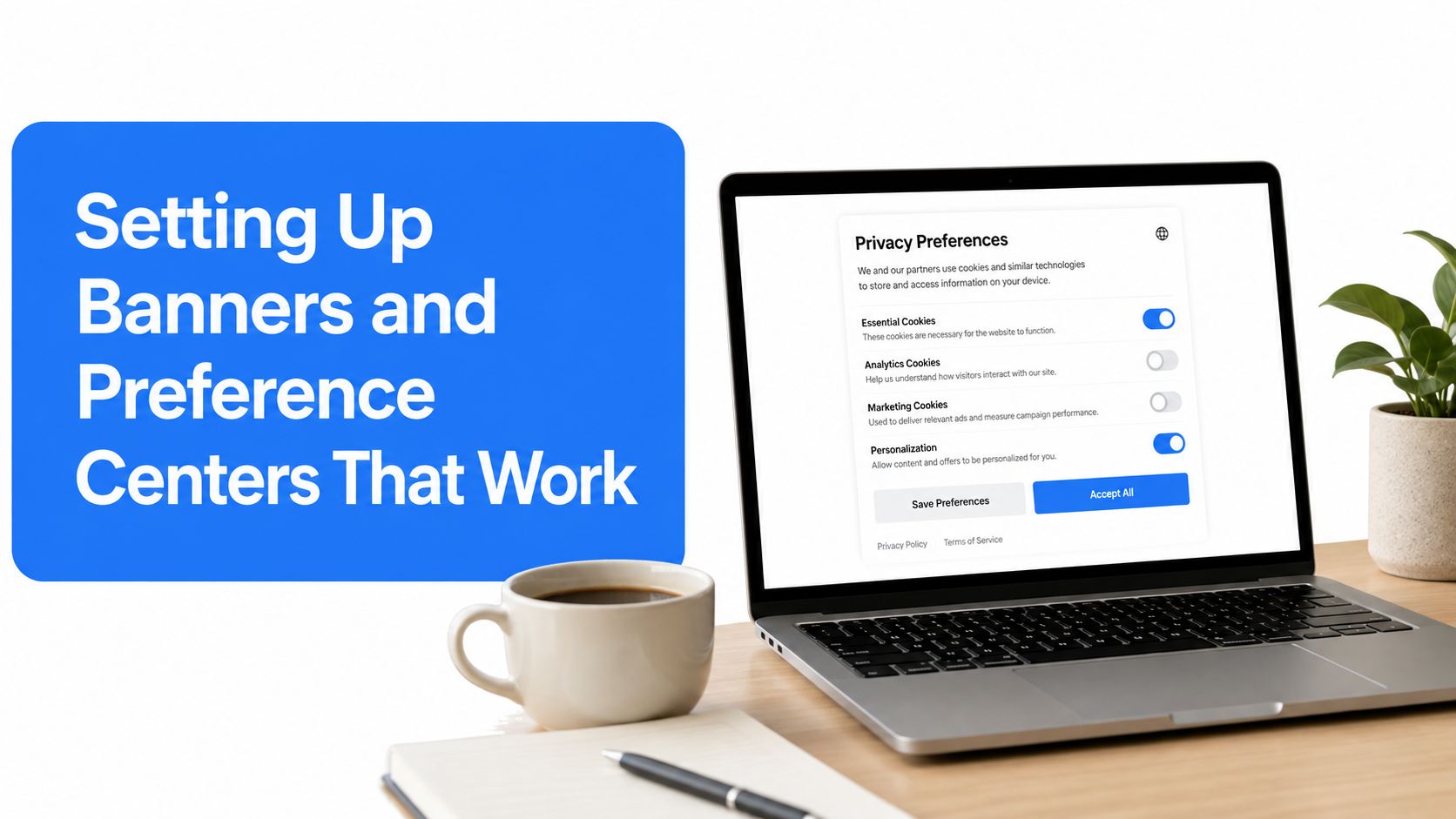
A banner should help a visitor make a quick, informed decision before the tour begins. It shouldn't obscure the entire experience, use vague wording, or make rejection harder than acceptance. Setup works best when the marketing, privacy, and engineering owners define the data map before anyone writes the banner copy.
Build the consent layer in a deliberate sequence
Inventory the tour stack. List the page scripts, VirtualTourEasy embed, GA4 configuration, GTM container, Meta or other advertising pixels, chat tools, form endpoints, CRM integrations, and third-party media. Include requests generated after a visitor opens a hotspot, starts a video, or submits a form.
Define categories by purpose. Keep necessary functionality separate from analytics and marketing. If a form can operate without advertising enrichment, don't make marketing permission a prerequisite for submission. If an optional personalization feature needs a distinct signal, give it a distinct category.
Write plain-language explanations. “Analytics cookies help measure which rooms visitors explore” is more useful than “performance technologies may process information.” Each category should identify its purpose, the type of data involved, and the relevant vendor relationship.
Place equal primary actions together. Accept all and reject all should be visible at the same decision level. A “manage preferences” option can open the detail view, but it shouldn't be the only way to refuse optional processing.
Design for mobile first. The privacy-barometer data shows mobile acceptance at 76.35%, compared with 68.82% on desktop, a difference of 7.53 percentage points (the mobile and desktop consent dataset). That makes touch-friendly controls and readable category descriptions essential, not cosmetic.
Store a durable record. Save the consent status, timestamp, policy or banner version, categories selected, and a consent identifier where appropriate. The record should be retrievable for audit and usable by downstream systems.
Keep the preference center reachable
The preference center belongs in the footer, privacy notice, and any persistent control provided by the CMP. It should show the current state, permit category changes, and trigger an update event that every connected system understands. A visitor shouldn't need to clear the browser or hunt through the tour to undo a decision.
The banner also needs regional behavior. A publisher serving European visitors, California residents, and other markets may need different notices, signals, and opt-out treatments. The 2026 industry analysis describes this as a “26-jurisdiction problem”, where organizations must align regional rules with tracking inventories, vendor classifications, preference signals, and consent behavior (the 2026 jurisdiction analysis). A region-aware configuration is more reliable than assuming one global banner covers every obligation.
Finally, test the banner with the tour itself open. Verify that the page doesn't load optional scripts in the background, that the embed responds to the category state, and that the form remains usable under the permissions the publisher intends to support. The Virtual Tour Easy lead capture forms documentation can help teams map the form experience before wiring consent-dependent enrichment.
Wiring Consent to GA4 GTM Pixels and VirtualTourEasy Embeds
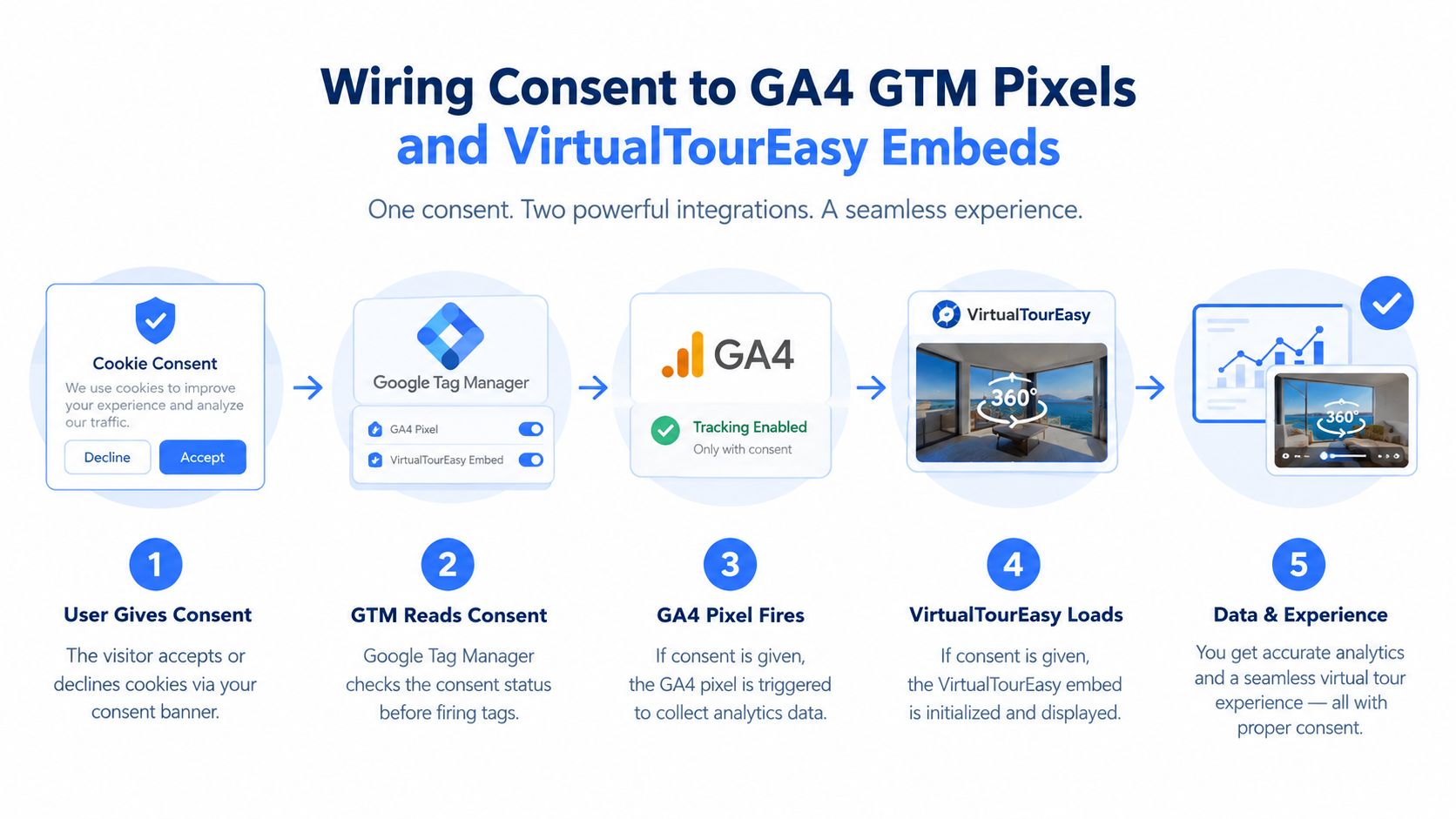
The difficult part begins after the visitor clicks. The consent event must travel from the CMP to the data layer, from the data layer to GTM, and from GTM or direct code to every dependent tool. An embed that initializes itself before the parent page receives the consent state can bypass the entire design.
Establish a default-denied state
For visitors who haven't made a choice, configure analytics and advertising storage as denied. The exact implementation depends on the CMP and Google setup, but the principle is stable: no optional tag should assume permission because the page loaded.
The consent system should publish a normalized event such as consent_updated, with category values that the rest of the stack can consume. A practical payload might include analytics, marketing, and functional states, along with a version and timestamp. The names can vary, but the meaning must remain consistent across teams and properties.
In GTM, configure built-in consent checks for GA4 and advertising tags. Analytics tags should require the analytics category, while Meta, Google Ads remarketing, LinkedIn, and similar pixels should require marketing permission. Custom HTML tags need the same discipline. A trigger that fires on “all pages” is a common way to undo a carefully designed CMP.
Gate the embed, not just the page tags
An embedded tour should receive the consent state before it initializes optional tracking. The parent page can render a privacy-respecting placeholder, then load the full tour after the visitor grants the category required for analytics or marketing. If the tour supports essential viewing without optional measurement, the publisher can load that experience while keeping analytics calls disabled.
A reliable pattern has four parts:
- Parent-page state: The CMP exposes the current decision through its API or data layer.
- Conditional initialization: The embed checks that state before starting optional telemetry.
- State updates: A later accept, reject, or withdrawal event reaches the embed through a supported message or callback.
- Server enforcement: Form and analytics endpoints validate the consent context rather than trusting a browser-only flag.
Lead forms need separate treatment. A visitor may consent to analytics but not marketing, or may submit an inquiry without agreeing to promotional follow-up. The form handler should store the minimum information required for the requested response and pass marketing eligibility separately. It shouldn't infer advertising permission from the fact that someone completed a form.
Virtual Tour Easy supports tours with analytics, lead capture forms, and integrations with GA4, GTM, and tracking pixels. In a real deployment, those integrations should be connected to the site's consent contract rather than enabled as independent sources of truth. Teams can use the Virtual Tour Easy conversion tracking setup as an implementation reference, then confirm that each event fires only under the intended category.
Prevent consent loss in downstream systems
Client-side consent can disappear when data enters a backend, CRM, warehouse, or vendor pipeline. Every submission and event should carry a consent status or consent reference that downstream services can interpret. Withdrawal should update suppression and processing rules, not merely alter the next browser event.
A useful data model separates:
- Identity data, such as the contact details voluntarily submitted through a form.
- Purpose status, such as whether analytics or marketing processing is permitted.
- Evidence, including the time, policy version, source page, and method of collection.
- Change history, including later grants, refusals, and withdrawals.
This separation prevents a common mistake, treating one “consent: true” field as universal permission. It also makes it easier to stop marketing enrichment while preserving a necessary service response.
Testing Auditing and Keeping Consent Compliant
A consent implementation isn't finished when the banner appears in production. It's finished when the organization can prove that each choice changes behavior across the full stack. The test should follow the actual funnel:
exposure → interaction → decision → signal persistence → downstream enforcement
Start in a clean browser session and inspect network activity before any choice. Confirm that optional cookies, analytics requests, advertising pixels, and tour telemetry don't fire prematurely. Then test accept, reject, category-level choices, and the preference center independently. A GTM preview session should show which tags were blocked, which fired, and why.
The repeatable audit routine
- Check the initial state: Open the tour in a private browsing session and inspect cookies, requests, iframe behavior, and data-layer events before interaction.
- Test every category: Accept analytics without marketing, then reverse the choice. Confirm that only the authorized tools activate.
- Submit the form: Verify that required lead handling works, while optional marketing fields and enrichment follow their own permission.
- Withdraw permission: Use the preference center, reload the page, revisit the tour, and check whether future collection stops.
- Inspect downstream records: Confirm that the CRM, analytics destination, pixel vendor, and server-side systems receive the right consent status.
- Test browser signals: Validate the organization's handling of Global Privacy Control where applicable, and document the regional behavior.
- Repeat across devices and regions: Mobile and desktop flows can differ, as can geo-specific configurations and embedded-tour loading paths.
The audit should run after a new vendor, campaign, tag, form change, tour update, or CMP configuration change. Cookie and script inventories also need periodic review because a previously harmless embed update can introduce a new request.
Organizations with mature security programs can align consent testing with broader vendor and application assurance practices, including resources on automated SOC 2 pentesting for MSSPs. The disciplines aren't identical, but both reward repeatable evidence, documented ownership, and verification rather than assumptions.
Execution drives consent risk. A reputable CMP can still produce a non-compliant result when tags, embeds, forms, and backend workflows ignore its signal.
The clearest operational measure isn't raw acceptance. Teams should track whether visitors receive a meaningful choice, whether the decision persists, whether withdrawal propagates, and whether every destination honors the result. That approach protects trust while giving marketers cleaner evidence about what the tour contributes.
Virtual Tour Easy provides 360° tour creation, website embeds, lead capture forms, analytics, and GA4, GTM, and tracking-pixel integrations that teams can place inside this consent architecture. Visit Virtual Tour Easy to create a tour, map its data flows, and test the complete visitor experience before launching it across client or property pages.