Skip to content
AI 360° panorama generator

AI 360° panoramas of real-world spaces.

Describe a room, a terrace or a whole property — or upload one ordinary photo — and AI generates a seamless, realistic 360° panorama you can look around in. Then do what other panorama generators can’t: link your scenes into a virtual tour people can walk through, with hotspots, and publish it anywhere.

Text → 360°Photo → 360°Seamless 2:1 equirectangular
Example promptLavender parterre in front of an 18th-century Provençal stone farmhouse, cypress trees, warm late-afternoon light
How it works

From prompt to panorama to tour

1

Describe it or upload a photo

Type what the space looks like — room type, materials, light, view — or upload a regular photo (up to four of the same room) for AI to build around.

Text promptPhotoListing URL
2

AI generates the 360°

You get a seamless 2:1 equirectangular panorama with a level horizon and continuous floor and ceiling, ready to explore in the 360° viewer.

StandardHigh quality
3

Walk it, link it, publish it

Add the panorama to a tour, generate the next room in the same style, link scenes with hotspots and publish to a short link or an embed.

TourHotspotsEmbed
Beyond a single image

A panorama generator that finishes the job

Most 360° image generators stop at a picture. VirtualTourEasy treats each panorama as a scene in something people can explore.

Text → 360°

Generate a realistic panorama of an interior or exterior from a written description. Great for concepts, pre-sales and spaces that don’t exist yet.

Photo → 360°

Extend a single photo into a complete panorama around the original view. Add up to four photos of the same room for a more faithful result.

Whole tours in one style

Generate every room of a property from one description or a listing link — consistent materials and light, with navigation between scenes.

Auto hotspots

AI analyzes your scenes and proposes navigation and info hotspots for you to review and keep.

AI Photo Studio

4× upscaling, noise reduction and detail enhancement for the panoramas and photos you already have.

Panorama → video

Turn generated scenes into cinematic or vertical AI video tours with an AI soundtrack, ambient sound or your own voice-over (Professional and Business).

Photo → 360°

One ordinary photo, a full 360° scene.

Upload a well-lit photo taken with a phone or a DSLR. AI keeps the original view recognizable — the same materials, light and proportions — and builds the rest of the sphere around it: what is behind you, above you and below you.

  • Best input: a sharp, level, landscape photo taken from a corner, so AI has the most context.
  • More views, more accuracy: add up to four photos of the same room.
  • Honest output: the parts you didn’t photograph are AI’s best guess — present them as a visualization, not a survey.
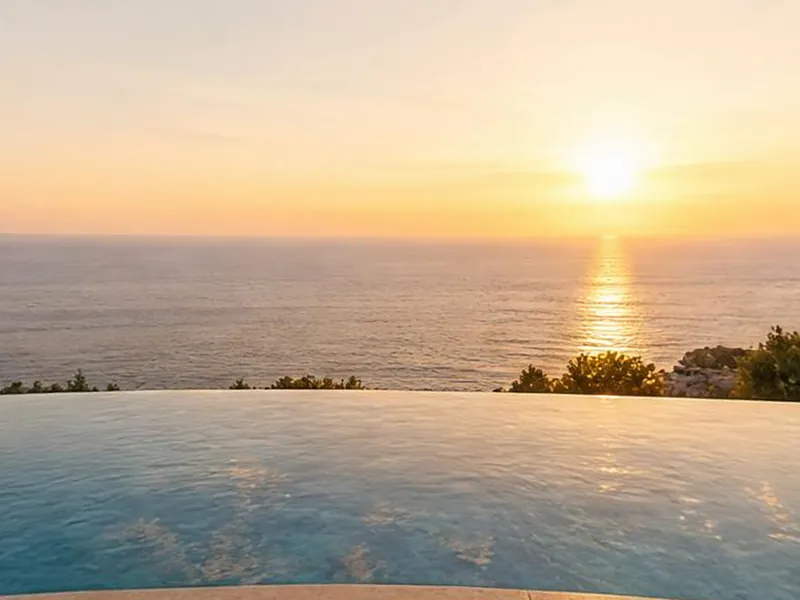
The original flat photo of the pool terrace
Your photo
Extended to 360° by AIDrag
Guide

Prompts, output, credits and licensing

Example prompts by industry

Good prompts read like a photographer’s brief: the space, its size and style, the materials, the light and the view. Borrow these and adapt them.

Real estate

  • “Bright Scandinavian living room in a 1930s apartment, herringbone oak floor, tall windows onto a tree-lined street, late-morning light.”
  • “Penthouse terrace at sunset, plunge pool, teak loungers, glass balustrade, view over a marina and city skyline.”

Hotels and hospitality

  • “Boutique hotel junior suite, king bed with linen throw, arched window to a sea view, rattan armchair, soft morning light.”
  • “Moroccan riad courtyard with a reflecting pool, zellige tiles, orange trees in terracotta pots, carved cedar doors.”

Restaurants, bars and venues

  • “Candle-lit wedding reception in a stone barn, long banquet tables with eucalyptus garlands, festoon lights under timber beams.”
  • “Rooftop cocktail bar at dusk, low lounge sofas, brass bar counter, string lights, city skyline.”

Tourism and outdoor spaces

  • “Vineyard terrace above a medieval hill town at golden hour, rows of vines, cypress trees, rolling hills.”

Architecture, development and retail

  • “Double-height lobby of a new mixed-use building, polished concrete floor, timber slat ceiling, full-height glazing, reception desk.”
  • “Furniture showroom room set, curved bouclé sofa, travertine coffee table, wool rug, warm gallery lighting.”

Tips for realistic 360° panoramas

  1. Name the space and its scale — “a 40 m² open-plan kitchen” beats “a kitchen”.
  2. Specify materials and finishes: floors, walls, worktops, fabrics.
  3. Set the light and the time of day: morning sun, overcast, golden hour, evening with lamps on.
  4. Describe what is outside the windows — it is part of a 360° image.
  5. Leave out people and signage. The generator is tuned for clean, empty spaces without invented text or logos.
  6. For a multi-room tour, generate the whole tour at once so every room shares the same style.

What you get: format and exports

Every panorama is a true 2:1 equirectangular image — the standard format of 360° cameras and viewers — with seamless left and right edges, a level horizon at mid-height and continuous floor and ceiling. Higher-quality settings produce a larger panorama. From there you can:

  • Add it to a tour as a scene, next to AI scenes or real 360° photos.
  • Embed it on any website with the tour’s one-line iframe, or share its short link.
  • Turn it into video with AI video tours (Professional and Business).
  • Get the image file itself through the REST API, which returns the full-resolution equirectangular image of every scene (Professional and Business).

Credits and plans

AI generation runs on AI credits, included every month on paid plans: Solo ($19/month, or $16 billed yearly) includes 100 credits, Professional ($59, or $48 yearly) 500 and Business ($199, or $160 yearly) 1,500. Each generated scene uses credits according to the quality you choose — Standard is the most economical — and the exact cost is shown on the button before you confirm. Solo’s monthly allowance covers dozens of standard-quality scenes. The Free plan has no AI credits but lets you build tours from your own 360° photos. See the pricing page.

Can you use AI-generated panoramas commercially?

Under our Terms of Service, the AI-generated or AI-modified media you create with our AI features is yours to use — on your website, in listings, in marketing. A few responsibilities come with it:

  • AI scenes are illustrative and may not accurately represent a real property, so present them honestly — for example, labeled as a visualization or concept.
  • Outputs are provided as-is, and we don’t guarantee they are unique or free from resemblance to existing works.
  • You are responsible for making sure your use complies with applicable laws, and the usual content rules apply.
  • Don’t publish AI-generated scenes to Google Maps, which asks for photos taken on location — see publishing to Google Street View.

A Skybox AI alternative for real-world spaces

If you have searched for an AI 360° generator, you have probably come across Skybox AI by Blockade Labs. It’s a well-known 360° panorama generator, and its own site positions it for XR, virtual production and games, including Unity, Roblox and Fortnite creators. VirtualTourEasy is built for a different job: believable interiors and exteriors of real estate, hotels and venues that people walk through as a tour.

Skybox AI (as of October 2026)VirtualTourEasy
Built forXR, virtual production, games and other immersive contentReal estate, hospitality, venues and retail spaces
OutputEquirectangular panoramas, with exports such as cube maps, HDRI, depth maps, video and mesh, up to 16K on higher plans2:1 equirectangular scenes hosted in a 360° viewer, plus AI video tours
Multi-sceneOne skybox per generationWhole tours: several scenes in a consistent style, linked by navigation
Tour features—Hotspots, floor plan, inquiry form, analytics, embedding, white label
Paid plans from$24 per seat a month ($20 billed annually)$19 a month ($16 billed yearly) with 100 AI credits

Building a game level, a VR environment or an LED-volume backdrop? Skybox AI’s export options are designed for that. Need a realistic room that buyers or guests can explore on a listing, a hotel website or a venue page? That is what VirtualTourEasy is for.

Generated with AI

Every scene in these tours came from AI

No 360° camera, no photographer — just AI on VirtualTourEasy. Click to look around.

FAQ

AI 360° panorama questions

Yes. VirtualTourEasy generates seamless 2:1 equirectangular 360° panoramas from a text description or from a regular photo, and can generate several rooms in a consistent style as a complete virtual tour.
Upload a regular photo — ideally sharp, level and taken from a corner — and choose to convert it to a 360° scene. AI keeps the original view and builds the rest of the sphere around it. Adding up to four photos of the same room gives a more faithful result. This uses AI credits, included from the Solo plan.
It is the standard flat format for 360° images: a 2:1 rectangle that maps the full sphere, 360° horizontally and 180° vertically. 360° cameras export it and 360° viewers display it; every panorama VirtualTourEasy generates uses it.
Not on our Free plan: AI generation uses credits, which start with the Solo plan at $19/month (100 credits a month). The Free plan does let you build and publish tours from your own 360° photos at no cost.
Under our Terms of Service, the AI-generated media you create is yours to use. AI scenes are illustrative and may not accurately represent a real property, so present them honestly, and you remain responsible for complying with applicable laws.
It depends on the quality you choose; Standard is the most economical and higher quality uses more. The exact cost is shown before you generate, and Solo’s 100 monthly credits cover dozens of standard-quality scenes.
For realistic real-world spaces, yes. Skybox AI by Blockade Labs is positioned for XR, virtual production and games, with exports such as HDRI and depth maps. VirtualTourEasy focuses on realistic interiors and exteriors that you link into walkable tours with hotspots and publish on a website.

Describe it today. Walk through it in minutes.

Create your account free, then generate your first panoramas with the Solo plan’s AI credits.
Create your free tourFree plan · No credit card
Start free