A virtual tour of a castle isn't automatically an immersive digital visit. It might be a Street View walkthrough, a curated panorama, an interactive map, a narrated heritage experience, a video, or a structured 3D model. Those formats serve different goals, so a viewer looking for room-to-room exploration may be disappointed by a map-led preview, while a teacher may value authoritative narration more than unrestricted movement.
The seven official examples below compare navigation, historical context, device access, immersion, and practical use. They include broad discovery collections, focused palace experiences, map-based planning tools, government heritage portals, 3D visualizations, and panoramic video. They also show how castle operators can turn digital access into a reusable asset for tourism discovery, classroom interpretation, pre-visit planning, and marketing. Teams considering a similar project can use exploring castles on a shoestring as travel inspiration, then evaluate which digital format best supports their audience.
Table of Contents
- 1. Google Arts & Culture English Heritage Street View collection
- 2. Historic Royal Palaces Virtual Palaces
- 3. Prague Castle official virtual tour
- 4. Blarney Castle map and virtual tour
- 5. Cadw Welsh Government virtual visits
- 6. Neuschwanstein Bayern 3D and Virtuelles Bayern
- 7. Himeji Castle official 360 video and photo experiences
- 7-Point Comparison of Castle Virtual Tours
- Choose the format that matches the goal
1. Google Arts & Culture English Heritage Street View collection
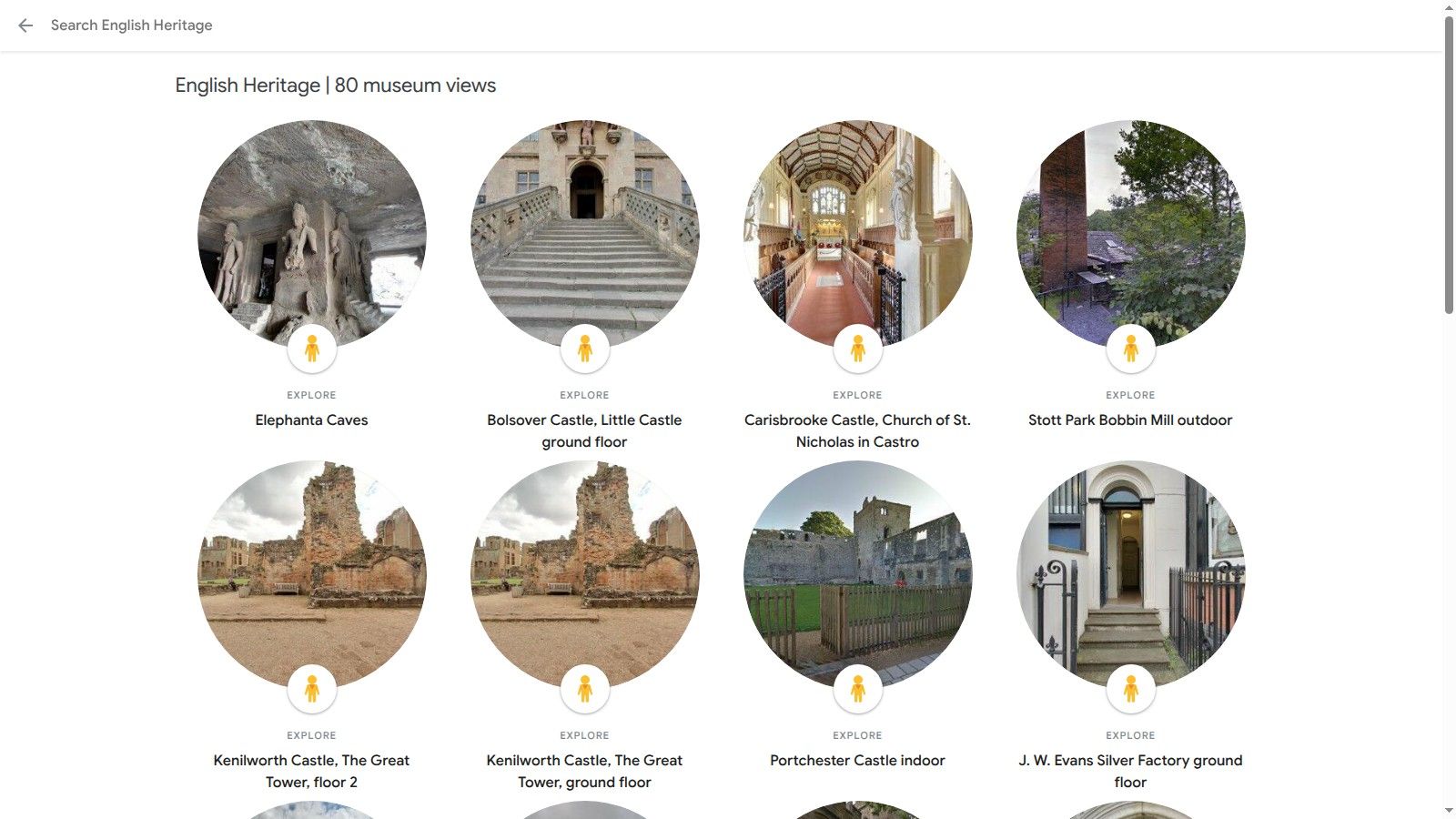
The Google Arts & Culture English Heritage collection works best as a discovery shelf rather than a single, interpreted castle visit. It brings together Street View walkthroughs of selected English Heritage properties, including examples such as Bolsover Castle and Carisbrooke Castle, with editorial stories, contextual image text, and visual material that users can inspect in a browser.
The central strength is breadth. A prospective traveler, teacher, or heritage enthusiast can sample several English castles from one familiar platform instead of learning a different interface for every site. Desktop and mobile access lower the entry barrier, while Cardboard-style VR support adds an optional layer of immersion for users with compatible equipment.
Best for rapid discovery
Street View nodes create a recognizable, low-friction browsing pattern. Users click from viewpoint to viewpoint and can combine visual exploration with short historical explanations. That makes the collection useful for destination discovery, especially when someone wants to compare several castles before choosing a trip.
The tradeoff is uneven depth. Content varies by site, and some entries may feel closer to image browsing than a complete virtual visit. Navigation also depends on connected Street View positions rather than a detailed room-by-room floor plan, so a user may understand the atmosphere without fully understanding the building's layout.
Practical rule: Use this format when reach and sampling matter more than exhaustive interpretation.
For tourism teams, the collection suggests a valuable marketing model: publish attractive panoramic access, then attach concise stories that move visitors from curiosity toward a physical visit. Teams can also review how Street View tours work before deciding whether a castle needs linked panoramas, editorial content, or both.
2. Historic Royal Palaces Virtual Palaces
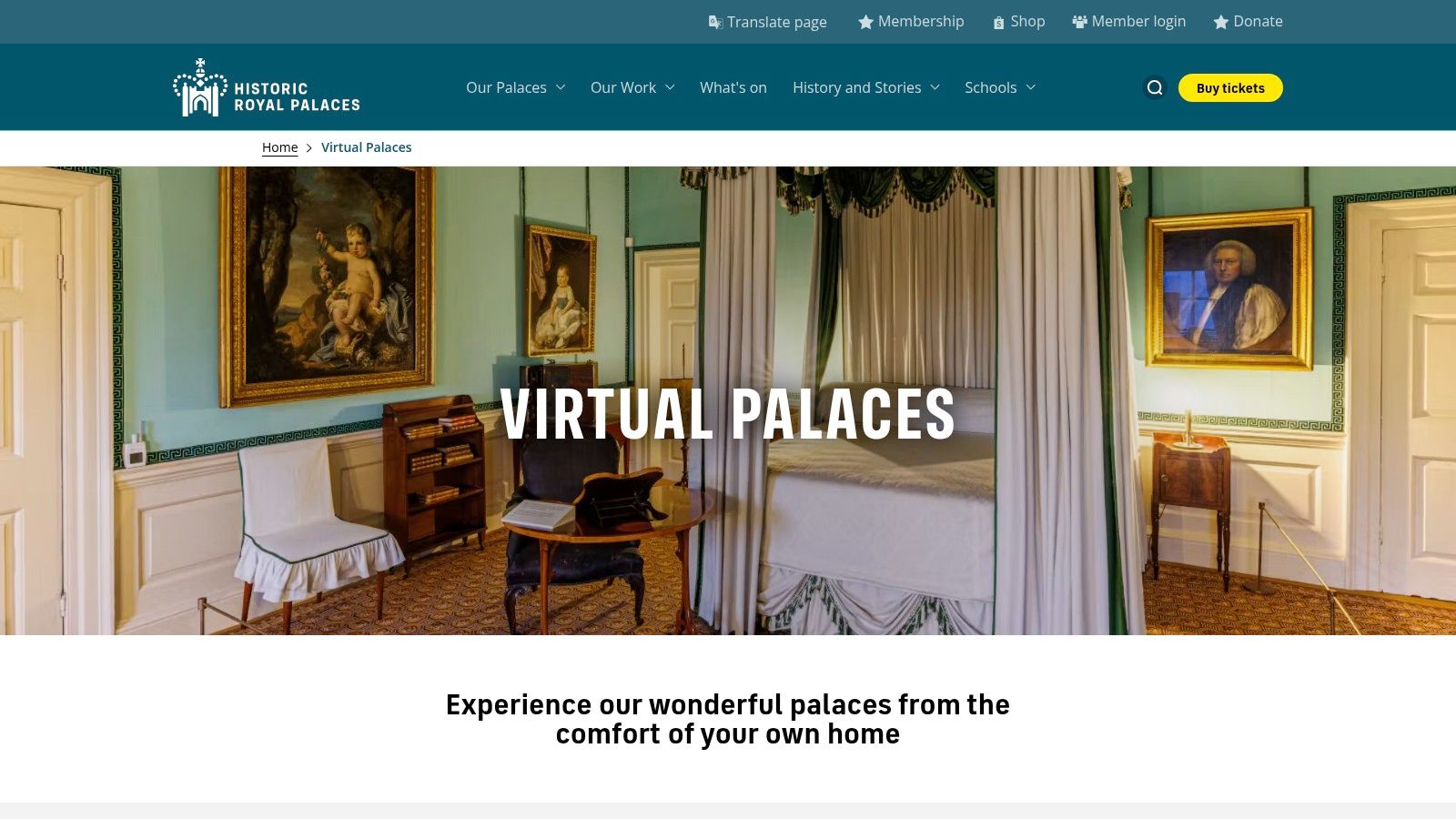
Historic Royal Palaces Virtual Palaces takes a more curated approach, particularly through its Tower of London 360 experiences. Instead of presenting a broad catalogue for casual sampling, the platform focuses on selected rooms and areas, then surrounds those views with expert narration, historical notes, and supporting media.
That combination gives the experience strong institutional authority. The viewer isn't left to interpret an empty panorama alone. Narration can explain why a room matters, while companion videos add material that a static viewpoint cannot provide. The result is especially suitable for classroom sharing, public education, and guided remote sessions where context carries as much weight as visual access.
Interpretation outweighs unrestricted movement
The Tower of London experience demonstrates why immersion and authority aren't the same thing. A visitor can feel present inside a historic space, but the experience remains selective rather than a complete scan of the entire building. Some elements are video-based, so the viewer may watch rather than freely explore.
That limitation is useful to identify. A school doesn't necessarily need every corridor. It may need an accurately explained room, a clear historical sequence, and media that supports discussion. A tourism operator, however, may want more open exploration, stronger calls to action, and direct links to tickets or visit information.
- Immersion: Strong at selected viewpoints, but not continuous throughout the full palace.
- Authority: High, because the experience is published by the official custodian.
- Navigation: Guided and selective rather than fully free-roaming.
- Practical use: Well suited to teaching, interpretation, and institutional presentation.
A castle marketing team adapting this model should separate visual access from explanation. An interactive experience can guide visitors through a small number of meaningful locations, then use audio and video to answer the questions that panoramas can't answer. Virtual tours for tourism describes the broader operational use of this approach for visitor-facing digital experiences.
3. Prague Castle official virtual tour
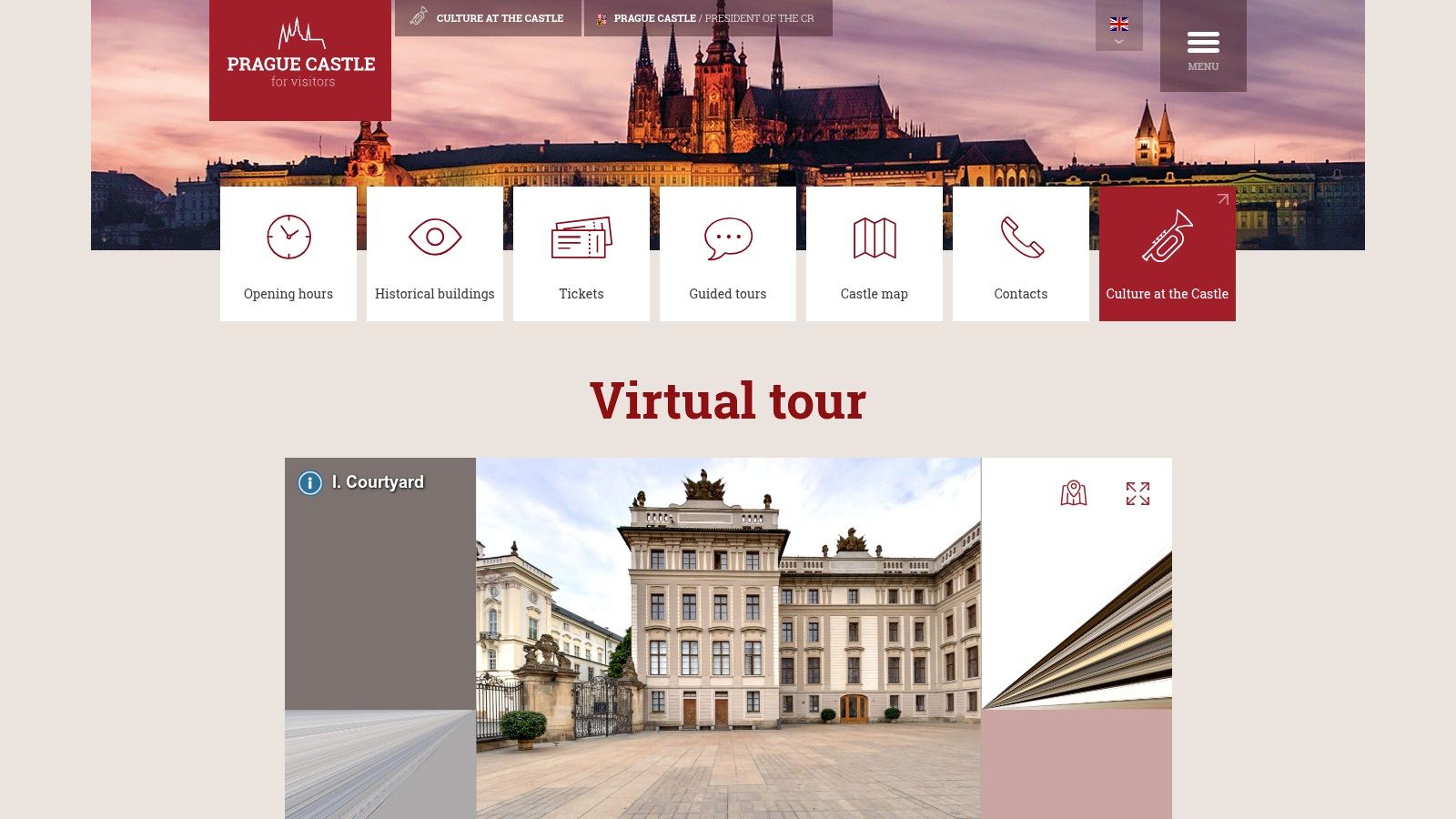
The official Prague Castle virtual tour prioritizes wayfinding. Its map-driven interface lets users open individual sections, view curated locations, and read English descriptions. That structure is particularly valuable for a large castle complex, where a beautiful panorama alone may not tell a prospective visitor how the site fits together.
The experience behaves more like a digital orientation system than a continuous 3D scan. Users choose areas through the interface, then inspect selected viewpoints supported by contextual text. This reduces the cognitive burden of navigating a sprawling historic site, and it creates a practical reference for travel clients, students, and visitors preparing an itinerary.
A planning tool disguised as a tour
The most important distinction is between seeing a place and understanding its organization. Prague Castle's map-led design helps users connect sections to the broader site plan. That makes it more useful for pre-visit planning than an isolated set of panoramic images, even though it offers less freedom than a full room-to-room environment.
The official source also matters. Visitor information can change, and users planning a trip need confidence that descriptions come from the institution responsible for the site. The interface is designed for visitors and supports mobile use, so it can function as a reference before travel rather than only as a desktop browsing experience.
A map-led virtual tour can reduce uncertainty even when it offers less visual freedom than a full 360 scan.
For educators, Prague Castle provides a straightforward sharing format. A teacher can direct students to a particular section, ask them to compare viewpoints, and use the descriptions as a starting point for research. For tourism businesses, the same structure can support client consultations, itinerary planning, and links from destination pages.
Its weakness is equally clear. Curated viewpoints don't provide the same spatial continuity as a connected 3D model. The experience is strongest when the goal is orientation with context, not unrestricted digital wandering.
4. Blarney Castle map and virtual tour
Blarney Castle's official map and virtual tour treats digital access as a visitor-orientation service. The interactive map identifies key points of interest, including the Blarney Stone and gardens, while the surrounding information helps users understand the site's arrangement and practical visit flow.
This is a useful reminder that the word tour doesn't always mean a simulated interior walk. Blarney Castle's experience is more concerned with showing where the main attractions sit and helping visitors form a mental picture of the grounds. For a traveler deciding how to approach the site, that may be more useful than a technically impressive scan with no logistical explanation.
Practical orientation before visual spectacle
The experience's strongest use case is pre-visit planning. Visitors can identify important stops, inspect the site plan, and connect visual expectations with official directions. Families, travel advisors, and visitors with accessibility or mobility concerns can use that information to prepare questions before arrival, although the tour itself shouldn't be treated as a substitute for checking current visitor guidance.
Its immersive ceiling is lower than that of a full panoramic scan. The map provides a strong overview, but it offers limited room-by-room interior exploration. That isn't necessarily a flaw. A site can use a digital map to answer operational questions, then reserve immersive content for the locations where visual detail has the greatest value.
- Navigation: Clear, map-based, and visitor-focused.
- Context: Practical information supports the visual orientation.
- Immersion: Limited compared with linked interior panoramas.
- Marketing value: Strong for setting expectations and encouraging an in-person visit.
The model works well for castle operators that need to communicate a route through a complex property. A marketing team could add hotspots for gardens, viewpoints, facilities, or event spaces, then connect each point to images, audio, booking information, or a contact form. That produces a useful digital guide without pretending that every visitor needs a full virtual reconstruction.
5. Cadw Welsh Government virtual visits
Cadw's virtual visits represent a network approach to digital heritage. The Welsh Government historic environment service presents virtual experiences across multiple historic properties, including castles and historic homes such as Castell Coch and Tretower Court & Castle. Rather than treating one virtual tour as an isolated campaign, Cadw shows how a custodian can build a recognizable digital portfolio across a group of sites.
The format combines browser-based 360 imagery with heritage interpretation. That pairing gives users more than an attractive view, while standard web access keeps the experience available without specialized plugins. For educators and castle enthusiasts, the multi-site structure supports comparison. A user can examine different buildings, periods, and presentation styles within a single official ecosystem.
Portfolio thinking improves reuse
Cadw's main lesson is strategic. A heritage organization doesn't need to publish every property in exactly the same way to gain value from a shared digital programme. A common landing page can support discovery, while individual experiences can vary according to a building's architecture, available survey material, and interpretive priorities.
The coverage isn't uniform. Not every Welsh castle has a complete 360 tour, and depth varies by property. Users should therefore distinguish between a network portal and a promise of identical immersion at every location.
- For discovery: The multi-property structure encourages browsing across destinations.
- For education: Official interpretation gives teachers material that can be discussed and compared.
- For marketing: A network creates cross-promotion opportunities between sites.
- For preservation: Digitized environments can provide a remote record and a platform for future content.
The broader heritage sector now treats virtual tours as a standard visitor-service layer. English Heritage offers dedicated virtual tours for Goodrich and Pendennis Castles, with navigable floor plans, circular-window movement, and clickable information points. Cadw's multi-site approach demonstrates how that maturity can translate into a sustainable digital catalogue rather than a one-off novelty.
6. Neuschwanstein Bayern 3D and Virtuelles Bayern
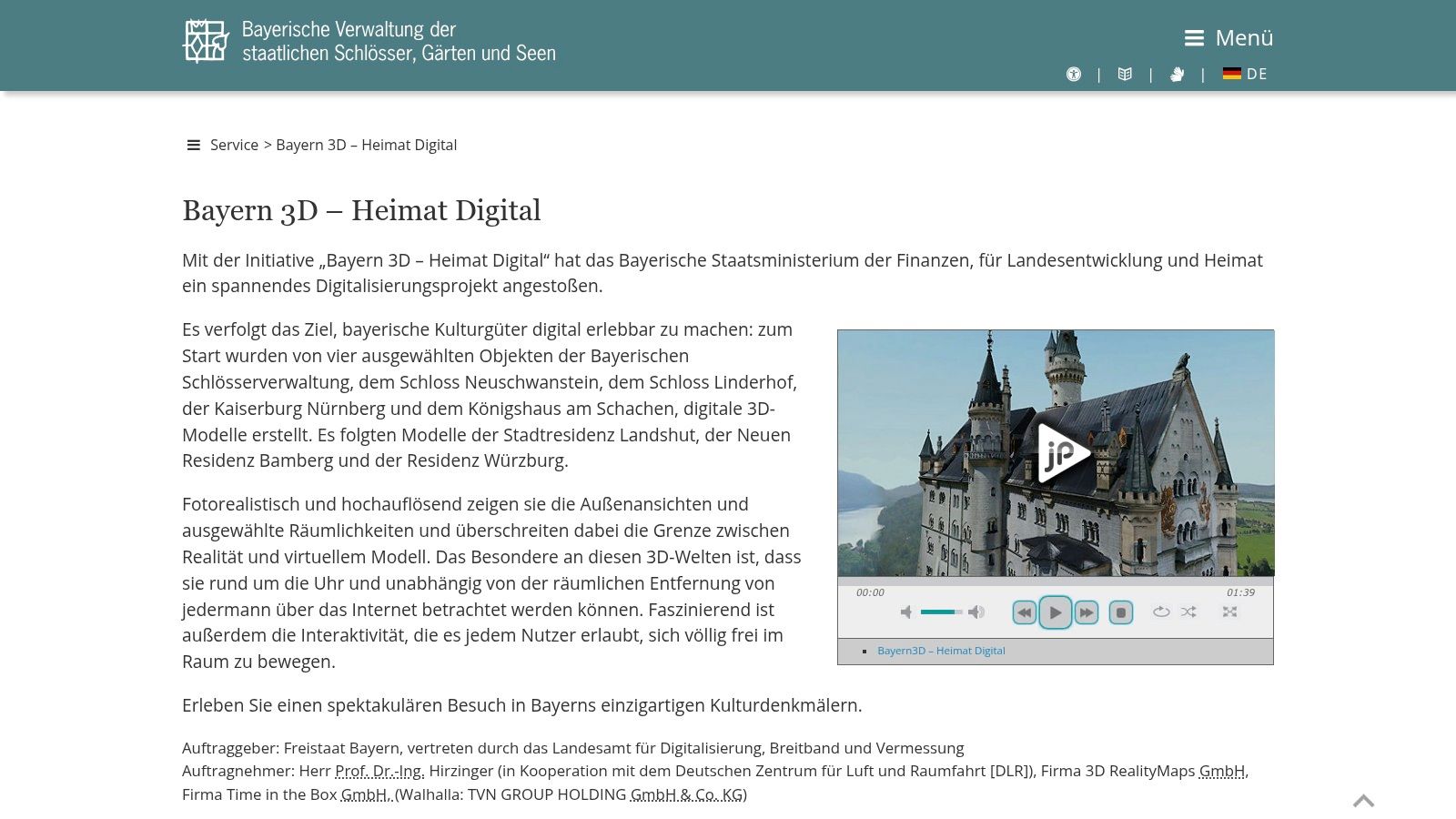
Bayern 3D changes the question from “Where can the viewer click next?” to “What kind of digital object is being presented?” Its government-backed visual resources for Bavarian landmarks, including Neuschwanstein Castle, are model and visualization oriented. They provide authoritative visual references that can support education, research, and pre-visit understanding.
A 3D model has a different strength from a panorama. Panoramas preserve what a camera sees from particular positions. Models can support a more structured understanding of form, volume, and relationships between architectural elements, depending on how the model was produced and presented. That makes this format relevant to researchers, teachers, architects, and visitors interested in the building as an object rather than only as a sequence of viewpoints.
Models offer structure, not automatic immersion
The Serralunga d'Alba Castle heritage-computing case study shows why the distinction matters. Its workflow combined Historic Building Information Modeling, known as HBIM, with a VR model tour, demonstrating how survey data can become an immersive, navigable heritage environment. The 2019 ISPRS case study supports a preservation-oriented view of digital touring, where accurate geometry and structured metadata matter alongside visual appeal.
Bayern 3D shouldn't be judged by the same standard as a free-roaming interior scan. Its value lies in provenance, visual reference, and model-based understanding. The primary resources may also be German-language first, which can add friction for international users who need browser translation.
For a classroom, a model can support discussion about exterior form, architectural relationships, and digital documentation. For a tourism website, it may need a companion layer with visit information, story points, booking prompts, and mobile-first navigation. A 3D asset becomes more useful when the operator explains what viewers should notice and what action they can take next.
7. Himeji Castle official 360 video and photo experiences
Himeji Castle's official video and panoramic library emphasizes high-quality viewpoints rather than continuous navigation. The collection includes 360-degree panoramic videos and photos of interior features and gates, with YouTube's 360 player providing familiar access on desktop, mobile, and compatible app environments.
This format is easy to distribute. Viewers don't need to learn a specialist interface, and mobile gyroscope support can make a panoramic video feel interactive. Exterior footage, including drone perspectives, adds a sense of scale that interior viewpoints alone can't provide.
Curated viewpoints suit short attention windows
Himeji's approach is particularly effective for quick visual access. A visitor can open a video, look around a selected location, and gain an impression of the castle without navigating a complex map or model. That makes panoramic video suitable for social sharing, destination pages, classroom introductions, and campaign landing pages.
The limitation is continuity. Curated panoramas don't create a connected room-to-room scan, so viewers can't necessarily build a complete spatial route. Supporting instructions and pages may also be Japanese-language first, which can affect accessibility for international audiences.
- Immersion: High within each panoramic viewpoint.
- Navigation: Viewer-controlled orientation, but not continuous free roaming.
- Context: Official footage supplies visual authority, while interpretation may need supplementary text.
- Practical use: Strong for previews, promotion, and short educational introductions.
The museum-sector case study on interactive trails found that most visitors spent 10 to 30 minutes in a virtual tour, while 9% stayed longer than 50 minutes. It also recorded a positive mean response of 2.92 for future use and a 3.14 mean for users' ability to focus without distractions. Those figures suggest that operators should structure panoramic experiences into concise thematic segments rather than force every viewer through a long, linear presentation. Teams exploring production options can also review Chrome browser VR guidance and consider how existing assets can support browser-based access.
The Himeji model also has a useful content lesson. A castle doesn't need to choose between a polished video and an interactive tour. Short panoramic clips can attract attention, while linked scenes, hotspots, and information panels can carry users deeper into the experience. Designers studying how to turn logos into 3D models can apply the same broader principle: visual assets should be selected for the role they play in the journey, not for novelty.
7-Point Comparison of Castle Virtual Tours
| Platform / Tour | Implementation complexity (🔄) | Resource & access (⚡) | Expected outcomes (📊) | Ideal use cases (💡) | Key advantages (⭐) |
|---|---|---|---|---|---|
| Google Arts & Culture – English Heritage Street View collection | Low, browser‑based Street View nodes, no setup | Free; desktop, mobile, Cardboard VR | Broad, quick sampling of many castles with 360° panoramas + short editorials | Casual exploration, quick previews, compare multiple sites | Wide coverage and immediate access; curated context |
| Historic Royal Palaces – Virtual Palaces (Tower of London 360 tours) | Low–Medium, curated guided 360s and narration | Free; web presentation with companion videos | Authoritative, narrated 360 experiences suitable for groups | Classroom use, guided virtual visits, interpreted learning | Official, well‑produced content with expert interpretation |
| Prague Castle – Official virtual tour | Low, map‑driven, section‑by‑section interface | Free; mobile‑friendly, English descriptions | Clear wayfinding and curated viewpoints for a large complex | Visitor orientation, trip planning, education | Official, reliable site orientation and layout preview |
| Blarney Castle – Map and Virtual Tour | Low, interactive map and highlight previews | Free; visitor‑focused pages with maps and directions | Quick orientation of grounds and main highlights | Trip planning, quick site familiarization | Straightforward visitor logistics and key‑stop previews |
| Cadw (Welsh Government) – Virtual Visits | Low–Medium, browser 360s with heritage interpretation | Free; browser access, educationally focused | Multi‑site official virtual visits with narrative context | Educators, enthusiasts, multi‑site educational browsing | Government‑sourced, educationally robust content |
| Neuschwanstein – Bayern 3D / Virtuelles Bayern | Medium–High, official 3D models and visualizations | Official assets; may require downloads or translations | Authoritative 3D models and reference visuals for research | Research, teaching, high‑fidelity visual reference | High‑quality government 3D assets with strong provenance |
| Himeji Castle – Official 360° video and photo experiences | Low, curated panoramic videos/photos (YouTube 360) | Free; browser, YouTube app, gyroscope support | High‑quality panoramic footage and drone/exterior views | Mobile viewing, classroom media, visual exploration | Easy access via YouTube; high‑quality official captures |
Choose the format that matches the goal
These seven experiences show why “best virtual tour of castle” is an incomplete search question. The right choice depends on the job the experience must perform.
For broad discovery, Google Arts & Culture's English Heritage collection is the most adaptable model. Its value comes from bringing multiple destinations into one browser-based environment, even though individual entries vary in depth. A tourism board or travel publisher can use that structure to help audiences discover several castles before selecting a destination.
For education and interpretation, Historic Royal Palaces offers the clearest model. Official viewpoints become more useful when narration, historical notes, and supporting videos explain what visitors are seeing. Cadw adds a network perspective, showing how a heritage custodian can make multiple properties available through a shared digital programme.
For pre-visit planning, Prague Castle and Blarney Castle are more practical than a purely immersive scan. Their map-led structures help visitors understand layout, points of interest, and site organization. That information can reduce uncertainty before travel and give teachers or travel advisors a clear orientation resource.
For research and architectural understanding, Bayern 3D demonstrates the value of government-sourced models and visual assets. The Serralunga d'Alba HBIM and VR case study adds an important preservation lesson, heritage-grade capture, structured metadata, and semantic reconstruction can support future interpretation as well as immediate viewing.
For fast visual access and promotion, Himeji Castle's 360 videos and photos provide a simple entry point. Panoramic footage works well in campaigns, social content, and introductory lessons, but it shouldn't be presented as a complete navigable building unless it provides that continuity.
A practical review should ask:
- Authority: Is the experience published or verified by the castle custodian?
- Navigation depth: Does it offer connected 360 scenes, curated viewpoints, a map, video, or a 3D model?
- Mobile usability: Can visitors access it comfortably through a standard browser or app?
- Interpretation: Are hotspots, captions, narration, timelines, or educational prompts available?
- Next action: Can users move from exploration to tickets, enquiries, lesson resources, or trip planning?
- Measurement: Can the operator understand views, visitor behavior, device use, geography, and lead activity?
Tourism operators, educators, real estate teams, and marketing agencies can adapt these principles with Virtual Tour Easy. The platform supports tours built from text prompts, regular photographs, or existing 360 images, then lets teams assemble scenes with drag-and-drop tools, hotspots, information panels, audio, and custom starting views. Short links, embeds, Google Street View sharing, cinematic video exports, lead capture, analytics, GA4, GTM, and tracking-pixel integrations make the tour more than a static gallery.
The strongest castle experience is therefore not necessarily the one with the most advanced graphics. It's the one whose format, interpretation, navigation, and call to action match the audience's real task. A student may need context, a traveler may need orientation, a heritage researcher may need a structured model, and a marketing team may need measurable engagement. Each goal calls for a different digital design.
Virtual Tour Easy lets tourism and marketing teams create castle-style immersive tours from prompts, regular photos, or existing 360 images, with hotspots, audio, information panels, embeds, lead capture, and analytics. Visit Virtual Tour Easy to build and share an interactive experience that helps visitors explore a place before they arrive.