A seller has moved out, the rooms are clean and empty, and the photography is booked for tomorrow. The photos will be accurate, but a bare living room gives buyers little sense of scale, purpose, or whether a sofa and dining table can share the space. Virtual staging for real estate agents solves that narrow problem when it's handled as a disclosure system, not as decoration applied at the last minute. The standard is simple to state and harder to run. Every digitally furnished image needs an untouched original, a visible label, and edits limited to movable items.
Table of Contents
- When Virtual Staging Fits and When to Skip It
- What Staging Results Can and Cannot Prove
- Where Virtual Staging Helps Your Listing Marketing
- Disclosure Rules for Digitally Furnished Photos
- How to Build a Virtual Staging Workflow
- Room-by-Room Staging Choices That Look Believable
- Run a 30-Day Staging Test on One Listing
When Virtual Staging Fits and When to Skip It
Virtual staging earns its place on vacant or hard-to-read rooms. It stays off any image where digital furniture would hide condition, change permanent features, or create expectations the property can't meet at a showing. That distinction matters more than style.
When to Use Virtual Staging by Listing Situation
| Listing situation | Use virtual staging? | Why |
|---|---|---|
| Vacant living room with unclear purpose | Yes | Furniture shows scale and intended use |
| Vacant bedroom in a family home | Yes | Buyers struggle to judge bed placement and room size |
| Occupied home with owner's furniture | No | Real furniture already shows the room; replacing it adds risk |
| Dated carpet, flooring or paint | Limited | Staging can distract from finishes but cannot fix condition |
| Wall damage, water stains or cracks | No | Masking a defect misrepresents condition |
| Views or nearby features | No | Altered views change what buyers expect |
| Small or oddly shaped room | Yes, with caution | Furniture can show scale but must not stretch the layout |
| Cross-market listing with different ad rules | Check first | Requirements vary by market |
A vacant living room is the clearest case because a correctly scaled sofa, rug, and coffee table answer the questions an empty rectangle leaves open. A vacant bedroom works for the same reason. Buyers need to see whether a bed fits against the main wall with walking space on both sides, and a staged image can show that without moving a single physical item.
An occupied home is different. The owner's furniture already establishes scale, so replacing it digitally adds disclosure work and mismatch risk for no comprehension gain. Dated finishes sit in a limited middle ground. Furniture may draw the eye, but it doesn't repair worn carpet or tired paint, and agents shouldn't imply otherwise. Damage, stains, cracks, and views are excluded outright because those edits change facts a buyer will inspect in person.
Small or oddly shaped rooms need caution rather than refusal. A narrow den can carry a desk and chair at true scale, but undersized furniture that makes the room feel larger crosses the line. Cross-market listings need a broker check first because advertising rules differ. Agents who want a practical starting point for photo preparation can prepare listing photos with virtual staging before deciding which rooms qualify.
Quick test: If the furniture helps a buyer understand how the room works, it may help. If it makes the room look better in condition than it is, skip it.
The defensible framing is that virtual staging supports visualization and lead qualification, a position consistent with the summary of virtual staging outcomes in the Roomagen analysis of virtual staging statistics. Price still depends on condition, location, comparable sales, and accuracy.
What Staging Results Can and Cannot Prove
The strongest figure is also the narrowest. In the National Association of REALTORS® 2025 Profile of Home Staging, 83% of buyers' agents said staging made it easier for buyers to visualize a property as their future home. That's evidence about imagination, not a promise about price.

Key 2025 NAR Staging Figures and How to Use Them
| Measure | Figure | What it can support |
|---|---|---|
| Buyers' agents saying staging helps buyers picture the home | 83% (same in 2019) | Staging helps buyers imagine the home; applies to staging generally |
| Buyers' agents reporting offers 1% to 5% higher | 17% | Modest effect reported by agents; not a guarantee |
| Listing agents reporting offers 6% to 10% higher | 10% | Agent-reported; not a controlled test |
| Sellers' agents reporting 1% to 10% higher offers | 29% | Survey perception; not a price guarantee |
| Sellers' agents reporting shorter time on market | 49% | Common observation; not proof for virtual staging alone |
| Agents using virtual staging exclusively | 8% | Most agents treat it as a supplement to physical preparation |
| Buyers' agents ranking photos as important | 73% | Photos rank above staging and virtual tours |
The money and time rows describe what agents reported, not what a controlled test measured. A minority of respondents reported higher offers, and just under half reported shorter time on market. Those results can support a careful statement that some agents associate staging with stronger offers or faster movement. They can't support a claim that rendered furniture on a specific listing will produce either outcome.
Limits Agents Should State Plainly
Three limits should shape every seller conversation.
- Scope: The survey covers home staging generally, not virtual staging alone, so physical and digital staging aren't separated.
- Method: Results reflect agent perception from 1,266 usable responses after 49,806 active REALTORS® were invited, producing a 2.5% response rate in February 2025 in the same NAR profile.
- Substitution: Exclusive virtual staging remains a minority practice, which supports positioning it as one layer beside photography and physical preparation.
A fair claim sounds like this. Staging helped buyers picture the home. An unfair claim sounds like this. Virtual staging sells homes faster. The second sentence assigns a cause the survey didn't isolate.
Agents who publish AI-assisted images also need a reliability check before those files reach a portal. The AI Image Detector's guide to reliability is useful background for teams deciding how much trust to place in automated detection and review.
A practical local test fills the gap the survey leaves. Before staged images go live, the listing team records listing-page views and showing requests. After publication, the team compares the same measures over a matched period and logs enquiry quality. Those listing-level numbers, not national perception data, show whether digital furniture changed buyer behaviour.
Where Virtual Staging Helps Your Listing Marketing
Photos are the shop window that earns the click. A staged image is the fitting-room mirror that shows how a space could be used. The showing is the in-person try-on, where the buyer tests light, noise, layout, and condition.

That order matters because buyers' agents rank photos above physical staging, videos, and virtual tours as important listing features. Virtual staging therefore shouldn't lead the marketing stack. It should sit inside a layered set of assets that moves a buyer from attention to comprehension to inspection.
The Layered Listing Set
- Unstaged photography first: Sharp, well-lit originals establish the actual room and become the permanent reference files.
- Staged stills second: Digital furniture answers scale and purpose questions in rooms where empty photos leave buyers guessing.
- Virtual tours third: A walkthrough shows flow between rooms, ceiling height, and how spaces connect, which still images can't do alone.
- Physical staging last: Hero rooms get real furniture when budget, timeline, and showing volume justify the cost and logistics.
Consider a vacant 12-by-14-foot bedroom. The unstaged photo shows four walls and a window. The staged version, with a queen bed and two nightstands at measured scale, answers the will this fit question before a buyer books a showing. It doesn't make the room larger, newer, or quieter. It makes the room legible.
That legibility supports lead qualification. A buyer who understands that the second bedroom works as a nursery but not as a combined office and guest room asks sharper questions about storage, school zoning, or closing dates. Agents can track that shift through enquiry quality instead of assuming every extra click signals intent.
Consistent presentation across listings also affects how a brokerage is perceived before a seller interview. Agent teams building that consistency can use guidance on real estate brand marketing across listing assets to keep photography, tours, and staged imagery visually coherent.
Most agents don't rely on virtual staging exclusively, and the layered approach explains why. Digital furniture handles comprehension online. It can't let a buyer feel floor slope, hear traffic, or check water pressure. The strongest marketing set uses each format for the job it performs and stops asking one image type to close the sale.
Disclosure Rules for Digitally Furnished Photos
A one-line disclaimer buried in listing remarks isn't an operating standard. It doesn't tell a photographer which edits are allowed, a coordinator where labels must appear, or a broker which originals must exist if a buyer complains after a showing.
81% of buyers consider listing photos the most important factor when evaluating properties, a figure cited in NAR guidance on picture-perfect listing photos. The same guidance emphasizes that agents must avoid misrepresenting or concealing pertinent property facts and must present a "true picture" in advertising.

Which Image Edits Are Acceptable and Why
| Edit type | Acceptable with label? | Reason |
|---|---|---|
| Adding sofa, bed or dining set | Yes | Furniture is movable and clearly not part of the property |
| Adding wall art, rugs or plants | Yes | Décor is movable and does not alter the structure |
| Replacing carpet, paint or flooring | No | Changes a finish buyers will inspect in person |
| Removing wall damage, stains or cracks | No | Masks a condition the buyer must know about |
| Changing window size, views or room dimensions | No | Alters the property itself |
| Removing built-ins or a fireplace | No | Permanent features must stay as they are |
| Showing a staged image as current condition | No | Misleads buyers about the actual state of the home |
The dividing line is movable versus permanent. A sofa can leave with a seller, so adding one digitally illustrates use. Flooring, windows, built-ins, and wall condition stay with the property, so changing them changes the product being advertised. Agents comparing image formats can compare virtual staging and video tours to decide where a still visualization ends and a walkthrough should take over.
Label Checklist for Every Altered Image
- Label on the image: Place readable text directly on each staged photo so the disclosure survives cropping, downloads, and social sharing.
- Label in the filename: Use a consistent suffix such as _virtually-staged so coordinators don't upload the wrong file.
- Original beside staged: Publish the unstaged photo adjacent to the staged version in the gallery wherever the portal allows ordering.
- Syndication audit: Check each portal after publication because some feeds strip captions, reorder photos, or crop lower corners.
- AI disclosure: Identify AI-generated staging and reject output that invents windows, lighting, or architectural details.
- Condition boundary: Never use a staged image as evidence of condition in an offer, inspection response, or appraisal packet.
Furniture digitally added; room layout and finishes as shown in the original photo.
That sentence works as a caption because it names the edit and points to the reference image. Longer legal language doesn't help if a buyer can't see it on a phone screen. Teams using automated editing should also set review rules for AI real estate photo editing in listing workflows so speed doesn't bypass the label and original checks.
Rules differ by market, MLS, and brokerage policy, and this guidance isn't legal advice. The listing broker or counsel should confirm local requirements before publication. When local rules are stricter, the stricter rule governs, even if a portal would accept less.
How to Build a Virtual Staging Workflow
A repeatable workflow prevents the most common failure in Virtual Staging for Real Estate Agents. A polished staged image gets published, but nobody can find the original, confirm the label, or prove which features were left untouched.
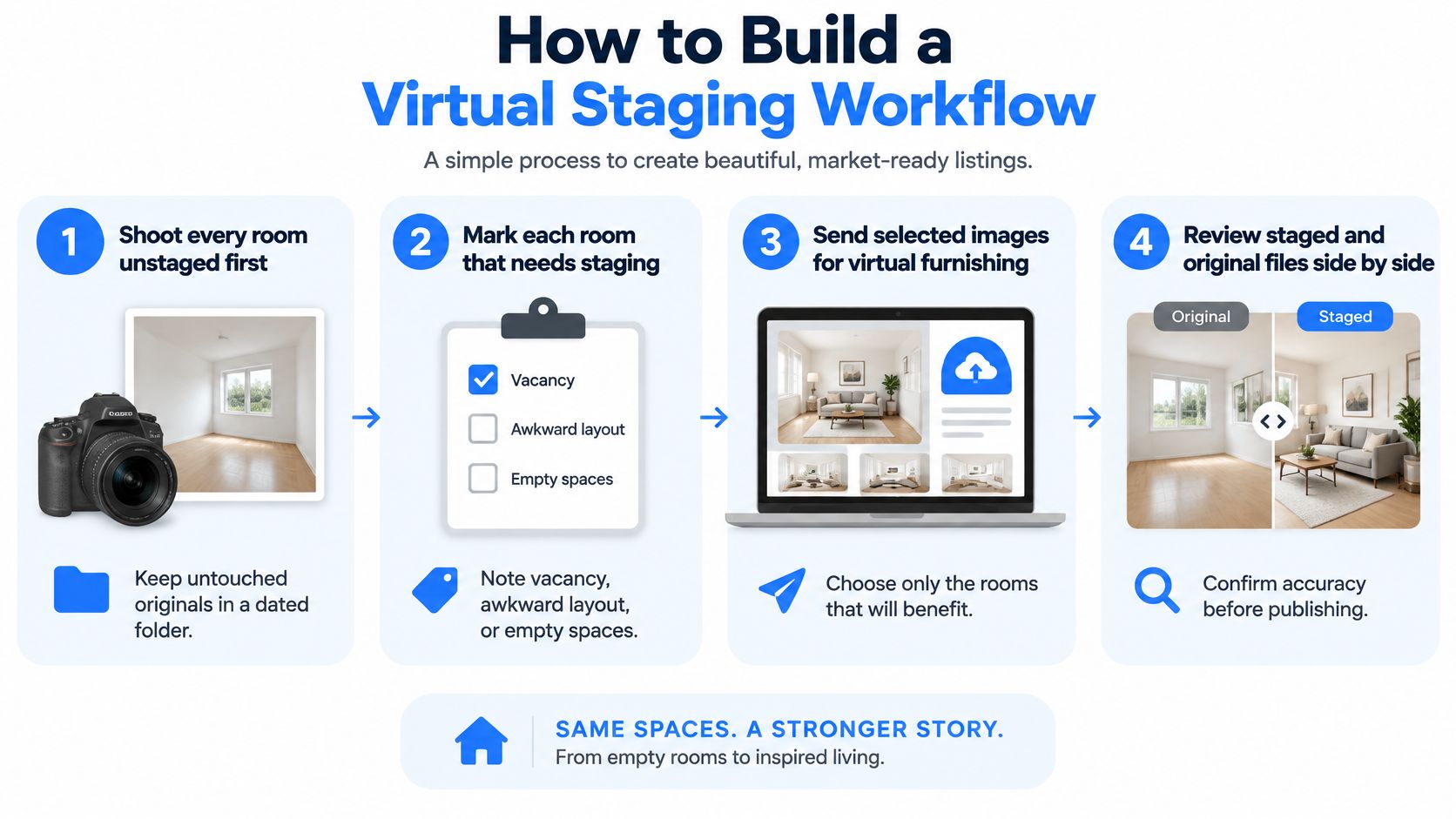
Before production starts, the listing team chooses one route per room. A human-designed render suits hero rooms where furniture placement needs judgement. A 3D model built from measured dimensions suits awkward layouts where scale errors are likely. An AI-generated fill suits simple empty rooms, provided a reviewer checks every architectural detail against the floor plan.
One rule governs all three routes. AI output may only add movable furniture, and any file that invents windows, lighting, or architecture gets rejected rather than corrected with another edit.
Eight-Step Production Routine
- Shoot every room unstaged first. Untouched originals go into a dated folder because every later claim about accuracy depends on that reference set.
- Mark each room that needs staging and the reason. Vacancy, unclear purpose, or difficult scale are valid reasons, while poor condition is not.
- Choose furniture scaled to the measured room. Dimensions get checked against the floor plan or tape measurements before rendering begins.
- Stage only movable items. Walls, windows, floors, fixtures, and views stay exactly as photographed.
- Save each edited file with a visible label and matching filename. A file named living-room_virtually-staged.jpg with on-image text prevents silent mix-ups during upload.
- Build the listing set in pairs. Each staged room sits beside its original photo so buyers can compare without hunting through the gallery.
- Store originals, staged versions, and disclosure text together. A single listing record gives the broker a complete audit trail after closing.
- Send the unstaged set before showings and offers. Buyers and cooperating agents should see the actual rooms before time and money are committed.
This routine creates a traceable four-stage pipeline. Original capture feeds the edited visualization, which carries disclosure metadata, which then becomes part of the showing materials. That sequence reflects the mitigation pattern described in NAR guidance on altered listing photos, which pairs prominent labelling with presentation of the original photograph.
Two Slips That Break the Pipeline
Relabelling after upload is the first. A coordinator notices a missing label, edits the file, and replaces it on one portal but not on syndicated copies. The fix is procedural. Labels get applied before the first upload, and one named team member audits every live copy.
Reusing a staged image after a physical change is the second. If carpet is replaced, a wall is painted, or a fixture is removed after photography, the staged file no longer matches its own original. The room needs a new unstaged photo and a fresh staged version, or the staged image comes down.
Tool selection should support the audit trail rather than just output speed. For tours that sit beside staged stills, Virtual Tour Easy can turn regular property photos into 360 degree scenes and assemble them into shareable tours with hotspots and analytics. That pairing lets buyers move from a furnished still into an unstaged walkthrough without leaving the listing page.
Cross-market teams need one additional checkpoint. Advertising and consumer-protection requirements may differ between markets, so the broker sign-off in step seven should name the market whose rules were applied. A workflow that can't show who approved an image, from which original, under which rule set isn't finished.
Room-by-Room Staging Choices That Look Believable
Believable staging starts with use at true scale. Furniture should show how a buyer will live in the room, at dimensions the room can hold, with walking paths a person can use.
Staging Focus and Common Mistakes by Room Type
| Room type | Staging focus | Common mistake |
|---|---|---|
| Living room | Scale-appropriate sofa and rug with clear walking paths | Oversized sofa that blocks doors or windows |
| Bedroom | Bed sized to the wall, one nightstand pair, one reading corner | Bed placed over a window or radiator |
| Kitchen | Stools or a small dining set; keep appliances and cabinets as found | Replacing appliances or countertops |
| Bathroom | Towels, bath mat and a plant only | Changing fixtures or tile |
| Home office or den | Desk, chair and shelving sized to the nook | Desk too large for the space |
| Basement or bonus room | Show a likely use such as a media room or gym | Implying legal living space when the room is not finished or permitted |
The living room carries the highest risk of scale exaggeration. A sectional that fills the main wall in a render can leave the actual room feeling cramped at a showing, even when the dimensions on paper are adequate. A standard sofa, a rug that leaves floor visible at the edges, and one side chair usually communicate capacity more clearly.
Kitchens and bathrooms need restraint because most of what buyers value there is permanent. Stools can show island seating, and towels can soften a bathroom, but appliances, cabinets, tile, and fixtures must remain as photographed. Strong source photography makes that restraint easier, and agents refining capture technique can apply realty photography tips for listing shoots before any digital furniture is added.
Styling Rules That Keep Renders Credible
- Match the price band: A clean modern set suits a new build, while a family-scale setup suits a suburban three-bedroom home.
- Limit the piece count: Two to four pieces per room read as furnished without crowding doors, closets, or storage access.
- Hold one focal point: A bed, a sofa, or a desk anchors the room, and secondary items stay visually quieter.
- Match light and perspective: Shadows, colour temperature, and horizon line must match the photograph, or buyers distrust the whole gallery.
Basements and bonus rooms deserve special care. A media setup can suggest a plausible use, but staging must not imply a legal bedroom, finished ceiling height, or permitted living space that doesn't exist. Whenever a styling choice touches a permanent feature, the disclosure rules govern the decision. The render gets simplified, not the fact.
Run a 30-Day Staging Test on One Listing
One listing, one staged room, and thirty days of tracked numbers will teach an agent team more than another vendor promise. The test works because it compares buyer behaviour on a real property rather than borrowing conclusions from national survey perception.
The trial starts with a vacant listing scheduled for launch this month. The team stages one hard-to-read room, publishes the original beside the staged version, and confirms the label appears on every portal. Rooms with damage or disputed condition stay out of the test so results measure comprehension rather than concealment.
Measures to Record Before and After Publication
- Listing-page views: Record the baseline period first, then track the same measure daily after staged images replace the empty set.
- Showing requests: Count requests and completed showings separately because curiosity and commitment aren't the same signal.
- Enquiry quality: Log whether buyers ask specific questions about fit, storage, and use, or repeat basic questions the photos should have answered.
- Room-level questions: Note which room types generate the most specific buyer questions so the next listing gets staged where comprehension improved.
A similar unstaged listing provides the comparison point. Price band, bedroom count, and launch timing should be close enough that differences in enquiry volume mean something. Perfect controls aren't possible in live listings, but a rough match beats comparing against memory.
Teams already publishing 360 degree tours can strengthen the test. The tour should use unedited photos so buyers walk through the actual room, while staged stills handle furnishing ideas. Tour view and visitor analytics then show whether buyers who saw staged stills spent more time in the walkthrough, returned for a second look, or submitted a lead form.
At day thirty, the log becomes the decision tool. If staged bedrooms produced specific questions and completed showings while staged kitchens only produced clicks, the next listing budget follows that pattern. If nothing changed, the team stops paying for renders on that property type. Either outcome is useful because the evidence belongs to the brokerage's own listings.
Agents ready to pair clearly labelled staged stills with walkthroughs of the actual rooms can build shareable 360 degree listing tours, add lead capture, and track viewer engagement with Virtual Tour Easy. Start with one vacant listing, publish the tour beside the originals and staged set, and let thirty days of viewing and enquiry data decide the rollout.