Admissions teams are dealing with the same scene right now. A prospective student lands on the website from a phone, looks for a campus tour, and decides within minutes whether the institution feels accessible, current, and worth a deeper look. If the only option is a polished overview video and a visit request form, that student moves on.
That's why virtual campus tour software should be treated as an admissions tool, not a design project. The useful platforms don't just show pretty dorms. They help schools capture interest earlier, understand what prospects care about, support students who can't easily travel, and give counselors a better reason to follow up.
Table of Contents
- Why Prospective Students Now Expect a Virtual Visit
- What Virtual Campus Tour Software Actually Does
- Features That Separate Campus Platforms from Generic 360 Tools
- A Vendor-Neutral Evaluation Checklist for Schools
- Real-World Use Cases Across the Admissions Funnel
- Measuring Impact Beyond Page Views
- Rolling Out Your Tour Without Burning Out Your Team
- Bringing It All Together
Why Prospective Students Now Expect a Virtual Visit
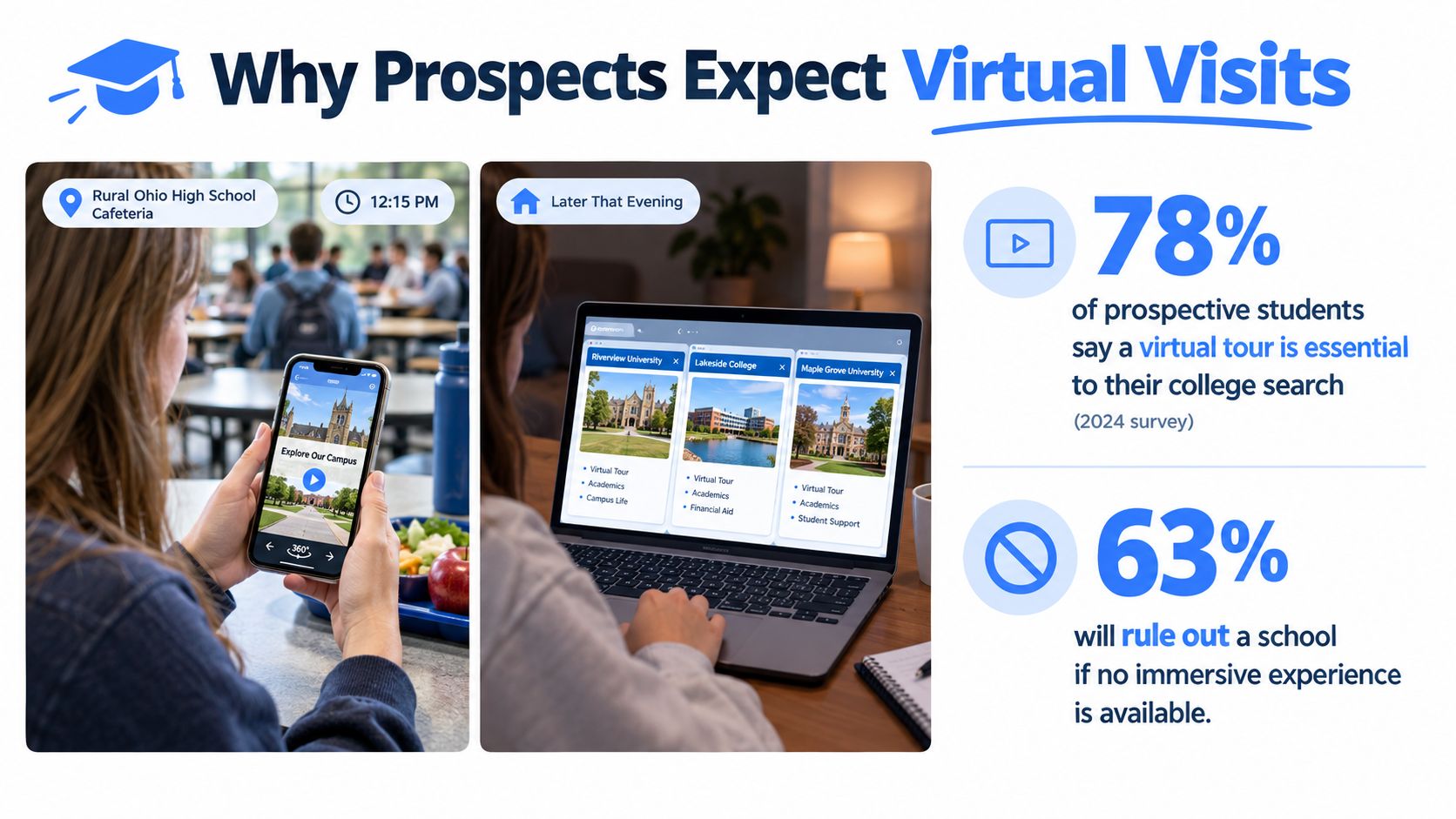
A high school student can compare colleges between lunch and bedtime. A campus visit no longer starts when a family parks outside the student center. It starts when a prospect opens a tour on a phone, taps into residence halls, checks a lab, and decides whether the school feels like a fit before speaking to anyone.
That shift has changed the standard. A virtual visit isn't a bonus anymore. It's part of the baseline digital experience students expect from an institution that says it understands modern recruitment.
The expectation is already baked into the search process
Higher ed teams sometimes still treat virtual tours like a substitute for students who can't travel. That's outdated. Prospects use them before a trip, after a trip, and instead of a trip.
Independent higher-ed marketing data cited by Concept3D shows 85% of students would be more likely to choose a school with a detailed virtual tour, 76% would be more likely to fill out a form after engaging with the tour, and 78% viewed a virtual campus tour after being accepted in its overview of 360 tours for higher education. Those numbers matter because they connect the tour to actual admissions behavior, not just website decoration.
A useful example of the broader format appears in this guide to a university virtual tour, which reflects how schools increasingly package self-serve exploration as part of recruitment rather than a side asset.
Practical rule: If a school recruits students beyond easy driving distance, a self-serve virtual visit belongs in the core funnel.
Students want control, not a brochure
Prospects don't want to wait for an event date to see a campus. They want to check housing, classrooms, dining, athletics, and student life on their own schedule. Families do the same, often from different devices and in different time zones.
That matters for admissions because self-directed behavior is intent data. The student who spends time in engineering labs is different from the student who keeps revisiting residence life and campus dining. A static admissions page can't expose that. A serious tour platform can.
The category has matured past one-off marketing builds
This isn't a fringe software niche anymore. The virtual tour software market was valued at US$2,491.5 million in 2024 and projected to reach US$17,311.1 million by 2030, with a projected 35% CAGR, according to DataIntelo's virtual tour software market report. The same report identifies education as a core end-user segment alongside real estate and tourism.
That growth matters because schools are no longer buying custom experiments. They're buying into a software category with broader vendor competition, more feature depth, and stronger pressure toward usable web-based platforms.
What Virtual Campus Tour Software Actually Does
Most campus leaders understand the output but not the system. They've seen the finished tour. They haven't always seen what sits behind it.
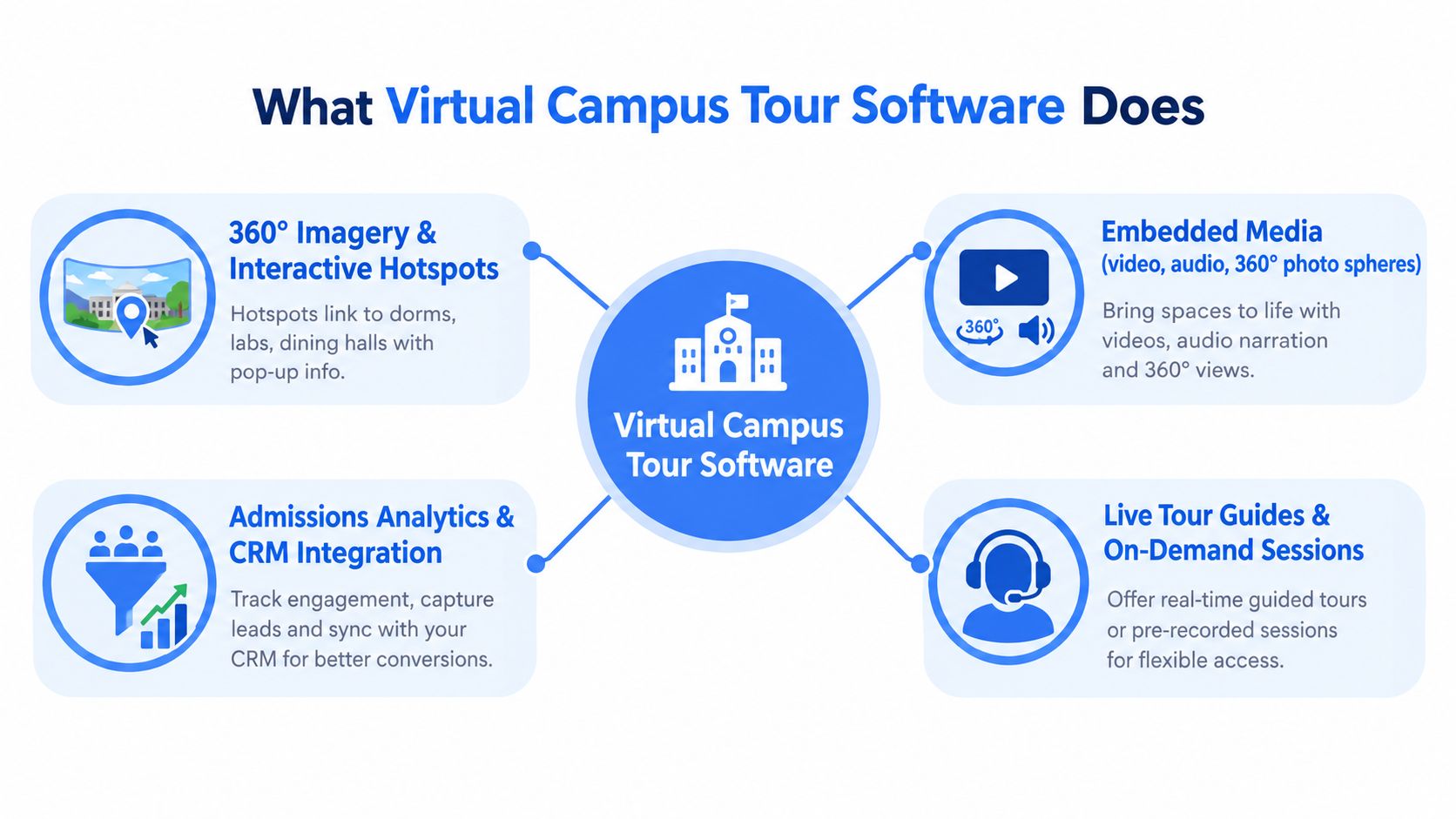
The simplest explanation is this. Virtual campus tour software is a self-guided open house layered onto a map and tied to admissions data. It lets a prospect move through campus remotely, open information inside each stop, and leave signals the enrollment team can use.
The front end is what prospects see
A student opens the tour in a browser. They enter a residence hall, spin around the room, click a hotspot, watch a short student video, jump to a classroom, and open a related academic page. That front-end layer usually includes:
- 360-degree scenes: Panoramic views of real campus spaces.
- Hotspots and navigation: Clickable points that move users through the tour or open extra content.
- Embedded media: Videos, photos, audio, faculty information, program details, and calls to action.
- Maps or route views: A way to orient users who don't know the campus layout.
A guided video tour can't do that well because it controls the pace. A Google Street View embed usually can't do it well because it wasn't built around admissions workflows. A proper platform is interactive and intentional.
The back end is what admissions needs
The difference between a media asset and a software platform is the back end. Serious virtual campus tour software logs engagement, supports forms or lead capture, and passes usable information into the school's systems.
A tour that can't tell admissions what a prospect explored is a slideshow with nicer production values.
That distinction matters because schools need more than views. They need route data, hotspot activity, form completion, and ideally a way to connect that behavior to inquiry records.
Most schools don't need a full 3D campus model
That's where some buying conversations go off the rails. Teams get distracted by cinematic walkthroughs and expensive reconstruction concepts that look impressive in demos.
Research on a university virtual tour project found a practical delivery model built around spherical panorama photography, image editing, panorama-stitching software, and tour-authoring tools distributed in HTML5 so the experience could run online, offline on PC, and on mobile devices in the published campus virtual tour project study. For most institutions, that approach is the smarter one. It lowers complexity, improves compatibility, and still supports the interactive layers that matter.
Features That Separate Campus Platforms from Generic 360 Tools
A real estate tour tool can show a space. A campus platform needs to support a decision. That's the dividing line.
The wrong software usually looks fine in a demo. It falls apart when admissions asks harder questions. Can counselors see what an admitted student explored? Can a nursing prospect jump straight to labs and simulation rooms? Can a blind or low-vision user move through the experience? Can marketing update a scene without filing a ticket every time?
What actually matters in practice
The feature set should be judged by admissions outcomes, not novelty. The strongest platforms tend to separate themselves in five areas.
| Platform Feature | Admissions Outcome |
|---|---|
| Program-specific hotspots | Helps prospects connect campus spaces to academic interests and career paths |
| Embedded student or faculty media | Adds context that turns a room into a reason to apply |
| Interactive wayfinding and maps | Reduces confusion and supports self-guided exploration |
| CRM integration and activity sync | Gives counselors usable engagement data for follow-up |
| Accessibility controls | Expands reach and reduces barriers for students with disabilities |
| Deeper analytics | Shows whether the tour assists inquiry, application, or yield activity |
Hotspots should answer real enrollment questions
A generic tour uses hotspots as navigation dots. A campus platform uses them as decision-support prompts. A chemistry lab hotspot should open more than a larger photo. It should connect to program pages, research opportunities, student outcomes content, or an invitation to speak with admissions.
That's where many tours underperform. They let users wander, but they don't help them decide.
Integration is where the ROI conversation gets serious
If tour activity lives in a dashboard nobody checks, it won't affect admissions operations. Schools should prioritize platforms that can push engagement into inquiry records, support attribution fields, and trigger follow-up workflows based on behavior.
Some tools in the broader category now combine tour creation with lead capture and analytics. For example, Virtual Tour Easy supports hotspots, embeds, lead forms, and analytics tied to visitor behavior. That kind of stack can be useful when a school wants lighter-weight deployment without commissioning a custom build. It still needs to be judged on integration and accessibility, not convenience alone.
What to watch: If a vendor spends more time showing transitions than reporting, the platform is probably optimized for theater, not enrollment.
Accessibility isn't a side feature
Accessibility is one of the easiest items to under-scope and one of the fastest ways to weaken the project. Some higher-ed vendors explicitly position around accessible digital experiences, interactive maps, mobile apps, and campus navigation in their campus experience product messaging. That signals a real buying concern in the market.
Schools should look for support for:
- Keyboard navigation: Users shouldn't need a mouse or touch gesture for every action.
- Captioned media: Video and audio content must have equivalents.
- Screen reader support: Hotspots and navigation labels need meaningful text.
- Low-bandwidth usability: Not every prospect has fast home internet or unlimited mobile data.
The impressive tour is not the one with the most spin effects. It's the one more students can use.
A Vendor-Neutral Evaluation Checklist for Schools
Most demos are designed to blur weaknesses. The salesperson controls the route, skips the clunky editor, and highlights the nicest campus they've ever launched. That's why schools need a scorecard before the meeting starts.
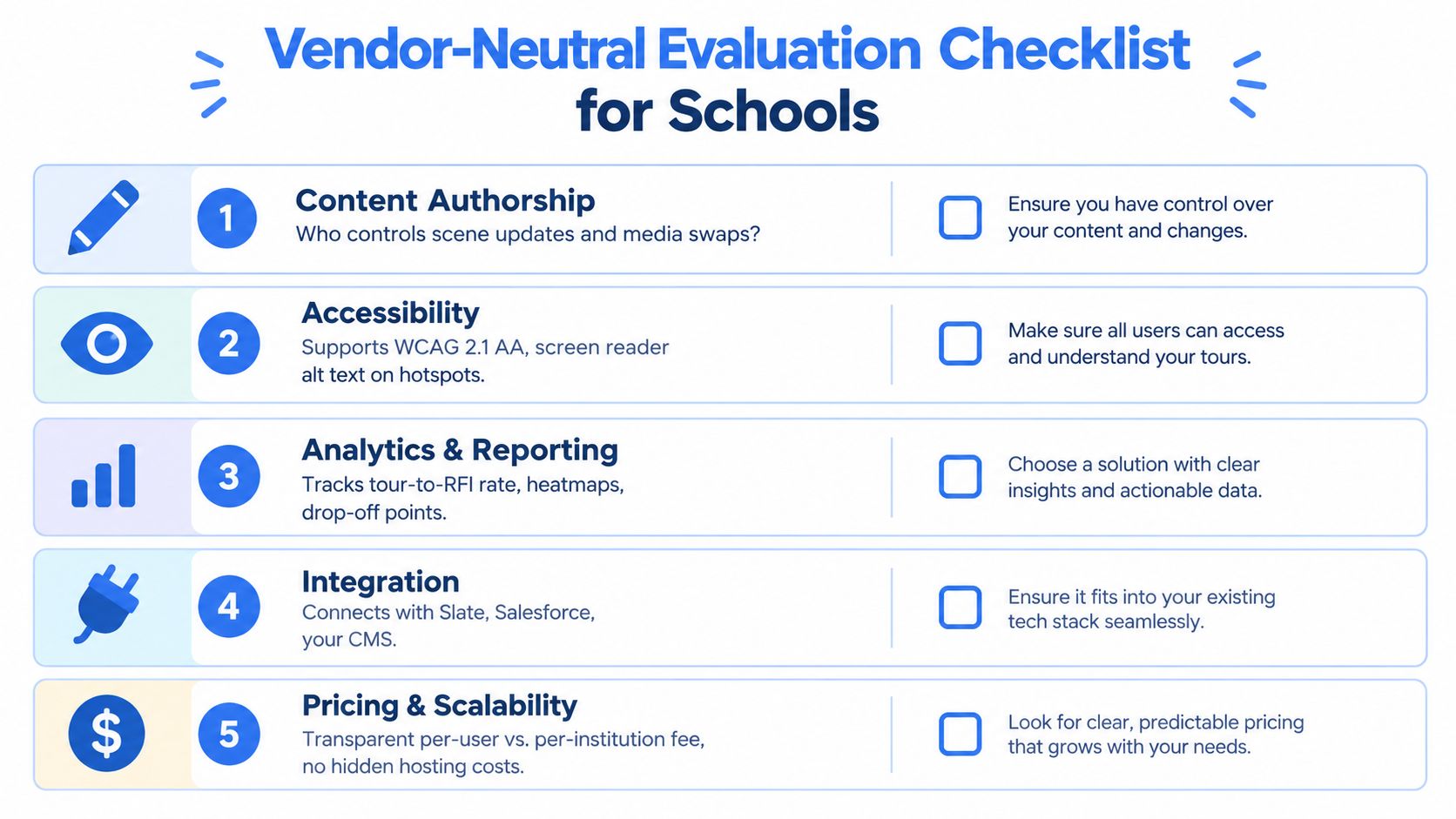
A clean evaluation framework keeps the conversation anchored on operational fit. Each category below can be scored as weak, acceptable, or strong. The point isn't perfection. The point is making sure the institution leaves with a defendable comparison instead of vague impressions.
Content authorship and update control
The first question is blunt. Who can update scenes, swap media, change links, and publish edits?
Good looks like an editor that marketing or admissions can manage without opening a technical support queue for routine changes. Weak looks like a vendor-managed workflow where every update becomes a billable task or a scheduling problem. Schools comparing providers in the broader 360 space can also review what a 360 virtual tour company typically handles versus what a campus team should retain in-house.
Accessibility and usable navigation
Ask for the inaccessible path, not the polished one. Can the vendor demonstrate keyboard movement, hotspot labeling, captions, and screen reader logic? Can they explain how the tour behaves on mobile assistive technology?
If the answer turns into a roadmap promise, score it low. Accessibility that arrives later usually doesn't arrive on time.
Data capture and attribution fidelity
This category often decides whether the tour becomes an admissions asset or just another content page. Schools should ask whether the platform supports:
- UTM preservation: Campaign source data should survive the handoff into the tour.
- CRM handoff: Forms and engagement events should move into systems the recruitment team already uses.
- Attribution fields: Counselors need to know which campaign, audience, or event drove the session.
- Behavior tagging: High-interest actions should be identifiable, not buried in generic pageview logs.
A vendor that can't explain where attribution breaks probably hasn't implemented it carefully.
Performance and sustainability
Fast tours win. Slow tours get abandoned, especially on mobile connections. Ask vendors to show mobile load behavior, scene transitions, and how they handle spikes during open house promotions.
Then ask about the unglamorous contract items:
- Content export rights: Can the school keep assets if the contract ends?
- SLA terms: What support response is promised?
- Hosting and scaling: Is pricing likely to change if usage grows?
- Contract structure: Multi-year discounts can hide lock-in.
A decent demo sells possibility. A strong evaluation process protects the institution.
Real-World Use Cases Across the Admissions Funnel
The same platform can support very different admissions jobs. That's why schools should stop asking whether they “need a virtual tour” and start asking where the tour fits in the funnel.
A self-serve top-of-funnel experience has different staffing needs than an admitted-student yield event. International recruitment asks for different routing and presenter support than a domestic open house week. One platform can handle all of it, but only if the institution designs separate plays instead of one generic launch.
Four use cases that actually matter
| Use Case | Funnel Stage | Typical Staffing | Primary KPI |
|---|---|---|---|
| 24/7 self-serve campus tour | Awareness and inquiry | Marketing owner, occasional web support | Request-for-information submissions assisted by tour engagement |
| Scheduled live virtual open house | Inquiry and consideration | Admissions presenter, student ambassador, event support | Attendance and follow-up conversions |
| Personalized admitted-student route | Yield | Admissions counselor, academic program liaison | Engagement from admitted students and deposit-stage activity |
| Recruiter-led international walkthrough | Early awareness and consideration | International recruiter, regional support staff | Qualified conversations and recruiter follow-up actions |
Self-serve tours do the heavy lifting early
This is the best starting point for most institutions. It runs all day, supports prospects before they're ready to talk, and gives admissions a low-friction conversion path.
The setup is content-heavy on the front end, then light on staffing. That makes it a practical foundation rather than a resource drain.
Live formats work when the school needs context
Some prospects need a human voice, especially during open houses, counselor weeks, or admitted-student campaigns. A live tour session can add student ambassadors, faculty appearances, or chat-driven Q&A without forcing every visitor onto campus.
The operational mistake is using live sessions as a replacement for self-serve access. They work best as a layer on top.
Yield and international recruitment need custom routes
An admitted student shouldn't get the same experience as a cold prospect. The route should focus on housing, student support, academic fit, and next-step confidence. International audiences often need recruiter-led pathways that explain location, logistics, safety, and student services with more context.
The platform matters less here than the scenario design. Schools that reuse one generic tour for every audience usually end up pleasing nobody.
Measuring Impact Beyond Page Views
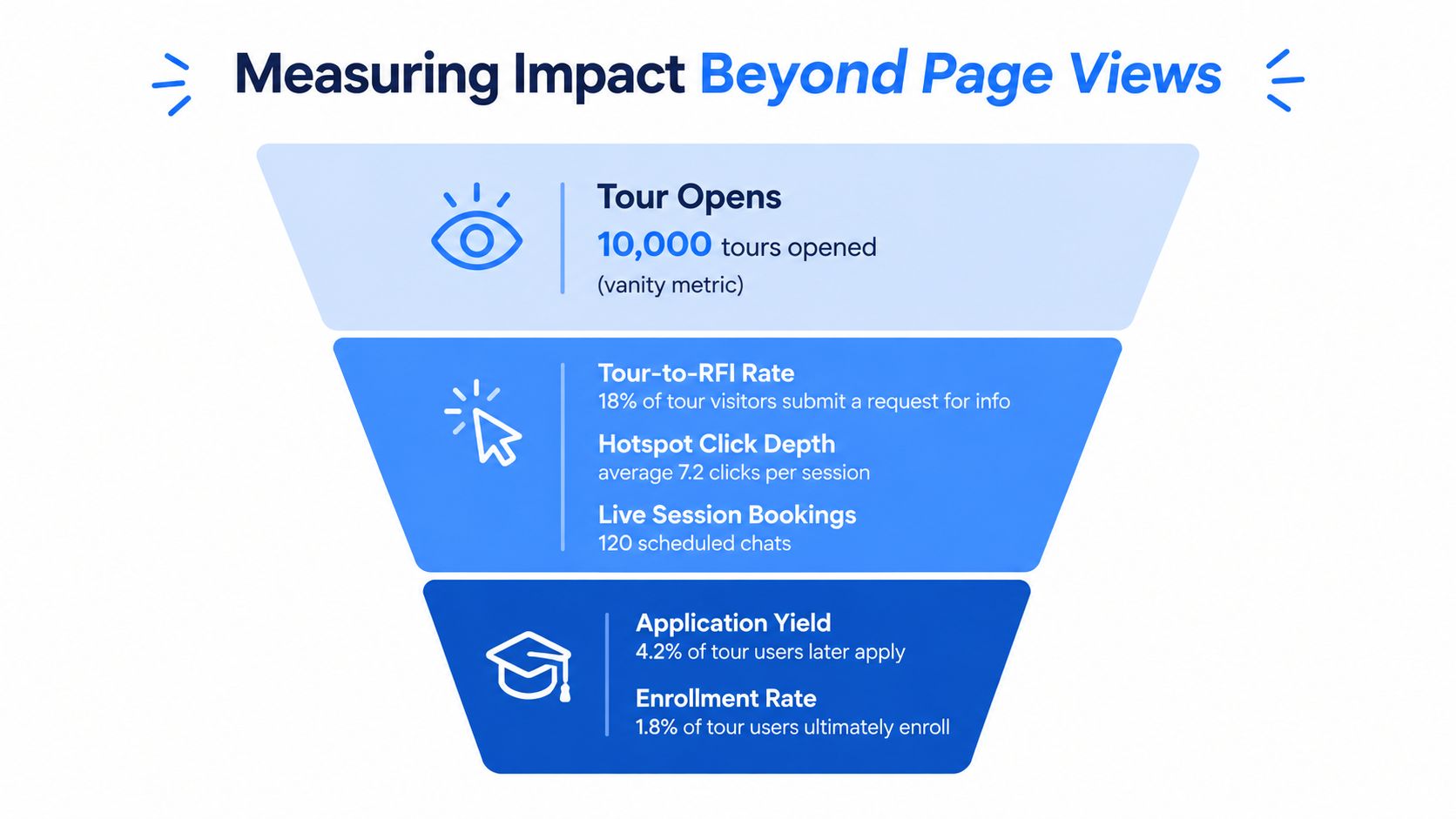
Page views are easy to report and weak as evidence. If a campus tour opens a lot and influences nothing, the institution bought traffic decoration.
Schools need a tighter measurement model. The tour should be evaluated like any other admissions channel, with attention on assisted conversion, engagement depth, and whether activity can be tied to later funnel movement.
Better metrics than raw opens
The strongest dashboards usually include a short stack of leading indicators:
- Tour-to-inquiry rate: Did users submit a form or request more information after engaging?
- Hotspot depth: Did they interact with meaningful content or bounce after one scene?
- Route completion or key-stop visitation: Did they reach the places most tied to decision-making?
- Live session conversion: Did scheduled tour attendees move into the next admissions action?
- Assisted inquiries: Did the tour appear in the path before form fill, application start, or counselor contact?
Teams that want a stronger framework for tracking engagement paths can review approaches to visitor behavior analysis and apply the same discipline to campus-tour journeys.
Attribution breaks in predictable places
Even good teams lose visibility when the tour sits inside an iframe, when analytics tags aren't aligned, or when form completions and tour sessions live in separate systems. Ad blockers and cross-domain handoffs also create blind spots.
That's why baseline planning matters. Before launch, schools should define which systems own which events and which conversions count as success. Otherwise the dashboard turns into an argument between admissions, marketing, and IT.
Bottom line: More views don't prove value. More qualified next steps do.
Independent ROI benchmarks are still thin
That's worth saying plainly. Academic research continues to place virtual tours inside the college-choice process, and product pages regularly highlight better engagement when tours include live chat, ambassadors, and interactive elements. But the published benchmark gap is real, and vendor claims on inquiry or application lift often aren't independently audited, as discussed in this research on virtual tours and the college-choice model.
So schools should build their own proof standard. Compare pre-launch and post-launch inquiry behavior, counselor follow-up efficiency, and audience-specific engagement patterns. That's more credible than repeating a vendor's generic success story.
Rolling Out Your Tour Without Burning Out Your Team
Most launch problems aren't technical. They're operational. The team underestimates content prep, captures visuals at the wrong time, forgets captioning, or buries the tour link where nobody will find it.
A disciplined rollout fixes that. Schools don't need a giant committee, but they do need an owner, a publishing calendar, and a realistic view of who must approve what.
A phased launch works better than a big reveal
A practical rollout usually follows four phases.
Discovery and asset capture
Gather priority locations, route logic, existing videos, maps, and academic content. This is also when the school should identify scenes that will age quickly, such as active construction areas or rebranded student spaces.Build and integration
Assemble scenes, hotspots, forms, and tracking. Test embed behavior, CRM handoff, mobile rendering, and any authentication or CMS issues early.Soft launch with internal users
Student ambassadors, counselors, faculty liaisons, and accessibility reviewers should test the tour before the public sees it. They'll spot navigation confusion faster than the vendor will.Public promotion and ongoing refresh
Once the tour is stable, place it in admissions emails, visit pages, campaign landing pages, counselor outreach, and accepted-student communication streams.
Staffing should stay lean but explicit
The cleanest launches typically assign a small working group:
- Part-time project lead: Usually from admissions marketing or digital communications.
- Faculty or program liaison: Useful for validating academic spaces and message accuracy.
- IT or web support: Needed for embeds, analytics, single sign-on questions, or CRM coordination.
Without named owners, the project stalls in approvals and half-finished asset requests.
Five mistakes that cause preventable pain
The same errors show up again and again:
- Shooting during active classes: Crowded or inconsistent scenes create privacy and quality issues.
- Skipping ADA content work: Captions and accessible labeling can't be tacked on casually later.
- Hiding the tour in site navigation: If the link is buried, usage will disappoint.
- Ignoring data sync: If the CRM never sees engagement, counselors can't use the signal.
- Treating launch as the end: Campus tours age fast when facilities, staff, and programs change.
A quarterly review cadence keeps the experience credible. Residence spaces change. Construction finishes. Faculty bios move. The tour has to keep up.
Bringing It All Together
The schools getting real value from virtual campus tours aren't the ones buying the flashiest software. They're the ones treating the tour as part of the recruitment system.
A practical decision framework looks like this:
Six moves that keep the project grounded
Secure executive backing
Someone with budget and enrollment accountability has to support the project.Audit existing assets
Schools often already have usable photography, video, maps, and landing pages. That shortens the path.Score vendors with a real checklist
Use the evaluation criteria above during demos and refuse to rely on sales polish.Pilot one audience or program first
A contained pilot reveals workflow issues early and avoids a sprawling launch.Measure against agreed conversion signals
Don't settle for view counts. Track the next action the institution cares about.Expand only after proof
Once the tour supports one campaign or audience well, then scale it to additional units and funnel stages.
The core decision is simpler than it looks
The institution isn't choosing whether to own a virtual tour. It's choosing whether that tour will function like a brochure or like an admissions asset.
The brochure version gets praise internally and weak adoption externally. The admissions version captures intent, supports access, informs follow-up, and earns its keep.
Schools should pilot the software they can measure, maintain, and improve. Everything else is expensive scenery.
Admissions directors who are ready for demos should line up two very different vendors and compare them against the same scorecard. Marketing teams still sorting the category should document required integrations and accessibility criteria before they speak with sales. Leaders who want a fast win should launch one guided tour tied to one inquiry-driving campaign, then judge it on follow-through instead of applause.
Virtual Tour Easy gives schools a practical way to build and publish immersive campus tours with hotspots, lead capture, embeds, and analytics without requiring specialized cameras or a custom development project. For admissions teams that want to test virtual campus tour software as a measurable funnel asset, it's a straightforward option to evaluate alongside other platforms. Visit Virtual Tour Easy to see how it fits a campus tour pilot.