A real estate agent usually notices the problem at the worst possible moment. The listing is ready, the photos look sharp, the virtual tour is live, and the link going into the seller email looks like a leftover demo URL from someone else's platform.
That's the moment a custom domain name stops feeling optional.
For tour links, branding isn't just about polish. It affects whether the URL looks trustworthy in an email, whether the brokerage name is visible when a link gets shared, and whether the tour becomes part of the business's long-term web presence instead of living on a disposable subdomain owned by a SaaS vendor.
Table of Contents
- Why Your Virtual Tour Deserves a Real Domain
- Choosing a Domain That Matches Your Brand
- Connecting the Domain Through Your Registrar
- Verifying the Domain and Issuing Auto-SSL
- Troubleshooting the DNS Errors That Block Verification
- SEO and Branding Benefits of a Branded Tour URL
- Rollout Checklist and Long-Term Domain Care
Why Your Virtual Tour Deserves a Real Domain
A generic platform URL works technically. It opens, it loads, and it lets a prospect view the property. But it rarely looks memorable when it lands in an inbox or appears inside a listing description.
A branded link like tours.yourbrokerage.com does something the default platform subdomain can't. It puts the business name in plain text, directly inside the URL, before the person even clicks. For real estate, hospitality, schools, and venues, that small detail changes perception fast.
The link a seller sees matters
A seller reviewing marketing assets doesn't audit DNS records or hosting architecture. That seller sees the surface. If the tour lives on a long third-party subdomain, it can feel rented. If it lives on the brokerage's own domain, it feels owned.
That difference shows up in common situations:
- Email pitches: A branded tour link looks like part of the agency's marketing stack, not an outsourced afterthought.
- MLS and syndication fields: A clean domain is easier to read and easier to trust.
- Social shares: People are more comfortable clicking links that clearly show the business name.
A tour URL is part of the presentation, not just a transport layer.
The broader domain market helps explain why this matters now. Domain names have become a normal layer of digital identity, not a niche technical choice. ICANN market reporting cited about 352 million domain names worldwide at the end of 2021, rising to 392.5 million registered domain names across all TLDs by the end of Q1 2026, with .com at 163.6 million and ccTLDs at 146.3 million according to AFNIC's summary of global domain market reporting.
For brokerages building out a polished online presence, a practical companion resource is Websites by Sibley Digital, especially when the tour domain needs to fit into a broader branded website system instead of sitting in isolation.
It's also a search asset
A custom tour domain doesn't guarantee rankings by itself. What it does is give the business a branded destination that can be linked, embedded, indexed, and controlled over time.
That control matters more than might be expected. A tour published on a platform-owned URL builds more value for the platform. A tour published on the business's own branded domain keeps more of that footprint attached to the brand.
Choosing a Domain That Matches Your Brand
Most businesses overcomplicate domain selection. They chase a perfect exact-match phrase, miss the renewal notice later, and end up with a domain that's awkward to say out loud.
The better approach is to choose a brand-first custom domain name that still makes sense to a local audience.
Start with the business name, not the keyword list
For a real estate team, photography studio, resort, or venue group, the strongest domain usually sounds like the company people already know. That's more durable than stuffing “virtual tours real estate” into the address.
A short branded domain usually works better than a long keyword domain because it's easier to repeat in conversation, easier to type on mobile, and less likely to look spammy in a listing or email signature.
Recent market reporting also shows that the old “just get a .com” reflex is too narrow. The domain market has shifted toward alternative extensions and country-code domains. Openprovider reported 368.4 million total registrations by Q1 2025, with new gTLDs growing 13.5% year over year, renewal rates of about 34% for new gTLDs versus roughly 75% for legacy TLDs, and steady ccTLD growth in markets including .de, .uk, and .br in its domain trends report for Q1 2025.
Picking the extension
Different extensions send different signals.
- .com still feels broad and familiar.
- .co can work when the .com is unavailable, but it needs careful brand consistency so people don't mistype it.
- Niche extensions such as industry-specific endings can look modern, but they require stronger renewal discipline and stronger audience familiarity.
- Country-code domains can make sense for region-specific marketing where local trust matters more than global reach.
Subdomain versus subdirectory
For tour delivery, many teams use a subdomain because SaaS platforms can usually connect it cleanly.
| Structure | Example | Best For | Watch Out For |
|---|---|---|---|
| Root domain | yourbrand.com | Main website and primary brand presence | Harder to dedicate solely to tours if the main site already runs elsewhere |
| Tours subdomain | tours.yourbrand.com | SaaS-hosted virtual tours and easy platform separation | Needs separate DNS management and SSL confirmation |
| WWW host | www.yourbrand.com | Standard public-facing site behavior | Can conflict with existing web hosting if records aren't planned |
| Subdirectory | yourbrand.com/tours | Centralized site architecture and direct lead flow into the main site | Often requires website-level routing control that many SaaS tour tools don't offer |
The renewal mistake that breaks live listings
The most expensive domain problem isn't usually a bad DNS edit. It's auto-renew being off on a domain that still powers active tour links.
When that happens, the tours don't just look broken. Listing links fail, SSL can break, and shares already sent to clients or syndication sites can go dead.
Practical rule: The registrar account should belong to the brokerage, agency, or business entity. It shouldn't sit in a freelancer's personal account or a former employee's inbox.
That ownership detail sounds administrative. It becomes urgent the first time someone needs to recover access before a live campaign.
Connecting the Domain Through Your Registrar
Most delays begin here. The registrar panel looks simple, but the wrong record type or one leftover record from the previous host can stall the entire setup.
For SaaS-hosted tours, the business usually needs three things at the DNS level: the apex record, the www record, and the verification TXT record.
Add the apex record first
The apex is the bare domain name, such as yourbrand.com without any prefix.
Some DNS providers support a flattened alias-style record at the apex. Others require a standard A record. The right choice depends on what the registrar or DNS host supports. If the provider doesn't support apex flattening, trying to use a plain CNAME there often creates a setup that looks valid in the UI but never verifies correctly.
This DNS view is the part that needs to be matched carefully:
Then add the www CNAME
The www host is usually a separate record. In most setups, it points to the platform target so both the bare domain and the www version can resolve consistently.
What matters here is consistency. If the root domain points to the new tour platform but www still points to an old website host, visitors can bounce between two different destinations depending on which version they open.
A clean registrar setup usually follows this order:
- Publish the TXT verification record exactly as the platform provides it.
- Set the apex host with the supported record type for that DNS provider.
- Create the www CNAME so the prefixed version resolves correctly.
- Wait for propagation before retrying verification in the platform dashboard.
Why the TXT record often matters first
Teams tend to focus on where the domain should resolve. The platform usually cares first about whether the business controls the DNS zone.
Microsoft Entra's verification guidance is a good reference point here because the same operational principle applies across many SaaS systems. The verification TXT or MX record must be in the authoritative DNS zone, must match the provided value exactly, propagation can still delay detection, and a domain can only be verified in one directory at a time according to Microsoft's Entra support guidance on custom domain verification.
Publish the verification record at the exact host the platform specifies. “Close enough” doesn't pass DNS checks.
TTL also affects the pace. A default TTL such as 3600 seconds means public resolvers may continue serving old answers for a while even after the new record looks correct inside the registrar panel.
After the records are live, the next step is to paste the chosen domain into the tour platform's domain settings and trigger verification.
Verifying the Domain and Issuing Auto-SSL
Verification and SSL aren't the same event. That distinction causes a lot of confusion because many dashboards show a green status for domain ownership before the certificate is ready.
The first check confirms that the platform can see the expected DNS records. Only after that does the HTTPS certificate process complete.
A typical verification panel looks something like this:
What success actually looks like
A working setup has three visible signs:
- The platform recognizes the domain
- The domain loads in the browser
- The browser shows HTTPS without warnings
That last step is the one people skip. They see “verified” in the admin panel and assume the job is finished. It isn't finished until the lock icon appears on both the bare domain and the www version.
For teams using a platform with managed certificates, the SSL process usually runs automatically after verification. If certificate status stays blank or pending longer than expected, the next move is to inspect the DNS records again before forcing a reissue. A related maintenance topic is covered in Virtual Tour Easy's guide to SSL certificate auto renewal.
Why auto-SSL fails silently
The failure is often silent because the browser error shows up long after the original DNS change. The most common causes are simple:
- the challenge record is on the wrong host
- the domain resolves inconsistently across public resolvers
- an old redirect or CDN proxy interferes with validation
- the site loads, but some embedded asset is still hard-coded to HTTP
When HTTPS loads but the browser still warns about security, the issue is often mixed content inside the tour page or embedded media, not the certificate itself.
Verification proves ownership. HTTPS proves visitors can trust the connection.
Troubleshooting the DNS Errors That Block Verification
Most domain failures aren't caused by outages. They're caused by records that look reasonable to a human but fail strict DNS checks.
The frustrating part is that registrar dashboards often make bad configurations look normal. A green save button doesn't mean the record is valid for the way the platform checks ownership or routing.
The four mistakes that waste the most time
One detailed DNS troubleshooting source notes that verification checks “almost always fail” when old records remain, only partial apex A records are published, or the www target is mis-pointed, and it recommends testing with multiple resolvers plus explicit validation before retrying issuance or platform verification in this writeup on custom domain DNS verification failure.
Here are the mistakes that show up most often in SaaS tour rollouts:
| Mistake | Broken Record | Correct Record |
|---|---|---|
| Apex CNAME on unsupported DNS host | Bare domain uses a standard CNAME even though the DNS provider doesn't flatten apex records | Use the supported apex method for that provider, such as an A record or supported alias-style apex handling |
| Old hosting record left active | Previous parking or web-host record still answers for the domain | Remove legacy records so the platform gets one clear destination |
| TXT record on the wrong host | Verification value added to the wrong label or nested subdomain | Publish the TXT record exactly at the host the platform specifies |
| CNAME value entered as a full URL | Destination field includes protocol or the brand prefix again | Enter only the target host value the platform provides |
What to check before retrying
A better troubleshooting sequence is short and mechanical:
- Check authoritative DNS: Confirm the live public answer, not just what the registrar panel shows.
- Test more than one resolver: Different public resolvers may hold old answers for a while.
- Delete before adding duplicates: Parallel records from the old host create conflicting answers.
- Retry only after validation: Re-running platform verification too early creates false negatives.
Another common operational issue isn't a bad record at all. It's domain governance. Domain ownership, hosting, DNS, and email are separate layers, but small teams often bundle them mentally and assume one login controls all of it. That gap becomes costly when a freelancer or departed vendor still controls the registrar account, as discussed in this operational guide to custom-domain hosting and governance.
SEO and Branding Benefits of a Branded Tour URL
A branded tour URL earns its value after launch, not during setup.
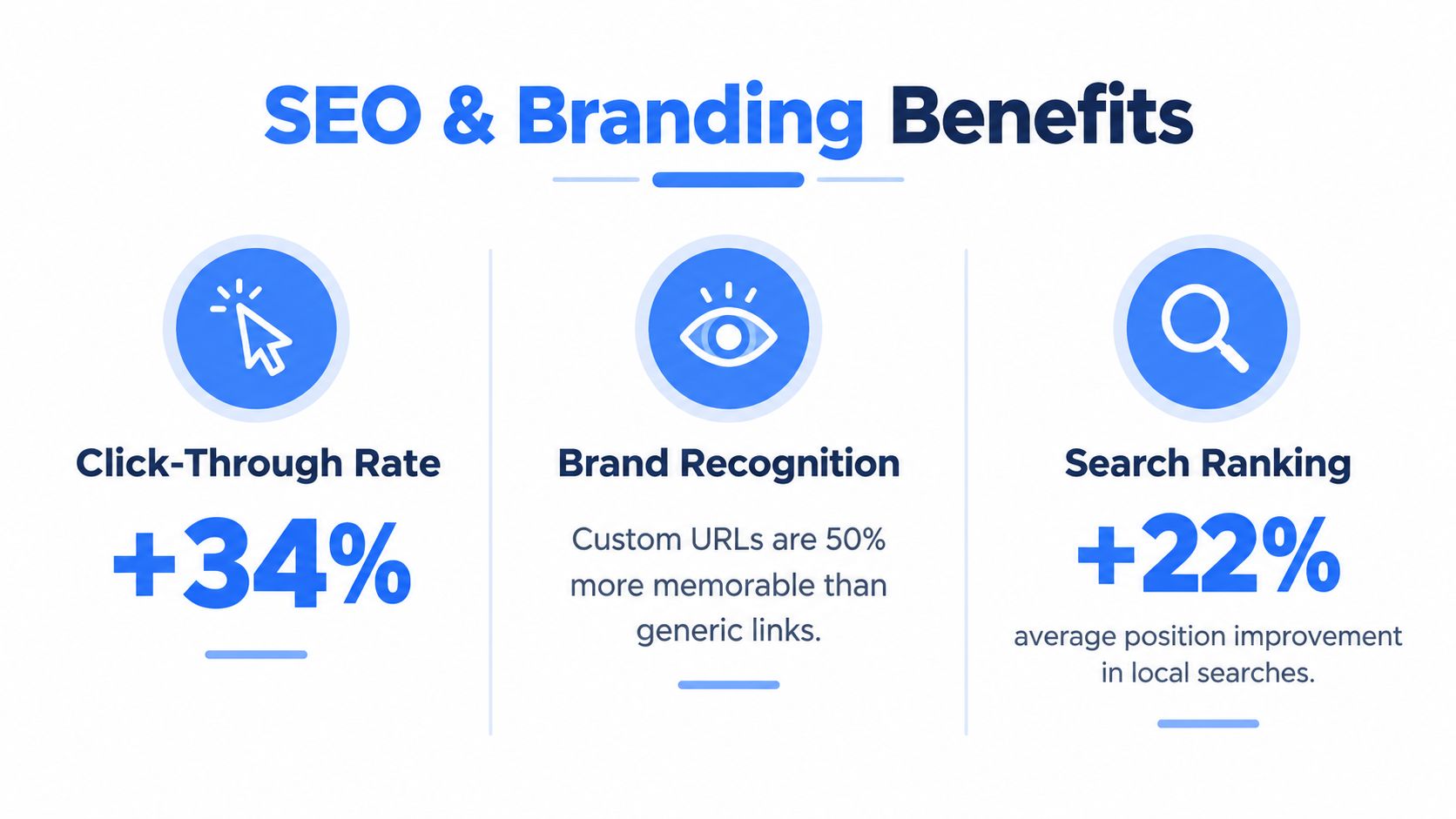
Once the domain is connected, every listing share, property page link, and embed has a chance to reinforce the business name instead of a third-party platform brand. That matters in local search because branded entities tend to perform better when their assets are clearly connected across site pages, business listings, and shared media.
Why branded hosts travel better across channels
In search results and business listings, a custom domain name looks deliberate. A platform subdomain often looks disposable, especially when the URL includes generic account text or a vendor brand that the user doesn't recognize.
Social platforms also tend to display shared links more cleanly when the tour resolves under the business's own host. That makes preview titles, images, and metadata feel more consistent with the rest of the brand. Teams working on those page-level fields can pair the domain setup with better metadata optimization practices.
Local search is partly an identity problem
This matters even more for multilingual or local-market campaigns. Custom domains aren't only about owning a brand string in English. ICANN reported 1.52 million Internationalized Domain Name registrations across all gTLDs as of December 2022 and 1.467 million as of March 31, 2024, a 3.36% decline over that period, while 50% of IDN registrations were in Chinese script and 26% in Latin script according to the ICANN 2022 IDN annual report. For regional brokerages, hospitality groups, and schools, that reinforces a simple point: domain choice can support language access and local usability, not just branding.
The practical SEO takeaway is straightforward:
- Keep the domain active: retired campaigns shouldn't collapse into broken links
- Avoid dead-end parking pages: they weaken trust and waste link equity
- Preserve branded continuity: use redirects and consistent metadata when tours move
Rollout Checklist and Long-Term Domain Care
The launch itself is the easy part. The part that keeps branded tour links healthy is governance.
A custom domain name behaves more like an asset than a setting. It has ownership, renewal risk, certificate dependencies, DNS records, redirect behavior, and sometimes multiple vendors touching it over time.
Pre-launch checks that prevent ugly surprises
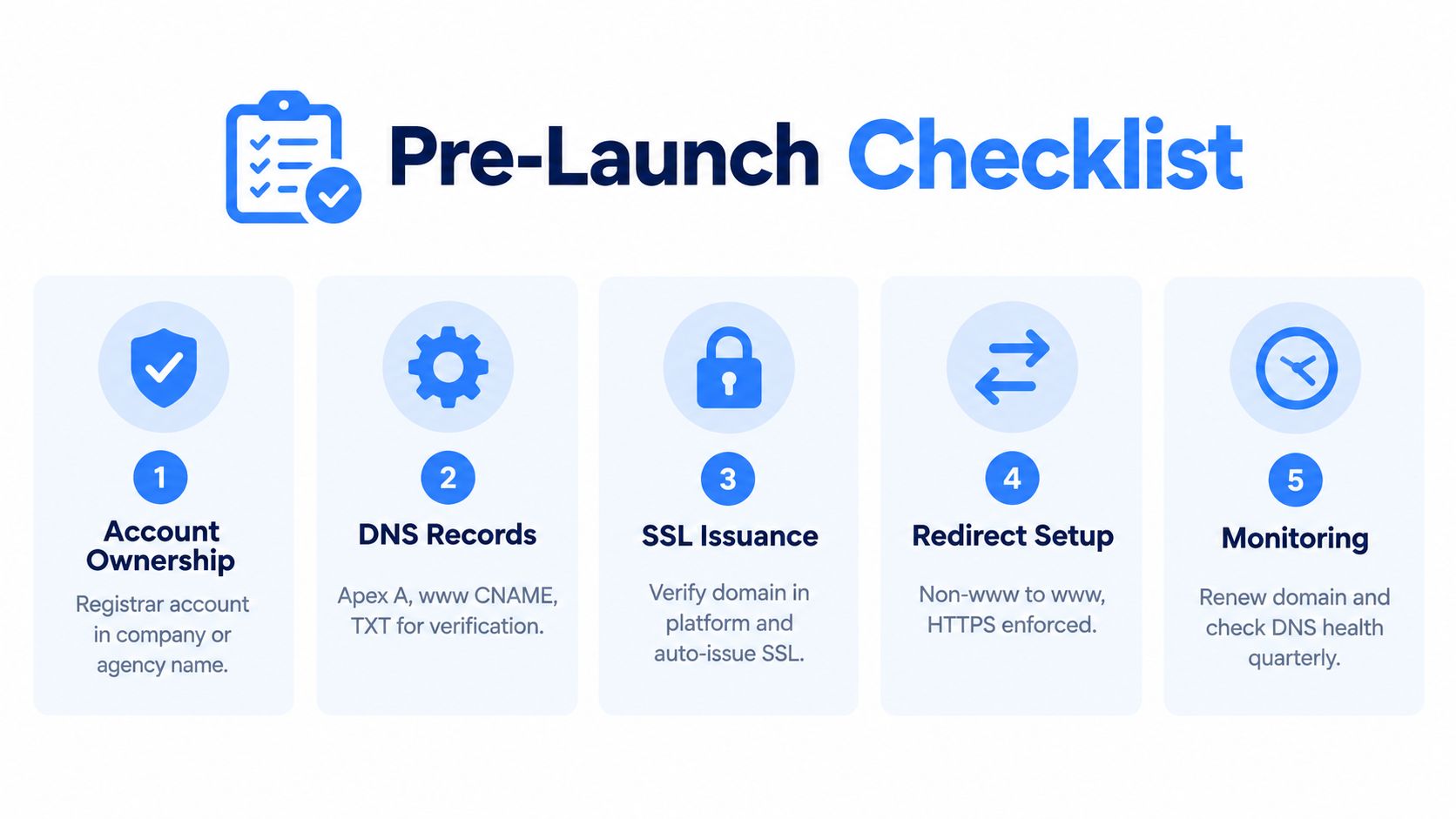
Before a brokerage or agency flips DNS, a short checklist catches most avoidable problems:
- Confirm account ownership: The registrar account should sit under the company or agency, not a personal inbox.
- Export current DNS details: A backup makes rollback much faster if records need to be restored.
- Validate global resolution: Check that the apex and www records resolve consistently before announcing the link.
- Test HTTPS in a clean browser: Incognito mode on mobile data helps bypass cached redirects.
- Document who can edit DNS: Someone inside the business should always know where the domain is registered and who has access.
This visual checklist captures the essentials:
Long-term care matters more than launch day
The quiet failures usually happen months later. A card on file expires. A registrar migration resets a record. Someone removes a redirect while changing another service. SSL renewals have also become more operationally important because certificate validity windows are tightening. One SSL source noted that as of 15 March 2026 certificate validity is capped at 200 days, with even shorter windows planned later, as cited in the governance article linked earlier.
That's why teams should keep a recurring maintenance routine:
- Turn on auto-renew and confirm the payment method stays current
- Set internal reminders well before the expiration window
- Re-check DNS and redirects after any website migration
- Review caching behavior if visitors report inconsistent domain changes, especially after edits to hostnames or redirects. Virtual Tour Easy's article on caching strategies is useful for that operational side.
The domain that hosts virtual tours should be reviewed at least annually, even if nobody plans to change it.
A branded tour URL accumulates value over time because every share, backlink, and listing reference points back to the business. Letting that domain lapse doesn't just break one link. It can erase months of trust and discoverability.
Virtual Tour Easy gives businesses a way to publish branded virtual tours on their own domain, with managed SSL and tools for sharing, embeds, analytics, and lead capture. For teams that want tour links to look like part of the brand instead of borrowed platform space, it's worth reviewing how Virtual Tour Easy handles custom domains as part of the tour publishing workflow.