An agent has a listing that looks perfect in photos, a calendar full of short showings, and three out of town buyers asking the same question about layout. The photos don't answer whether the kitchen connects sensibly to the dining room, or whether the second bedroom fits a desk. That's the gap a real estate 3D camera is meant to close, and it's also where most buying mistakes start, because not every camera that spins creates useful spatial information.
Table of Contents
- What a Real Estate 3D Camera Actually Does
- Types of 3D and 360 Cameras Explained
- Key Camera Specs to Evaluate Before Buying
- Budget Tiers and What You Get at Each Level
- Integrating Your Camera with Virtual Tour Platforms
- Privacy and Accessibility Considerations Most Guides Miss
- How to Choose the Right Camera for Your Business
- Final Recommendations and Key Takeaways
What a Real Estate 3D Camera Actually Does
A relatable starting point is a Saturday with back to back appointments. One buyer drives across town and leaves within minutes because the hallway feels cramped. Another buyer, who might have loved the home, never books because the photos made the living room look smaller than it is.
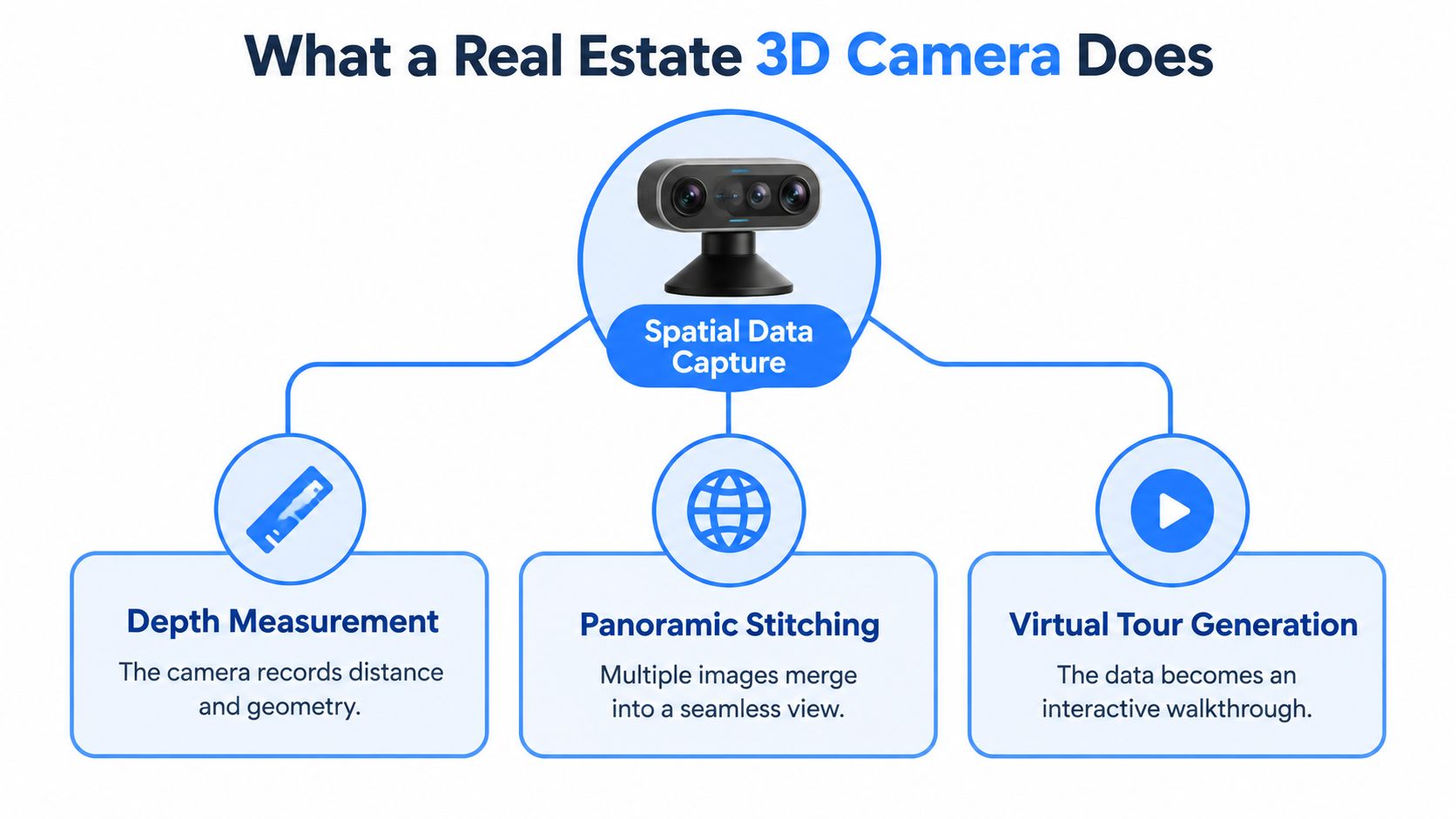
A real estate 3D camera addresses that mismatch before anyone travels. It captures a room from multiple positions, records how far walls and objects are from the camera, and combines those views into a navigable model. A buyer can move from entry to kitchen, turn around, and understand how spaces connect.
A 360 Photo Is Not the Same as 3D
A 360 degree photo is like standing in one spot and turning in a circle. It shows what's visible, but it doesn't reliably know how far away each wall is. A true 3D capture adds depth data, so software can estimate dimensions, build a floor plan, and keep rooms aligned as a viewer moves between scan points.
That distinction explains the history. Matterport was founded in 2011 and introduced its first dedicated 3D camera in 2012, combining depth sensing with panoramic imaging, and by 2024 the company reported more than 12 million captured spaces across 177 countries in the CoStar Group announcement on acquiring Matterport. The shift wasn't just prettier photos. It was a move toward measurable digital twins.
The Honest Job of the Tour
The best use is screening, not remote closing. Harvard Business School researchers analyzed 75,178 homes sold in greater Los Angeles, found approximately 22% had virtual tours, and found the price effect became statistically insignificant after accounting for stronger photography and captions, as summarized in Harvard Business School Working Knowledge on virtual tours and home sales.
A 3D tour earns its keep when it helps the right buyer book a showing and helps the wrong buyer self select out, early and politely.
That framing matters for every later decision. Agents who need better remote filtering can succeed with simpler gear. Agents who need dependable measurements, floor plans, or large space documentation need a different class of camera.
Types of 3D and 360 Cameras Explained
Confusion usually starts with naming. Sellers use 360 camera, 3D camera, and LiDAR camera as if they're interchangeable. They're not, and the sensing method determines what the final tour can and can't do.
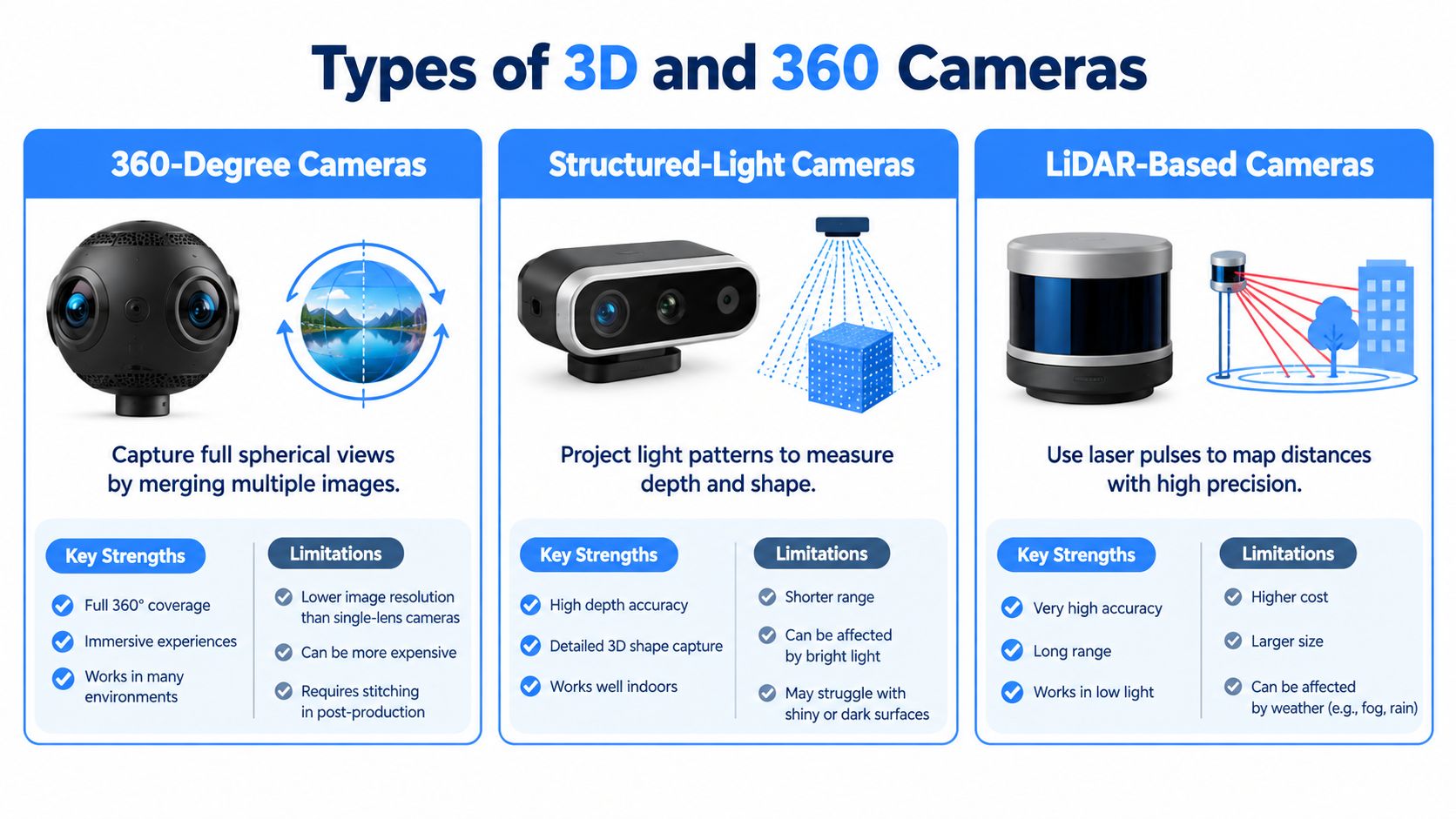
360 Degree Cameras
A 360 degree camera such as a Ricoh Theta or Insta360 model uses multiple lenses and stitches the images into a sphere. Think of it as wrapping a panorama around the viewer. It's fast, portable, and often enough for a visual walkthrough, especially for smaller homes.
The limit is geometry. Without dedicated depth sensing, software has to infer space from images, so floor plans and measurements are less dependable. Readers comparing capture technique can review the basics in this guide to taking 360 photos for property tours, then judge whether visual navigation alone meets the brief.
Structured Light Cameras
A structured light camera projects a known pattern and watches how that pattern bends across surfaces. The analogy is a tape measure made of light. When the pattern stretches or compresses, the system estimates distance and shape.
- Best fit: Compact residential interiors where rooms are modest and the main goal is a smooth walkthrough.
- Main limit: Range and reliability drop in large rooms, bright exterior areas, and measurement sensitive work.
- Typical example: Earlier dedicated interior systems built around depth sensing plus panoramic imaging.
LiDAR Based Cameras
LiDAR sends out laser pulses and times their return, much like a laser rangefinder taking many measurements in rapid sequence. Those returns become a point cloud, a dense set of measured points that describes walls, ceilings, and openings.
That approach suits large commercial interiors, mixed indoor and outdoor capture, and projects where room to room alignment matters. It also tends to cost more and can produce heavier data. The practical question isn't which technology sounds most advanced. It's whether the listing workflow needs a picture a buyer can look around, or spatial data a professional can measure and reuse.
Key Camera Specs to Evaluate Before Buying
Spec sheets reward the wrong instinct. A bigger megapixel number looks decisive, but a tour can still fail at the seams, blow out at the windows, or mislead on room size. Agents get better results by translating each spec into a visible outcome.
Resolution, Stitching, and HDR
Resolution controls how much detail survives when a viewer zooms toward a countertop or reads a room from a doorway. Stitch quality controls whether door frames line up where lens views merge. A sharp image with a warped seam still feels untrustworthy.
HDR, or high dynamic range capture, matters because interiors rarely light evenly. Bright windows, dark corners, and glossy floors often appear in the same view. Good HDR keeps detail in both extremes without making the room look artificial. This pairs closely with the fundamentals in this overview of cameras for real estate photography, where lens and exposure choices shape stills as well as tours.
Accuracy and Range in Plain Terms
Accuracy tells a buyer how close a digital measurement is likely to be. Matterport specifies its structured light Pro2 at approximately ±54 mm at 5 m with a roughly 5 m depth range, while the LiDAR Pro3 is specified at ±20 mm at 10 m with depth capture up to 100 m in E57 output, according to Matterport support guidance on dimension accuracy in Spaces.
| Spec | Structured Light | LiDAR |
|---|---|---|
| Illustrative accuracy | ±54 mm at 5 m | ±20 mm at 10 m |
| Illustrative depth range | About 5 m | Up to 100 m in E57 output |
| Stronger use | Visual navigation in compact homes | Floor plans, large spaces, mixed capture |
| Caution | Verify any contract measurement independently | Verify any contract measurement independently |
Those tolerances still depend on distance, surface reflectivity, scan geometry, and conditions. A camera measurement can guide a conversation. It shouldn't replace independent verification for contracts, construction, or valuation.
Point Density and Workflow Speed
The Pro3 records approximately 1.5 million points per scan at standard density or up to 5 million at high density, with a minimum range of 0.5 m, as listed on the Matterport cameras product page. More points can describe geometry more densely, but they don't fix poor scan placement. Overlapping positions still matter around corners, mirrors, and complex rooms.
Practical rule: Buy for the deliverable that must be trusted, not for the largest number on the box.
Workflow deserves equal weight. A tripod based scan that needs careful repositioning may suit a photographer. A fast, simple capture may suit an agent handling many listings. Post processing time, battery swaps, and rescan risk are specs too, even when they don't appear in bold type.
Budget Tiers and What You Get at Each Level
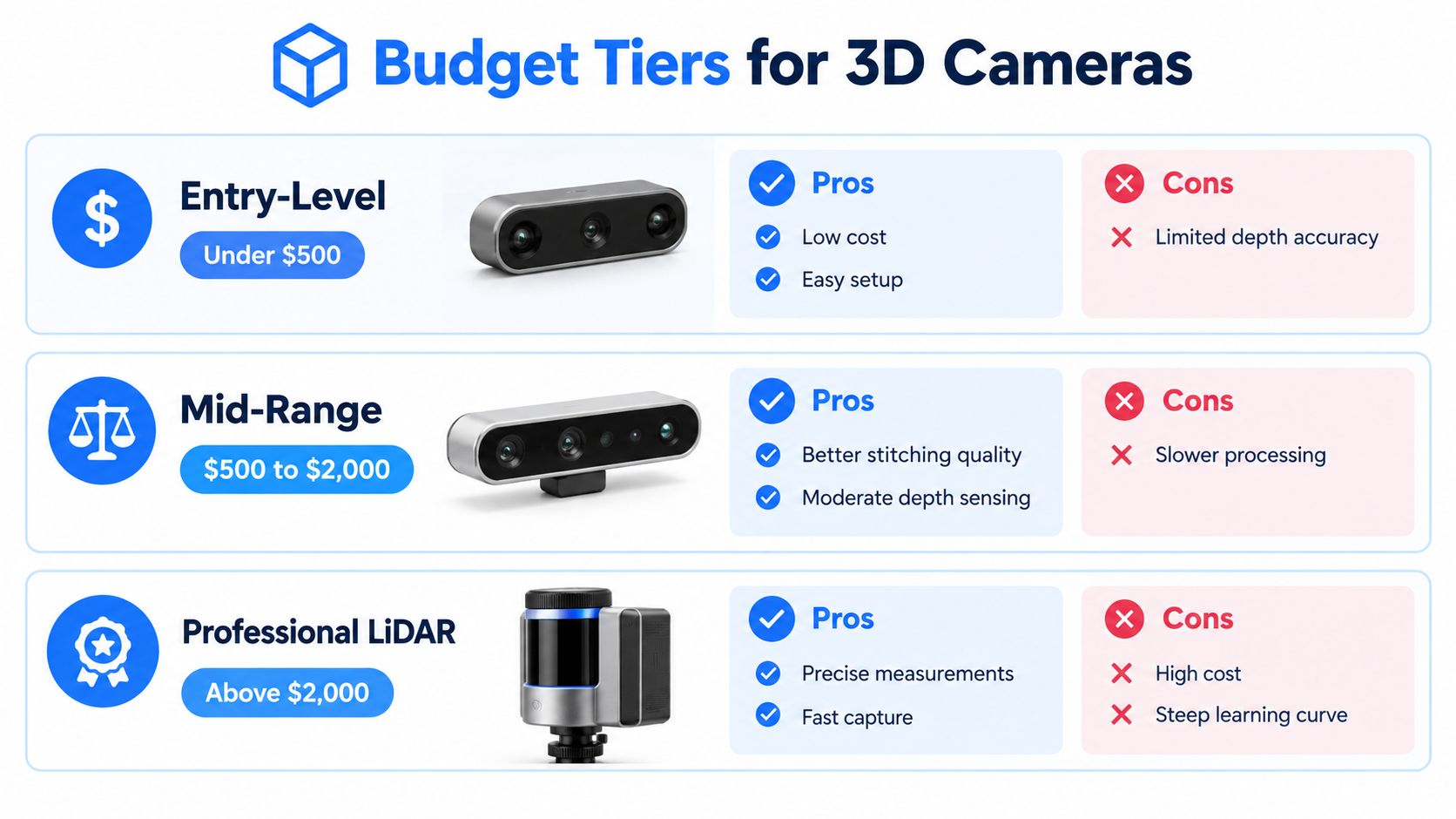
Price tiers are best understood as trade offs in trust. Lower tiers ask the viewer to trust the picture. Higher tiers add spatial data that other people can check, reuse, and build work from.
Entry Level 360 Cameras
Entry level models prioritize speed and simplicity. An agent can place the camera, capture each room, and publish a visual tour without learning a complex scanning workflow. For a small apartment where the goal is simple orientation, that may be enough.
The compromises show up in low light, stitch seams, and any request for measurements. If a buyer asks whether a sofa fits a wall, an entry level tour may offer a visual guess rather than a defensible answer. That isn't failure. It's a limit that should be disclosed.
Mid Range and Dedicated Interior Systems
Mid range options usually improve image quality, stabilization of the workflow, and depth information for standard interiors. They're a sensible middle path for brokerages that publish tours often but don't routinely document warehouses, hotels, or large commercial floors.
- What improves: Cleaner panoramas, more consistent room alignment, and better support for floor plan generation.
- What still needs care: Large open spaces, exterior transitions, and measurement claims.
- Who benefits: Residential teams that need repeatable quality across many listings.
Professional LiDAR Systems
Professional LiDAR costs more because it produces more than a tour. The same capture can support point cloud review, downstream CAD or BIM tasks, and asset documentation. That reuse is where the investment can make sense for commercial brokers, hospitality operators, architects, and high volume capture services.
The hidden costs matter just as much. Training, scan planning, storage, processing, platform fees, and quality checks all take time. A premium camera used for occasional small listings can become expensive overhead. A simpler camera used daily, with a clean publishing process, often delivers more operational value.
The honest test is frequency plus consequence. If inaccurate dimensions create real business risk, professional capture earns consideration. If the only job is helping buyers decide whether to book a visit, paying for survey style capability may never show up in results.
Integrating Your Camera with Virtual Tour Platforms
A camera capture sitting in a folder isn't a marketing asset yet. The platform turns scenes into a path, adds context, collects inquiries, and shows whether anyone used the tour. That's why camera choice and platform choice shouldn't be made in isolation.
Three Ways Scenes Enter a Platform
Most workflows start with uploaded equirectangular 360 images from a compatible camera. Some platforms also transform regular listing photos into 360 style scenes, which helps when a property was photographed before a tour was planned. A third route generates a panorama from a text prompt for concept spaces or pre construction presentation, though that should never be presented as a capture of an existing home.
Virtual Tour Easy is one example of a platform that accepts uploaded 360 images, transforms regular photos into 360 scenes, and generates panoramas from text. Its relevance here is workflow flexibility, not camera replacement. A brokerage can mix camera captured rooms with other scenes when the source material differs by listing.
Building a Tour Buyers Can Actually Use
Assembly usually involves ordering scenes, setting a starting view, and adding hotspots that move a viewer to the next room. Info panels can label a renovated kitchen or explain access to a garden. Audio can guide a remote buyer, but it should support navigation rather than repeat the listing description word for word.
Readers evaluating platform features can compare categories in this guide to virtual tour software for property marketing. The checklist should include link sharing, website embeds, Google Street View publishing where appropriate, and export options such as video walkthroughs for channels that don't support interactive tours.
Analytics and Lead Capture Close the Loop
A tour without measurement is just a nicer gallery. Analytics such as views, visitors, device data, and geographic data help a team see whether remote buyers are engaging. Lead capture forms placed inside the tour connect that attention to a next step.
The camera creates the evidence. The platform creates the route, the record, and the response.
That connection supports the screening model. Tour completion, inquiry to showing conversion, showing cancellations, and remote buyer leads tell a brokerage whether capture is saving time. Those operational signals are more useful than assuming the camera alone changed the final price.
Privacy and Accessibility Considerations Most Guides Miss
More detail isn't always better. A navigable scan can reveal things a cropped photo would never show, and a viewer can pause, zoom, and revisit each corner. That permanence changes the responsibility before publication.
Privacy Is a Pre Publication Task
A scan can expose mail, documents, passwords, family photos, valuables, and identifying details. In a Canadian survey summarized in available coverage, 19% of respondents who preferred in person viewing cited personal data security and 31% cited possible property misrepresentation, as reported in this International Journal of Research in Academic World article on virtual tour concerns.
A careful team treats privacy as part of staging. The workflow is unglamorous, and that's why it works.
- Sweep before capture: Remove mail, documents, medication, credentials, and identifiable photos from every room.
- Check reflections: Mirrors, windows, screens, and glossy appliances can reveal items outside the direct view.
- Blur after capture: Use platform tools for faces, plates, and personal details that couldn't be removed.
- Control access: Use restricted links for occupied homes rather than public sharing by default.
- Set retention rules: Decide when tour assets and visitor analytics are deleted after a sale or lease.
Consent also matters. Tenants and sellers should know what's being captured, where it'll appear, and how long it'll stay live. A signed agreement doesn't excuse a careless scan, but it prevents surprise.
Accessibility Needs a Fallback, Not an Apology
Immersive interfaces can create barriers for people using keyboards, screen readers, captions, reduced motion settings, or low bandwidth connections. A spinning tour that requires precise dragging may exclude exactly the remote buyer it was meant to help.
The fix is parallel information. Labeled photos, text room descriptions, a readable floor plan, captions for audio or video, and a clear contact option give every visitor a usable path. Accessibility isn't a lesser version of the tour. It's part of accurate property communication.
How to Choose the Right Camera for Your Business
A sound choice starts with three plain questions. What kinds of properties dominate the work, what decisions will the tour support, and what happens if the spatial data is wrong. Budget comes after those answers, not before them.
Match the Camera to the Property
A residential agent listing compact homes and apartments usually needs clean navigation, fast capture, and dependable publishing. A good 360 or structured light workflow can meet that brief. The buyer needs orientation, not a construction record.
A commercial broker faces a different problem. Large floors, long sightlines, loading areas, and mixed indoor and outdoor spaces punish short range systems. LiDAR becomes easier to justify because alignment, floor plans, and reusable spatial data affect professional decisions.
Hospitality and venue marketers sit between those poles. A ballroom, restaurant, or hotel suite may need strong visuals first, with floor plans for event planning second. The deciding factor is whether staff reuse the capture beyond the public tour.
Match Expectations to the Buyer Journey
Only 6% of buyers purchased without physically seeing the property in a recent survey summary, despite larger shares saying they'd consider doing so, a figure discussed in this Snappr guide to Matterport photography and virtual tours. That single point should reset most return on investment claims.
The tour's job is to qualify interest. Fewer unnecessary showings, better prepared visitors, and stronger remote screening are realistic outcomes. A guaranteed price premium is not. Teams should compare similar listings using tour completion, showing conversion, cancellations, and days to offer before crediting the camera with a result.
Choose the least complex system that reliably answers the buyer's next question.
Buy, Hire, or Share the Work
Buying makes sense when listings are frequent and someone owns quality control. Hiring a photographer makes sense for occasional premium properties, difficult lighting, or measurement sensitive documentation. A shared brokerage camera can work, but only with a booking process, charged batteries, and a named person responsible for privacy checks.
The wrong purchase is rarely the cheapest or the most expensive one. It's the camera nobody has time to use properly.
Final Recommendations and Key Takeaways
A real estate 3D camera should be judged by the job it performs in the buyer journey. For simple screening of small homes, a clean 360 workflow is often sufficient. For dependable dimensions, large spaces, or reusable point cloud data, LiDAR is the safer category.
Start with the least expensive option that meets visual needs. Invest further only when measurement risk, property scale, or repeat volume demands it. Pair every capture with a platform that provides analytics and lead capture, complete a privacy sweep before publishing, and offer accessible alternatives. That combination produces a tour that's useful, measurable, and honest about its limits.
Turn camera captures, regular listing photos, or AI generated scenes into interactive tours with hotspots, analytics, and lead capture forms by visiting Virtual Tour Easy. It's a practical next step for brokerages that want to publish a real estate 3D camera workflow without adding complex software to every listing.