A real-estate agency is preparing a property launch across time zones. Two editors are changing the same virtual tour, a marketer is waiting for a revised hero scene, and the client has requested one more adjustment before publication. Everyone is working, yet nobody can say which version is final, who owns the next step, or whether the client has seen an approved asset.
That situation isn't a technology problem by itself. It's a team collaboration and communication problem. The agency needs a shared way to assign responsibility, preserve decisions, route feedback, and choose between a live conversation and an asynchronous update. Without that structure, more messages and more meetings only make the confusion harder to trace.
Table of Contents
- What Team Collaboration and Communication Actually Mean at Work
- Roles, Permissions, and Handoffs That Prevent Dropped Balls
- The Four Pillars of Effective Team Collaboration
- Versioning, Comments, and Shared Projects Working Together
- Choosing Between Synchronous and Asynchronous Communication
- Keeping Human Communication Central in AI-Heavy Workflows
- How Leaders Can Communicate Clearly Across a Distributed Team
- A 30-Day Plan to Improve Team Collaboration and Communication
What Team Collaboration and Communication Actually Mean at Work
Collaboration is the coordinated sharing of responsibility. Communication is the flow of information that keeps those responsibilities aligned. A team can communicate constantly without collaborating well, just as a relay team can shout encouragement while still dropping the baton.

In the agency example, the editors need defined working rights, the marketer needs a reliable handoff, and the client needs access only to the approved review state. The team also needs a clear record showing why a scene changed, who approved it, and which version should move forward.
Four ideas make the difference
- Roles and permissions: Roles identify who performs a task. Permissions determine what each person can view, edit, approve, or publish.
- Handoffs: A handoff transfers responsibility with enough context for the next person to act without reconstructing the entire project.
- Versioning: Version history gives the team a recoverable memory instead of forcing people to trust filenames such as
final-new-approved-2. - Intentional channels: Each message belongs somewhere appropriate, whether that means a live review, a scene comment, a task assignment, or a decision log.
A useful test is simple: can a new team member open a project and understand its current state without asking several colleagues for background? If the answer is no, the team probably has communication activity but not dependable collaboration.
Managers building distributed workflows can also find practical guidance in come gestire la collaborazione a distanza, especially when location differences make informal clarification less available. The objective isn't to eliminate conversation. It's to make important conversation visible, findable, and connected to the work it affects.
Roles, Permissions, and Handoffs That Prevent Dropped Balls
A well-run project resembles a relay race. One runner owns each segment, the next runner knows when to receive the baton, and the team agrees on the finish line before the race begins. If two runners assume they own the same segment, they collide. If nobody owns it, the baton stays on the track.
Separate responsibility from access
A role answers, “Who is expected to do this work?” A permission answers, “What may this person do inside the workspace?” Approval rights answer a third question, “Who can declare the work ready for the next stage?”
For a virtual-tour launch, the operating model might look like this:
| Workflow stage | Primary owner | Required permission | Completion signal |
|---|---|---|---|
| Scene editing | Editor | Edit assigned scenes | Draft saved |
| Brand review | Marketing reviewer | Comment and request changes | Review completed |
| Client approval | Account lead | Approve client-facing version | Approval recorded |
| Publication | Project owner | Publish or export | Live link confirmed |
This structure prevents editors from overwriting one another, reviewers from approving unfinished work, and clients from seeing internal drafts. A practical explanation of how user roles work can help managers distinguish access levels from actual workflow ownership.
Design the handoff as a small package
Every handoff should contain three things:
- A handoff brief: what changed, what remains open, and what the next person should inspect.
- Acceptance criteria: the conditions that make the work ready, such as approved branding, tested hotspots, or confirmed client copy.
- A confirmation step: the receiving person acknowledges ownership or identifies a missing detail.
A project workspace can connect these steps with marketing automation and downstream actions. For example, a team evaluating marketing automation integration can map the approved-tour state to the next campaign task instead of relying on a private message.
Teams often assign responsibility organically at first. That works while a project is small and everyone shares the same context. Deliberate roles scale better because the workflow keeps functioning when contributors change, projects multiply, or a client adds an urgent request.
The Four Pillars of Effective Team Collaboration
Busy teams often mistake visible activity for progress. A full chat stream, a crowded calendar, and frequent status updates can conceal weak decisions. Research summarized in a 2018 meta-analysis found that communication quality had a stronger relationship with team performance than communication frequency, while information elaboration, meaning the interpretation and application of task-relevant information, had the strongest relationship among the communication types examined. The research summary supports a practical conclusion: teams should preserve useful reasoning, not merely produce more messages.

Shared context prevents repeated explanation
Shared context includes the goal, constraints, current version, known risks, and relevant decisions. Without it, every contributor starts by asking the same questions or makes assumptions that later require rework.
Implementation rule: attach the reason for a change to the asset, task, or project where the change occurred.
Decision logs prevent circular debate
A decision log records the choice, the evidence considered, the owner, and any conditions that would justify revisiting it. It stops a team from reopening a settled question just because the original discussion happened in a disappearing chat thread.
Implementation rule: record decisions at the moment they become operational, not at the end of the project.
Feedback loops prevent silent failure
Feedback should create a route from observation to response. A reviewer identifies the issue, the owner answers or changes the work, and the reviewer confirms whether the result meets the requirement.
Communication already consumes a substantial part of many managers' days. In a 2024 survey of 7,969 full-time knowledge workers across 16 countries, 35% of leaders reported spending at least three hours per day in in-person meetings, compared with 12% of employees, while 29% of leaders spent at least three hours daily on email. Short, structured check-ins can protect decision time better than meetings that exist only to exchange status.
Implementation rule: every recurring check-in should end with an owner, a next action, and a due condition.
Accountability trails prevent memory-based management
An accountability trail shows who owned a step, what they delivered, and what happened next. It isn't surveillance. It's the project's receipt system, allowing a manager to distinguish a blocked task from an ignored task.
Implementation rule: make ownership visible at each approval state.
Practical rule: If a message changes the work, attach it to the work.
These pillars apply whether a team uses Microsoft Teams, Slack, a project-management platform, or a specialized virtual-tour workspace. The tool matters less than whether the system preserves context and makes responsibility observable.
Versioning, Comments, and Shared Projects Working Together
Versioning, comments, and shared projects solve different failures, but they work best as one system. Versioning preserves the sequence of changes. Comments explain the reasoning. A shared project gives the people, assets, permissions, and approval states a common address.
Versioning acts as team memory
Without version history, contributors hesitate to experiment or create duplicate files to protect themselves. That fear produces names such as tour-final, tour-final-2, and tour-final-client, none of which reliably identifies the approved state.
A useful version system lets the team answer four questions quickly:
- What changed? The editor or system identifies the modification.
- Why did it change? The review record preserves the rationale.
- Who changed it? Ownership remains visible.
- What can be restored? Earlier states remain recoverable.
Comments should support decisions
A comment is more useful when it identifies the exact scene, hotspot, line of copy, or branding asset involved. It should explain the issue, state the requested action, and identify the person responsible for resolving it.
For example, “Please revise this” creates uncertainty. “Replace the entrance image with the approved exterior scene because the current crop hides the accessibility ramp. Marketing owns the replacement” gives the editor a clear action and preserves the reason.
That structure reflects the information-elaboration finding that communication quality matters more than message volume, with elaborated task information showing the strongest performance relationship in the cited analysis. Comments should therefore function as decision support, not as a second general-purpose chat room.
Shared projects create one addressable workspace
A shared project should gather the tour versions, contributors, review states, comments, and publication information in one place. When those elements live across email, cloud folders, chat, and spreadsheets, people spend time reconciling systems instead of improving the deliverable.
A manager evaluating a tool stack can ask whether it supports all three layers together:
- Can contributors recover earlier versions?
- Can reviewers attach feedback to the precise work item?
- Can the team see permissions and approval status without manual tracking?
If the answer to one question is no, the team will need a workaround. Workarounds aren't always harmful, but they should be documented before they become invisible dependencies.
Choosing Between Synchronous and Asynchronous Communication
The choice between live and asynchronous communication should follow the shape of the problem, not personal preference. Live formats are useful when ambiguity is high and several people need to build shared understanding quickly. Asynchronous formats work well when the request is clear, the task is bounded, and the next action can be recorded without a real-time exchange.
Three situations, three channel choices
A brand mismatch in a tour scene may need a brief live review if the team disagrees about the guideline or the visual effect. Once the decision is clear, the final instruction belongs in a scene comment so the editor can act and future reviewers can understand the choice.
A client requests a structural change such as a different tour sequence or additional navigation requires a synchronous discussion when the request affects scope, timing, or user experience. A written decision log should follow the call, because verbal agreement alone doesn't define the approved outcome.
A marketing-to-sales handoff usually suits an asynchronous package. The sender can provide the tour link, audience, positioning, lead details, and open questions. A short live meeting is justified only if the receiving team can't resolve a material ambiguity from that record.
A peer-reviewed analysis of roughly 61,000 Microsoft employees during the 2020 shift to remote work found that cross-group collaboration time fell by about 25%, while employees added fewer new collaborators and relied more on asynchronous channels. The Microsoft analysis shows why asynchronous work needs deliberate cross-team touchpoints rather than passive reliance on messages.
A practical channel rule can fit on one team page:
Use live communication to resolve ambiguity. Use asynchronous communication to preserve a clear decision.
Teams seeking a broader evaluation of team collaboration tools should apply that rule to workflow design, not just compare feature lists. Too many meetings consume attention. Too much asynchronous exchange can hide disagreement until the project is already expensive to change.
Keeping Human Communication Central in AI-Heavy Workflows
AI changes more than task speed. It changes where employees go for answers, which can redirect learning away from colleagues. A global workplace report found that nearly one-third of employees interact less with colleagues because they use AI for quick answers, while almost half consult AI about legal or policy questions and more than four in ten use it for HR-related matters. The workplace report makes the governance question unavoidable: which questions should AI answer, and which should remain human conversations?
Create a human-escalation framework
AI can assist with retrieval, drafting, summarizing, and routine coordination. Human involvement should remain required when the issue includes:
- Conflict: disagreement between colleagues or teams.
- Feedback: performance, conduct, or relationship-sensitive feedback.
- Ambiguity: unclear requests where interpretation affects scope or trust.
- Sensitive policy: legal, HR, safety, privacy, or employee matters.
- Relationship repair: apologies, difficult conversations, and damaged confidence.
The distinction is similar to the difference between a map and a guide. A map can show routes quickly, but a guide helps people interpret conditions, weigh tradeoffs, and respond to uncertainty. AI can prepare a draft response to a policy question, but a qualified human should own the final explanation when the answer affects a person or a sensitive decision.
Preserve the colleague route
Managers should publish escalation rules where employees already look for help. A simple workflow can say: ask AI for a relevant policy summary, verify the source, then contact the designated human owner when the matter involves interpretation, exception, conflict, or personal impact.
That approach protects belonging as well as accuracy. If every quick question moves to an assistant, newer employees lose informal access to experienced colleagues, and teams lose weak-tie connections that often surface useful context. AI should reduce routine friction without making human communication optional by default.
How Leaders Can Communicate Clearly Across a Distributed Team
Technology changes fail when leaders announce the tool but not the operating model. Employees need to know what is changing, why it matters, what they must do differently, where training lives, and how questions will be handled.
EY research offers a clear operational contrast. At organizations that communicated their AI strategy clearly, 92% of workers said AI agents had positively affected team productivity, compared with a 30-percentage-point gap where communication was unclear. Adoption was 66% versus 39% in the respective groups. EY's research connects communication design with both perception and use.
Cascade the message through the organization
A leader introducing a major technology change can use five connected moves:
- Executive message: state the business reason, boundaries, expected benefits, and essential safeguards.
- Team translation: show how the change affects marketing, production, sales, support, and management separately.
- Documented decisions: record approved use cases, prohibited uses, escalation routes, and ownership.
- Live questions: give employees a setting where unclear or sensitive concerns can be raised directly.
- Feedback loop: collect questions, identify recurring misunderstandings, and update the guidance.
Senior leaders do not always see the communication gap experienced by frontline contributors. Only 52% of senior leaders reported that their organization had fully deployed AI training and upskilling, while employees below vice-president level were more than twice as likely as vice-president-level employees to say the AI strategy hadn't been clearly communicated, 21% versus 9%, according to the same EY research.
Leaders can use a simple readiness check before launch:
- Can each role describe its first required action?
- Can employees identify a human escalation owner?
- Can managers answer what AI must not decide?
- Can contributors find the training and the decision record?
- Has the organization created a way to report confusion?
Managers improving workflows across locations can apply the same discipline to improving productivity across global teams. Clear communication isn't a single announcement. It's a chain that carries meaning from leadership to the person completing the next task.
A 30-Day Plan to Improve Team Collaboration and Communication
A practical rollout should change the workflow before it adds more software. Research summarized from a 2021 Harvard study indicates that collaborative work increased by more than 50% over the preceding decade and consumed at least 85% of many employees' working weeks. The research summary explains why collaboration deserves operating rules rather than informal goodwill.
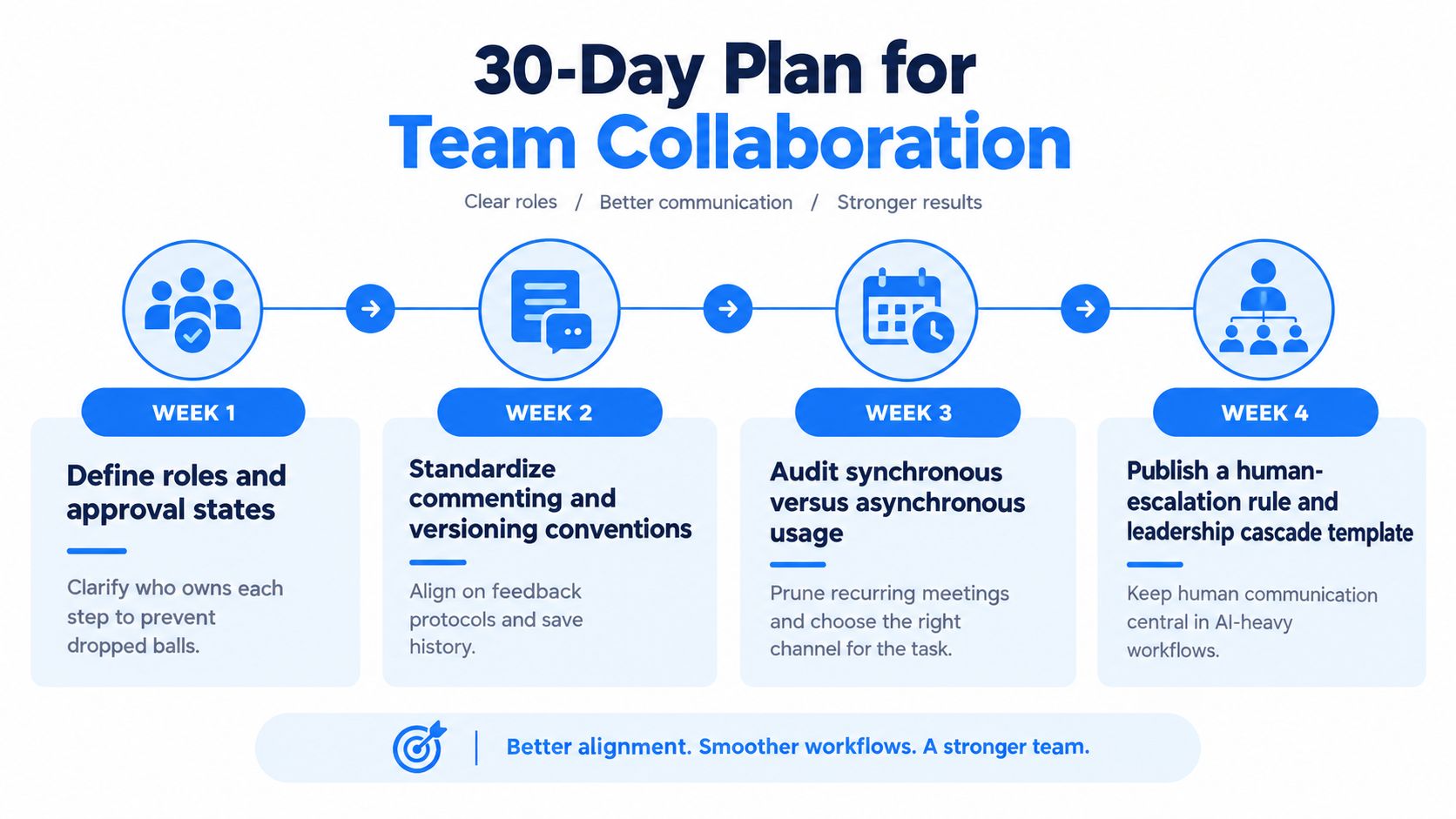
Week 1 defines ownership
List the recurring workflow from intake to publication. Assign an owner for each stage, identify who may edit or approve, and create explicit states such as draft, internal review, client review, approved, and published.
Deliverable: one visible responsibility map.
Success signal: every active task has one named owner and one next state.
Week 2 standardizes work memory
Choose a version naming convention, define what a useful comment contains, and require decisions to remain attached to the relevant asset or project. Teams interested in the human behavior behind adoption can use guidance on behavioral science for smarter teams to reinforce the habits through prompts and defaults.
Deliverable: a short commenting and versioning guide.
Success signal: reviewers can identify the current version and requested action without searching separate channels.
Week 3 audits channel use
Review recurring meetings and replace status-only sessions with asynchronous updates where the work is clear. Keep live sessions for ambiguity, conflict, complex review, and decisions that require shared interpretation.
Deliverable: a channel decision rule and a reduced meeting list.
Success signal: each remaining meeting has a defined decision or problem to resolve.
Week 4 protects human judgment
Publish the human-escalation framework for AI-assisted work. Add a leadership cascade template covering the executive message, team examples, decision record, live questions, and feedback route.
Deliverable: one escalation policy and one change-communication template.
Success signal: employees can identify which issues AI may assist with and which issues require a human owner.
The most common mistake is rolling out tools before defining the workflow. The habit that prevents it is a weekly review of ownership, decision records, and unresolved handoffs before the team adds another channel.
Virtual Tour Easy supports collaborative virtual-tour workflows by allowing teams to invite members, assign roles such as admin, editor, or viewer, and create, edit, and manage tours together. Visit Virtual Tour Easy to see how shared roles and centralized tour work can give distributed teams a clearer path from draft to approved experience.