The popular advice is to make a virtual tour as complete and immersive as possible, then measure success by views. That approach often produces a polished replica with no clear role in the museum's wider strategy. Virtual tours for museums work harder when they prepare people to visit, join, donate, or return, rather than trying to replace the building altogether.
A useful tour answers practical questions before arrival. What should a visitor see first? Which objects deserve extra time? Is the exhibition suitable for a class, a family, or a visitor with access needs? The strongest digital exhibits turn those answers into reasons to plan an in-person visit.
Table of Contents
- Rethinking the Purpose of Digital Exhibits
- Choosing the Right Capture and Creation Method
- Designing Intuitive Navigation and Scene Architecture
- Layering Audio, Interactivity, and Accessibility
- Publishing, Embedding, and Long-Term Archiving
- Measuring Success and Capturing Qualified Leads
Rethinking the Purpose of Digital Exhibits
Museum teams often worry that an online experience will remove the incentive to buy a physical ticket. The evidence points to a more useful interpretation. A 2021 study of museum virtual tours found that tours on Italy's Ministry of Culture portal had received 11.4 million visits by the end of 2020, while half of museums had added at least one new online service. The study also reported that two out of five museums saw online visits rise by 10% to 150%, showing that digital access could expand reach during a period when galleries were closed, not merely substitute for a normal visit. The study of virtual tours and museum exhibitions supports a planning-led view of the format.
A virtual visitor isn't always looking for a substitute experience. They might be checking whether an exhibition is worth the journey, previewing a school trip, sharing an object with a family member, or deciding whether a membership feels relevant. Those intentions require different calls to action. A tour built for casual browsing can be attractive, but a tour built around decision points can support admissions, memberships, education bookings, and donor conversations.
Build the funnel before the panorama
The museum should define the next physical or institutional action before selecting a camera or authoring a hotspot. A temporary exhibition might direct visitors to timed-ticket booking. A permanent collection tour might invite users to plan a route through the building. An education-focused experience could offer a teacher pack or group-visit enquiry.
Practical rule: Every major scene should answer a visitor question and offer a relevant next step.
The online experience should preserve what physical attendance makes valuable. It can reveal a detail, but not every detail. It can introduce the curator's argument, but leave room for scale, atmosphere, material presence, and serendipitous discovery in the gallery. A well-placed “continue in person” prompt feels like guidance when the digital tour has already created curiosity.
Treat access as an audience asset
The 2024 MuseumNext survey found that 47.6% of surveyed museums offered virtual tours or exhibits, and 73.4% of those experiences were free. Only 18% used a mixed free-and-paid model, while 8.6% charged exclusively, according to MuseumNext's survey report. That pattern suggests that museums commonly use tours for engagement and access, while the commercial value often sits in the surrounding funnel.
A free tour can still qualify high-intent audiences. Someone who explores a collection, saves an object, or requests a visit guide has shown more useful intent than someone who only loads a homepage. The important design decision is not whether the tour is free. It's whether the experience gives the museum a respectful way to continue the relationship.
Choosing the Right Capture and Creation Method
The right production method depends on the space, the purpose, and the level of visual truth required. A historic gallery with distinctive architecture needs a different treatment from a temporary installation, a closed archive, or a proposed exhibition that doesn't exist yet.
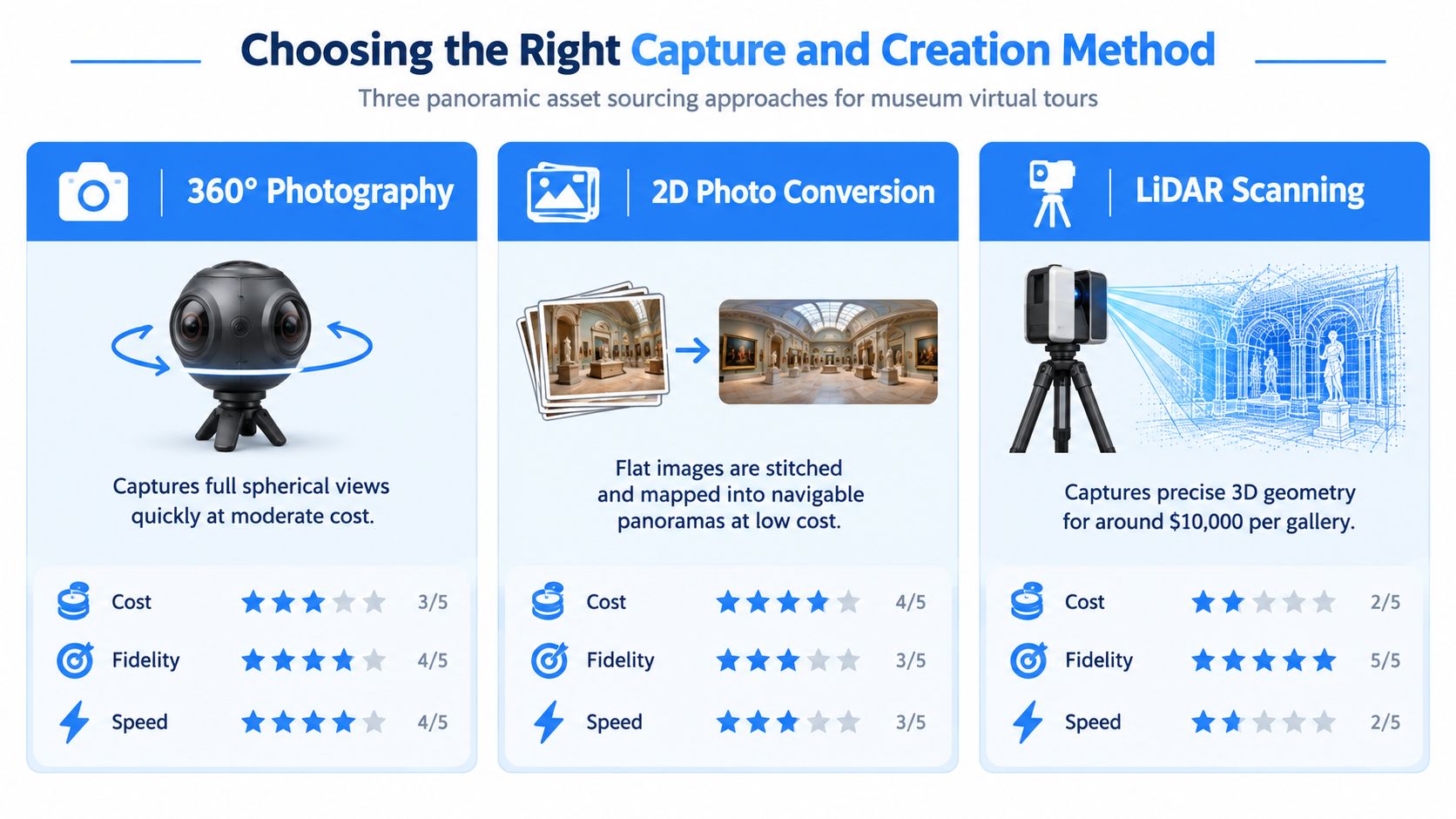
Three methods, three different jobs
360-degree photography is the practical default for a real gallery that needs faithful spatial orientation. It captures the room, the sightlines, and the relationship between objects in one spherical view. The method is relatively quick and can produce a convincing sense of presence, but it demands careful preparation. Reflections, visitors, tripod placement, poor lighting, and inconsistent camera height can undermine the result.
2D photo conversion works when the museum already has strong still photography but lacks spherical assets. Flat images can be mapped into navigable scenes or used as illustrated environments. This approach is useful for temporary displays, object-led storytelling, and low-budget transitional areas. It shouldn't be presented as a literal record of a room when the source image can't support accurate depth or movement.
LiDAR scanning is justified when geometry matters. A scan can preserve detailed spatial relationships, architectural surfaces, and complex forms that ordinary photography can't represent cleanly. The trade-off is production complexity and cost. The supplied comparison brief places LiDAR scanning at around $10,000 per gallery, so it belongs in a preservation, reconstruction, or high-value flagship workflow rather than every corridor. ThingLink's guidance on creating virtual exhibitions also describes the use of 360 images and LiDAR-enabled devices for different exhibition needs.
Match fidelity to the visitor task
A museum doesn't need maximum fidelity in every scene. The entrance may need a clear orientation view. A hero gallery may deserve carefully captured 360 photography. A transition between floors could use a converted image with directional labels. A destroyed or inaccessible space might require a reconstructed panorama, clearly marked as interpretive rather than documentary.
AI-generated panoramas are most useful for concept development, historical reconstruction, and spaces that haven't been built. They can help curators test an exhibition narrative or show what a lost environment may have looked like, but generated imagery mustn't be confused with evidence. Object details, architecture, inscriptions, and provenance require human review and explicit labeling.
For existing collections, a mixed workflow usually makes more sense than a single-method tour. Use authentic photography where visitors need to trust the spatial record. Use 2D conversion for supporting scenes. Use generated imagery only where interpretation benefits from reconstruction and the museum can distinguish creative visualization from captured reality.
If the museum also needs a campaign asset, selected stills can be turned into short cinematic clips. A resource such as turn images into videos with AI can support promotional cutdowns without changing the underlying tour.
Before capture, teams should document camera positions, lighting conditions, object labels, rights status, and scene names. The practical workflow for creating spherical source material is outlined in this guide to taking 360 photos. Good documentation prevents a later update from becoming a reconstruction exercise.
Designing Intuitive Navigation and Scene Architecture
A virtual visitor should never wonder whether a scene has ended. Digital exhibits lose people when users land in a corner, rotate without context, and find no obvious route to the next gallery. The 2022 PLoS ONE evaluation framework identified authenticity, interaction, navigation, and learning as core quality dimensions. Its case study found strong visual authenticity but weak behavioral authenticity, with navigation defects acting as the main bottleneck and information depth still needing improvement. The virtual-tour evaluation framework makes navigation a curatorial concern, not merely a software setting.
Start with a scene map
Before placing hotspots, draw the visitor journey as a small information architecture. Each node represents a scene, and each connection represents a meaningful movement or interpretive decision.
- Create a primary route. Link the entrance to the first gallery, then connect each major space in a sequence that reflects the exhibition's argument or the building's physical route.
- Add optional branches. Object details, curator commentary, and deeper research should open from the main route without trapping the visitor.
- Define return paths. Every branch needs a visible way back to its parent scene or to a stable navigation menu.
- Set intentional starting views. Point the initial camera toward the most useful orientation cue, not an arbitrary stitch seam or blank wall.
The main route should be visible through consistent hotspot placement, but visual guidance needs restraint. A hotspot at every object creates noise and turns the gallery into a field of buttons. Reserve persistent markers for navigation and use secondary interactions for interpretation.
Eliminate the dead-end trap
A dead end occurs when a user can enter a scene but can't identify the next action. It often appears at staircases, narrow corridors, exterior views, or scenes with several similar doorways. The fix isn't more decoration. It's a clear directional cue, a return control, and a tested transition.
Each scene should have:
- A stable orientation point, such as a doorway, gallery label, or architectural feature.
- A forward action, named with meaning rather than a vague “next” label.
- A return action, especially for object panels and side routes.
- A progress signal, such as a floor map, gallery name, or route indicator.
- A fallback control, allowing visitors to reopen the scene list without restarting.
Scene architecture should also separate content from layout. If an object description changes, staff should be able to edit one information panel rather than rebuild every connection. Consistent naming, reusable hotspot styles, and a shared content spreadsheet make handover easier when curatorial, education, and digital teams work on the same exhibit.
Test on a phone before publication. A route that feels obvious on a large monitor may hide controls on a small screen. Ask a colleague who hasn't seen the build to complete a simple task, such as finding a particular gallery and returning to the entrance. Their hesitation is more valuable than internal confidence.
Layering Audio, Interactivity, and Accessibility
A 360 image provides a viewpoint, not an exhibition. Interpretation begins when the visitor can listen, compare, question, and choose a path through the material. Audio, video, object details, and learning prompts should serve the narrative rather than decorate it.
Use layers with a clear purpose
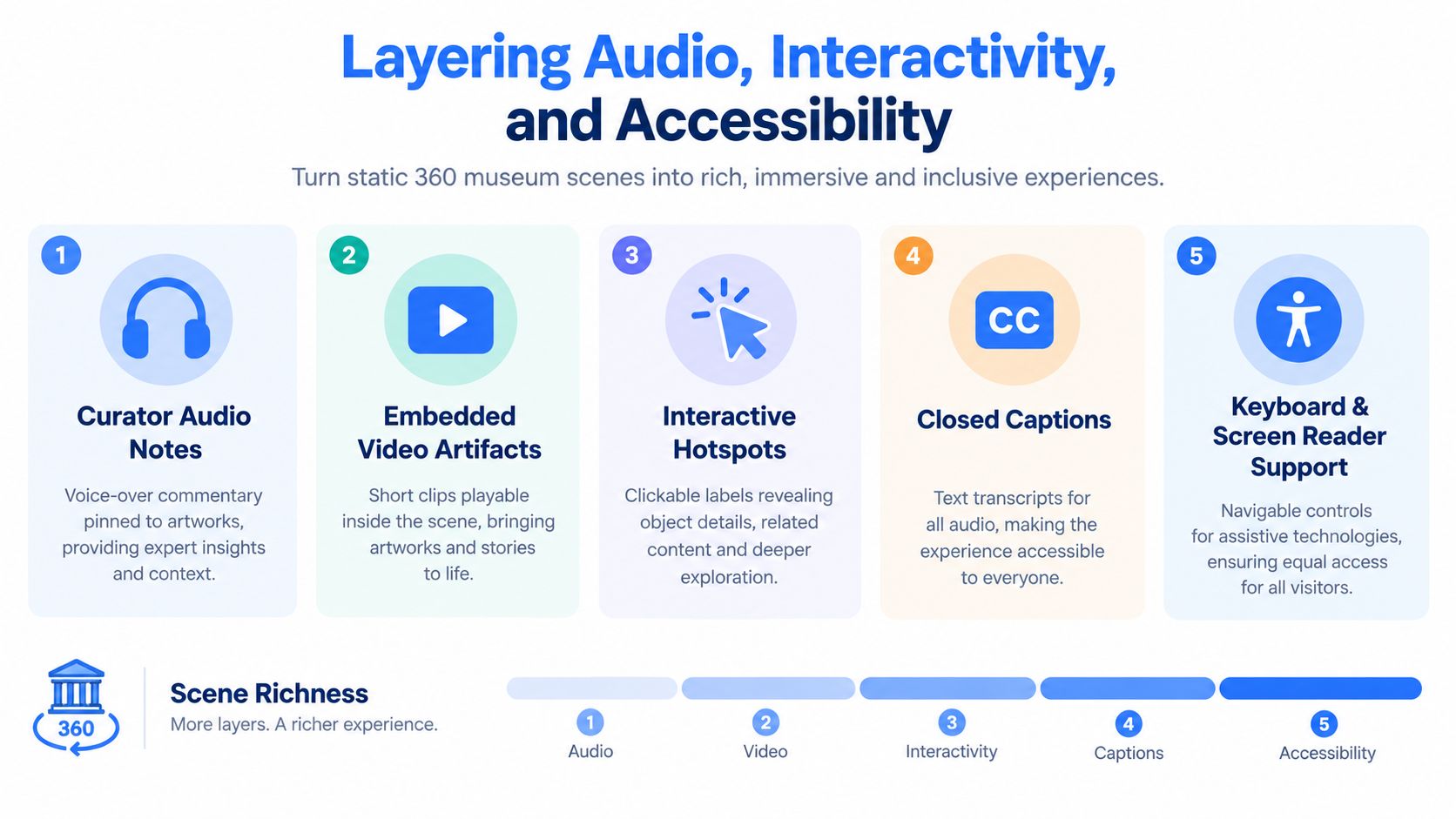
Curator audio can explain why an object matters without filling the scene with text. Embedded video can show conservation, handling, interviews, or archival footage. Interactive hotspots can reveal provenance, related objects, zoomable details, and links to collection records.
The layer should match the visitor's attention. A short audio note suits a first encounter. A detailed essay belongs behind an optional “explore further” action. Video should open quickly and include captions. A hotspot should tell users what they'll gain before they click, such as “Hear the conservator explain the surface” rather than “More information.”
The 2026 randomized experiment with 56 elementary students found that a gamified, task-based mobile guide with immediate feedback produced significantly higher museum knowledge, more meaningful learning, and greater satisfaction than a paper guide. Engagement and emotional connection didn't differ significantly between groups, and text-only guidance was less effective for knowledge gain and satisfaction in that study. The museum-tour experiment points toward short tasks, checkpoint prompts, and rapid validation instead of unguided clicking.
Design accessibility into the interaction
Accessibility isn't a final audit applied to a finished panorama. The 2022 evaluation noted limited inclusivity across ages and abilities, which is why museums should check access while designing scenes, controls, and content. A visitor who can't operate a hotspot, hear an audio track, or understand a visual-only instruction shouldn't have to abandon the experience.
A practical accessibility pass checks:
- Captions and transcripts: Provide text equivalents for narration, video, and important sound cues.
- Keyboard operation: Make scene changes, panels, media controls, and close buttons reachable without a pointer.
- Screen-reader structure: Give buttons descriptive labels and preserve a logical reading order.
- Contrast and scale: Keep labels legible over changing backgrounds and support comfortable zoom where possible.
- Reduced motion: Avoid animated elements that distract, flash, or create discomfort.
- Alternative interpretation: Explain essential visual information in text or audio so the narrative doesn't depend on sight alone.
Audio production benefits from a defined editorial process. Scripts should identify the object, use plain language, and separate essential information from optional context. This practical guide to voice-over and background music can help teams plan narration without letting sound overwhelm the visual work.
Structured guidance also helps visitors who need more support. A “find the object with the red seal” prompt, followed by an answer reveal, creates a manageable action. More advanced visitors can skip the prompt and browse independently. That flexibility makes the tour more usable without flattening the curatorial experience.
Publishing, Embedding, and Long-Term Archiving
A tour that works in a staging environment but disappears after a software change isn't a finished museum resource. Publication needs a distribution plan and a preservation plan, with separate owners and review dates.
Publish where intent already exists
The museum website should host a stable landing page with the tour, access information, exhibition dates, ticket links, membership options, and an explanation of what the digital experience represents. The embedded tour shouldn't be hidden behind a generic “digital projects” archive. Visitors searching for an exhibition should find the tour alongside opening hours and visit planning information.
Distribution can extend across several channels:
- Google Street View: Use suitable exterior or public-access scenes to support local discovery and help visitors orient themselves before arrival.
- Short campaign links: Create distinct links for newsletters, school outreach, social posts, and partner organisations so each channel can be evaluated.
- Exhibition pages: Connect object entries and event pages to relevant scenes, rather than sending every audience to a single generic tour URL.
- Email journeys: Follow a tour visit with a useful next action, such as a route planner, event invitation, or membership explanation.
- Partner distribution: Give schools, tourism bodies, libraries, and community organisations copy that explains who the tour serves.
The museum should also check loading speed, mobile controls, privacy notices, captions, link behavior, and search-engine indexing before launch. A beautiful scene that loads slowly or traps keyboard users will underperform regardless of its production quality.
Preserve the source, not only the link
Digital preservation requires more than renewing a platform subscription. Archive the original 360 images, 2D source photographs, scan files, audio masters, video files, transcripts, metadata, object identifiers, rights information, scene maps, and final published exports. Store a human-readable record of the tour's structure so another team can reconstruct the experience if the original builder changes.
A recent analysis of U.S. museum virtual-tour adoption found that many institutions fell into a “Limited Adoption” category because tours were not created or were not preserved in an accessible public archive. The same source reports that only 7.5% of respondents identified visiting the museum virtually as a top reason for engaging with museum digital activity during the previous twelve months. The analysis of museum virtual-tour adoption and digital engagement highlights the risk of treating launch as the end of the project.
Assign a preservation owner, record accessibility decisions, and review every public link on a schedule. If a tour supports a temporary exhibition, keep a durable version with dates and interpretive context rather than deleting it when the physical show closes. A searchable archive can continue serving researchers, educators, former visitors, and future exhibition planning.
Measuring Success and Capturing Qualified Leads
Views are a starting signal, not a business case. A museum needs to know what visitors did, which audiences they represent, and whether the digital experience contributed to an in-person action.
Build an event model around decisions
Connect the tour to GA4, Google Tag Manager, and appropriate tracking pixels only after the museum has defined the questions it needs answered. Useful events include scene opens, hotspot selections, audio plays, video completions, route exits, ticket-link clicks, membership-page visits, donation starts, guide downloads, and completed enquiry forms.
The measurement plan should distinguish between engagement and intent:
| Measurement area | Useful question |
|---|---|
| Route behavior | Which scenes attract attention, and where do visitors leave? |
| Interpretive use | Which objects, audio notes, or videos receive interaction? |
| Audience context | Which devices and geographic areas are reaching the tour? |
| Conversion actions | Do visitors click toward tickets, memberships, donations, or group bookings? |
| Lead quality | Which enquiries contain a visit date, group size, school role, or membership interest? |
A high scene count doesn't automatically indicate a strong experience. If visitors open the ticket page after exploring a route, that action has more strategic value than passive time spent rotating a panorama. Attribution won't be perfect, especially when a user changes devices or purchases later, but consistent campaign links, consent-aware analytics, and clear CRM handoff can establish useful patterns.
Capture leads without damaging trust
Lead capture should appear at a natural moment. A school group might request an educator pack after completing a guided activity. A prospective member might ask for upcoming exhibition information after exploring the collection. A donor might want a conservation story or a private-visit invitation.
Keep forms focused. Ask for the information the museum will use, explain the follow-up, and avoid forcing registration before the visitor has received value. A simple segmentation field can distinguish teachers, prospective visitors, members, donors, researchers, and partners. These data-collection strategies for virtual tours provide a useful planning reference for deciding what to collect and when.
The revenue question is whether the tour contributes to an identifiable journey. Track a visitor from campaign source to tour interaction, then to a ticket click, membership enquiry, donation form, group-visit request, or completed purchase where the museum's consent and analytics setup allow it. Report those paths alongside qualitative feedback and accessibility findings.
The commercial case should remain realistic. A recent sector report argues that digital revenue is usually 5% to 15% of total museum revenue, and that virtual tours rarely generate direct income unless they support pre-visit planning, membership funnels, or premium experiences. The same report says 98% of visitors still prefer in-person visits when given the choice. The report on museum digital revenue streams therefore supports a contrarian conclusion: the most valuable virtual tour may be the one that helps a visitor decide to enter the physical museum.
Virtual Tour Easy lets museums create 360-degree tours from regular photos, text prompts, or existing 360 images, then add scenes, hotspots, information panels, audio, and custom starting views in a visual builder. Visit Virtual Tour Easy to test a pre-visit funnel that connects digital interpretation with ticket planning, membership enquiries, and measurable audience actions.