A prospect may discover a hotel's virtual tour on a phone, compare room layouts later on a work laptop, and submit an inquiry from a tablet at home. In GA4, those interactions can look like separate people unless the property has a way to connect them. The result is a familiar reporting problem: the conversion appears, but the earlier device and channel that created the demand disappear from the visible journey.
GA4 cross-device tracking isn't a single switch that reveals every person's complete path. It's a layered identity system built from identifiers that have different reach, reliability, and privacy restrictions. The practical choices center on User-ID, Google Signals, Device ID, and modeling, with the reporting identity setting deciding how GA4 uses them.
Table of Contents
- Why Cross Device Tracking Matters for Tour and Lead Attribution
- The Four Identity Spaces Inside GA4
- How User ID and Google Signals Stitch Sessions Together
- Configuring Cross Device Tracking Step by Step
- Privacy Limits, Consent Mode, and the Coverage Gap
- Real World Journeys From a Virtual Tour Marketer
- Choosing the Right GA4 Cross Device Report
- Best Practices and a Quick Pre Launch Checklist
Why Cross Device Tracking Matters for Tour and Lead Attribution
A real estate prospect opens a virtual tour during a commute. The mobile session includes room navigation, a floor-plan view, and several hotspot clicks. Later, the prospect uses a desktop browser to compare properties, then completes a viewing request on a tablet.
Without an identity connection, GA4 can record those interactions as separate users. The mobile session may receive credit for an initial discovery, the desktop session may appear as a new acquisition, and the tablet may claim the conversion through direct traffic. The marketer sees activity on each device, but not necessarily one coherent lead journey.
That fragmentation affects more than the user count. It can make mobile discovery look less valuable, hide the role of mid-funnel research, and make a channel appear to close a lead only because its session happened last. The underlying issue isn't that GA4 has misread a known person. It lacks sufficient evidence to determine that the sessions belong to the same person.
Universal Analytics treated cross-device reporting as a separate area with Device Overlap, Device Paths, and Acquisition Device views, and those reports were available only in User-ID views. Google's migration documentation describes GA4 as a unified model that can combine web, iOS, and Android activity when User-ID is populated, while also using Google Signals for eligible signed-in users. Google's migration guidance places cross-device continuity inside the broader identity framework rather than treating it as an isolated report.
Three identity pillars matter most in practice:
- User-ID: A stable, pseudonymous identifier from an authenticated account.
- Google Signals: Aggregated information from eligible users signed into Google services with the relevant settings enabled.
- Modeling: An inferred layer that can help fill gaps when consent or identifiers are missing.
Device ID remains important as the fallback for device-level reporting, but it can't identify a person across separate browsers or devices by itself. For a tour or booking journey, the first question should therefore be simple: what evidence can GA4 use to connect the mobile browse, desktop research, and tablet submission?
The Four Identity Spaces Inside GA4
GA4 recognizes users through four identity spaces. Each one answers a different question about the evidence available for a session.
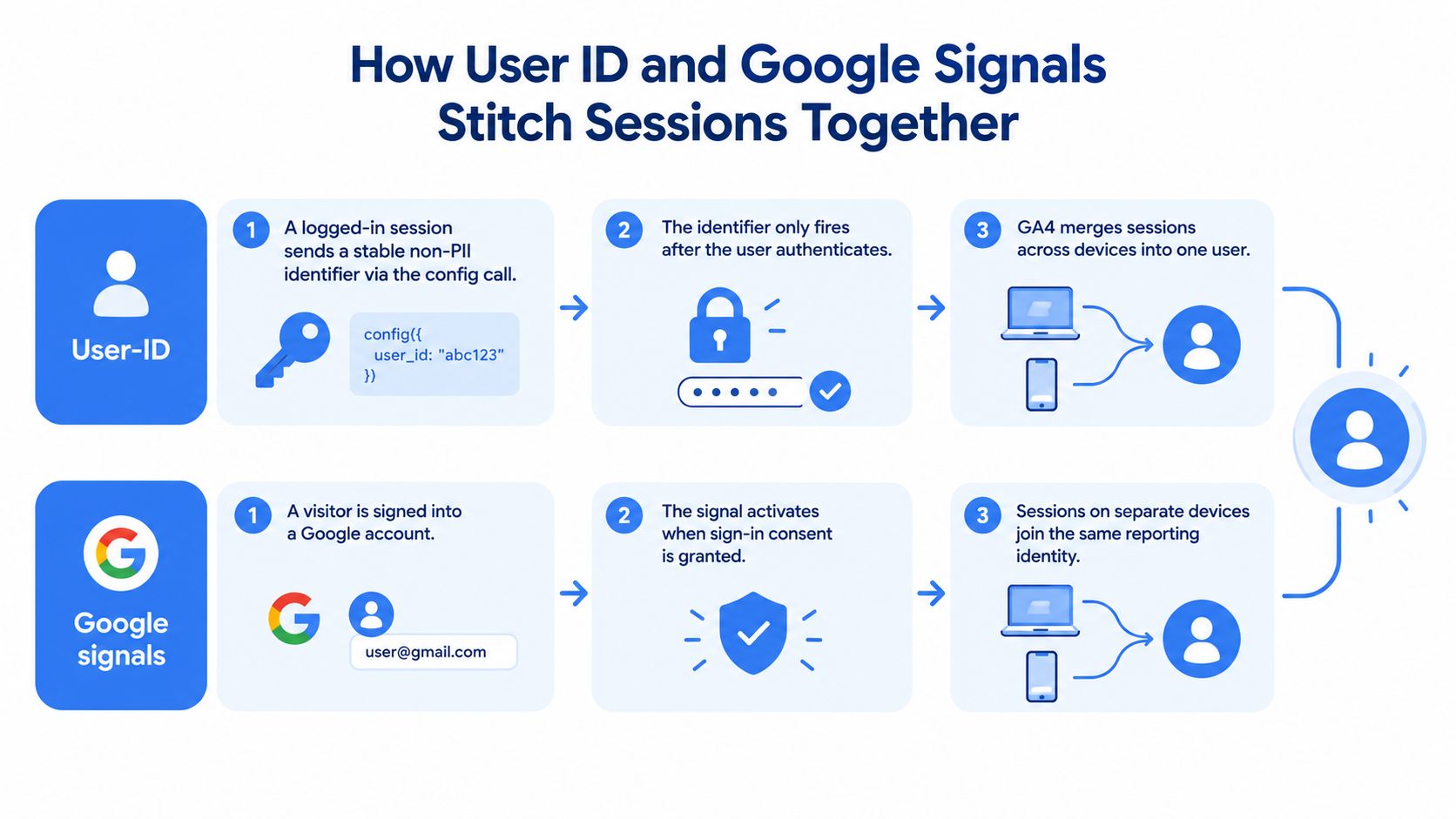
User-ID is the strongest option a business controls. After authentication, the site sends a stable, pseudonymous identifier associated with the account. The identifier must not contain directly identifying information such as an email address. When the same value appears across authenticated web or app events, GA4 can treat those events as part of one user journey.
Google Signals uses aggregated information from eligible users signed into Google services. It can connect activity across devices for reporting, but it doesn't cover every visitor and Google applies privacy controls to the resulting data.
Device ID identifies a browser or app installation. On a website, that generally means a first-party browser identifier. It helps GA4 distinguish returning activity on the same browser, but a phone and laptop normally have different identifiers. Clearing browser storage or changing devices can also create another device-level identity.
Modeling estimates behavior where consent and observable identifiers leave gaps. It isn't a replacement for a first-party login identifier. It's a permitted fallback that depends on the available signals and Google's modeling eligibility rules.
Reporting identity changes the visible result
The property's Reporting Identity setting determines which identity spaces GA4 uses when it calculates users and organizes journeys. A device-based configuration relies on Device ID. A blended configuration can prioritize User-ID, then use Google Signals, Device ID, and modeling where available. An observed configuration uses observed identifiers but doesn't include behavioral modeling.
That distinction creates an important vocabulary gap. A visitor can be identified at the device level without being stitched to another device. A visitor can also be part of a blended, privacy-safe aggregate without appearing as an individually inspectable profile. For a practical introduction to the broader question of what GA4 can and can't reveal about anonymous visitors, this guide to finding anonymous site visitors provides useful context.
How User ID and Google Signals Stitch Sessions Together
User-ID begins with a business event, usually authentication. A real estate portal might create a random account identifier when a prospect registers, then pass that identifier to GA4 after login. The same value should accompany authenticated events on the user's phone, desktop browser, and tablet.
The timing matters. A mobile visitor who browses anonymously remains device-scoped until an authenticated event provides the User-ID. If the prospect logs in on the desktop later, GA4 can use the identifier on subsequent authenticated activity and, under the applicable reporting rules, associate relevant activity from that journey. This doesn't turn every anonymous historical visit into a permanently identified record.
Practical rule: Send User-ID when authentication succeeds, not only when the lead form is submitted.
Google Signals works differently. The visitor doesn't need to create an account on the marketer's website, but the person must be an eligible, signed-in Google user and the property must be permitted to use the relevant signals. Google Signals therefore expands coverage beyond a site's own login system, but only for a subset of the audience. Reports may also be subject to privacy thresholding, so the resulting visibility can be less detailed than marketers expect.
Modeling handles another kind of absence. Where consent prevents cookies or other identifiers from being used, GA4 may use observed behavior to estimate patterns in the missing population when the property qualifies. Modeled output should be read as an aggregate measurement aid, not as proof that GA4 identified a specific traveler who moved from an iPhone to a desktop.
A useful example involves iOS Safari. A person may view a tour on an iPhone without logging in, then return on a desktop browser. If the person isn't covered by an authenticated Google signal and never supplies a site-controlled User-ID, GA4 has no deterministic basis for joining those sessions. The desktop conversion may therefore appear independent, even though the marketer knows the journey was connected.
Configuring Cross Device Tracking Step by Step
A reliable implementation starts with the property and ends with report validation. The configuration should be treated as a measurement workflow, not a checkbox exercise.
Start with the authenticated identifier
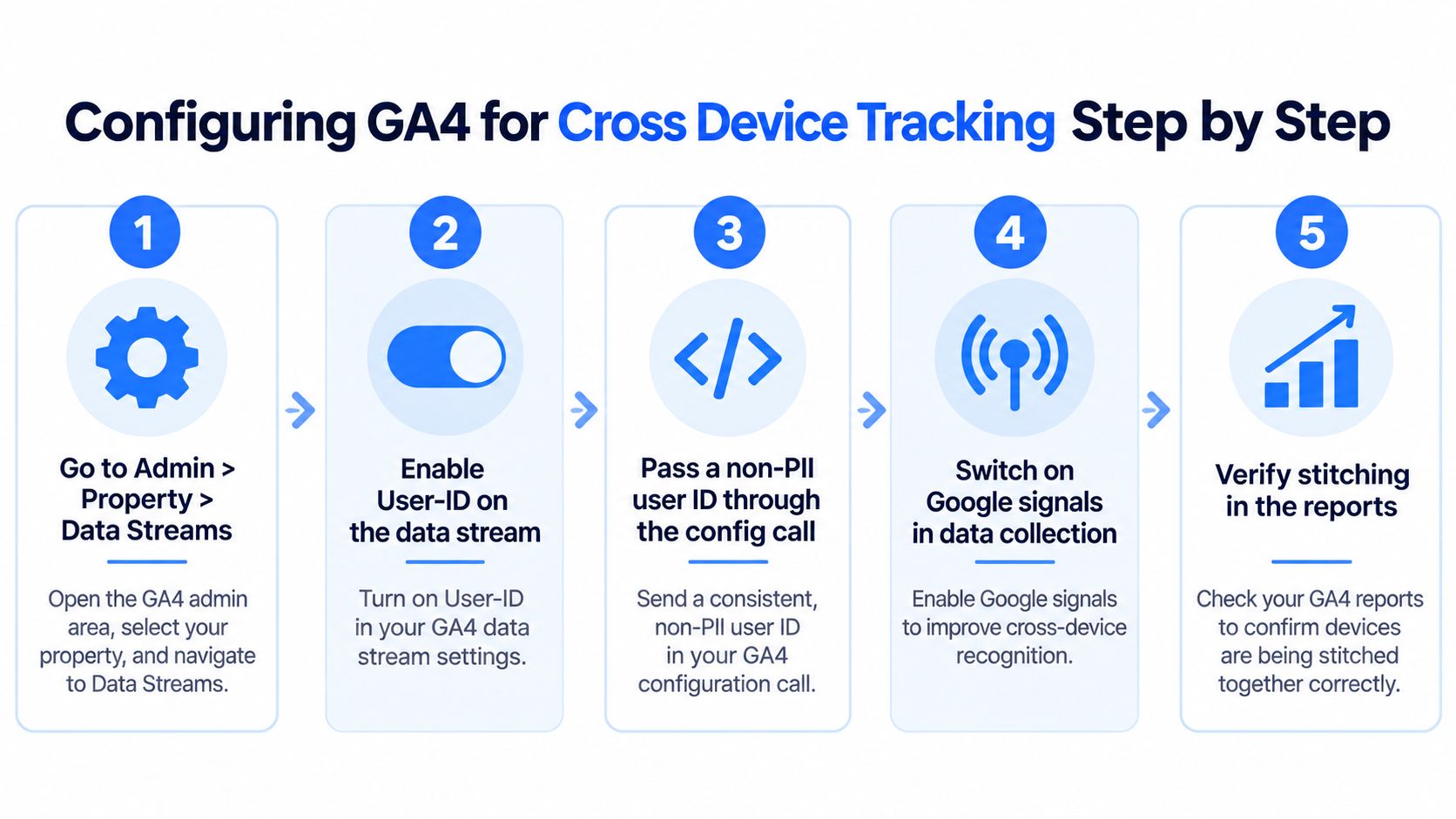
In Admin, open the property and review Data Streams. The exact interface can change, but the implementation objective remains stable: the site needs to expose a non-PII account identifier when a visitor authenticates, and GA4 needs to receive it on authenticated events.
The login event should fire immediately after successful authentication. A page-load-only setup can miss single-page application transitions or leave the first authenticated interactions without the identifier. The same User-ID value should be available through the Google tag and relevant event settings so that tour starts, hotspot interactions, form progress, and lead submissions carry consistent identity information.
Developers should provide the identifier through a controlled data layer or another reliable application-level method. It shouldn't be an email address, phone number, or another directly identifying value. Hashing alone doesn't automatically make prohibited personal information appropriate for analytics, so the identifier design should be reviewed with the privacy and development teams.
Turn on eligible signals with consent controls
Google Signals is configured under Data Settings, then Data Collection, subject to the property's regional and consent requirements. A consent management setup should communicate the user's choices before analytics and advertising-related storage or signals activate.
For sites serving visitors in regulated regions, the consent implementation must match the organization's legal basis and documented policy. The GA4 integration guidance for virtual tours can help teams connect tour activity with the wider analytics setup while keeping the event design visible to developers and marketers.
Validate before interpreting
Use DebugView, browser network inspection, and test accounts to confirm that the identifier appears only after authentication and disappears or is cleared after logout. Test the complete path, from mobile tour view to desktop research to tablet form submission, rather than checking only a single page.
Reporting identity is the final decision. Blended by device can be appropriate for tour and lead analysis when User-ID and eligible signals are both configured, because it preserves device coverage where stitching isn't possible while using stronger identity evidence where it exists. Teams should compare the result with a device-based view so they understand how much the chosen identity setting changes user counts and paths.
Privacy Limits, Consent Mode, and the Coverage Gap
Cross-device tracking isn't on by default in the sense many marketers assume. GA4 can collect device-level events immediately, but person-level continuity depends on authenticated identifiers, eligible Google Signals coverage, consent, and any available modeled data. The observable audience is therefore always partial.
User-ID reaches people during authenticated activity. Google Signals reaches eligible signed-in Google users, not every anonymous visitor. Modeling can address some consent-related gaps, but it doesn't reconstruct a named individual's journey. Google also uses privacy thresholding, which can suppress cross-device or demographic details when a report segment doesn't meet the required volume.
For a Virtual Tour Easy journey, a visitor who declines analytics storage may view a property on mobile and later submit a request on a tablet without entering the observable identity pool. The tablet session can then look like direct traffic, even if the original campaign introduced the prospect. That limitation should influence budget decisions. Reported channel credit is an evidence set, not a complete census of every touchpoint.
| Identity Space | Typical Reach | Depends On |
|---|---|---|
| User-ID | Authenticated portions of journeys | A stable, non-PII identifier sent after login |
| Google Signals | Eligible signed-in Google users | Google account status, applicable settings, consent, and reporting thresholds |
| Device ID | Browser or app installation | Available device-level identifiers |
| Modeling | Some consent-related gaps | Consent implementation, available observed data, and Google eligibility conditions |
Consent Mode can reduce the signals available for both measurement and modeling when visitors refuse storage. Reports may consequently look incomplete even when tags are correctly implemented. A practical GDPR-compliant analytics guide can help teams connect consent decisions with analytics governance.
The right response isn't to force more tracking. It's to label the limits, measure authenticated coverage, compare reporting identities, and avoid treating last-device attribution as the full commercial story. Teams should also document which conversions remain vulnerable to fragmentation through the GA4 conversion tracking setup.
Real World Journeys From a Virtual Tour Marketer
A property browser creates an account on a phone and opens a virtual tour. The same person reviews floor plans on a desktop, then submits a viewing request from a tablet while signed in. Because the same stable User-ID accompanies the authenticated events, GA4 can consolidate those interactions into one reporting journey where the configured identity rules permit it.
The marketer can then inspect the acquisition source, tour engagement, device sequence, and lead event together. The original paid social interaction may remain visible as an initiating touchpoint rather than being replaced by the tablet session just because the form was completed there.

A hospitality planner follows a different path. The planner browses anonymously on a phone, searches for the hotel later on a work laptop, and books a virtual site visit. If the person is an eligible signed-in Google user and the property can use the relevant signals, GA4 may join the sessions in aggregated reporting. The journey can become more coherent without a hotel login, but the marketer shouldn't expect unrestricted user-level inspection or complete demographic detail.
The third journey exposes the boundary. A traveler researching villas declines analytics storage on the phone, then returns directly on a tablet to book. No site-controlled User-ID exists, and the consent decision prevents the usual analytics storage from supporting the earlier session. GA4 may attribute the tablet booking to direct traffic and retain the phone interaction as a separate or unavailable touchpoint.
The appropriate report depends on the question:
- Device Overlap helps show whether the measured audience uses more than one device.
- Device Paths helps inspect sequences such as mobile to desktop to tablet.
- Acquisition Device helps compare the device associated with acquisition against later activity.
None of these views can recover evidence that consent or identity coverage never made available.
Choosing the Right GA4 Cross Device Report
Each cross-device report answers a different attribution question. Marketers should select the report before interpreting the result.
| Report | Answers | Required Identity |
|---|---|---|
| Device Overlap | Which device categories appear together in the measured user journeys? | Cross-device identity, with data limited to eligible identity coverage |
| Device Paths | In what order do measured users move between devices? | User-ID sessions for the documented cross-device reports |
| Acquisition Device | Which device was associated with acquiring the user before later activity? | User-level cross-device identity where available |
| Traffic Acquisition | Which source, medium, or campaign generated sessions and conversions? | Works at session and user reporting levels, but interpretation depends on reporting identity |
| Tech and device reports | Which browsers, platforms, and device categories are present? | Device-level data can remain available even when person-level stitching is limited |
A marketer asking, “How many prospects moved from a phone to a laptop before requesting a viewing?” should begin with Device Overlap and Device Paths. A marketer asking, “Which device introduced the lead, and which device completed the form?” should examine Acquisition Device alongside acquisition and conversion reports.
Google documents the three cross-device templates and states that they display data collected during sessions where a User-ID is sent. That requirement makes implementation quality decisive. A report with no populated User-ID data isn't evidence that visitors never switch devices. It may indicate that the property lacks the identifier needed for that view.
Cross-domain setups can create another source of confusion when tours sit on a separate domain or embedded experience. Teams managing that architecture can review GA4 cross-domain tracking for virtual tours before drawing conclusions from referral and device paths.
Best Practices and a Quick Pre Launch Checklist
Three decisions determine how credible a GA4 cross-device view will be.
Reporting identity decides which evidence GA4 prioritizes. Blended reporting can make sense when User-ID, Google Signals, and consent implementation are healthy. It shouldn't be selected just because it produces a more connected-looking journey.
User-ID coverage determines how much of the audience can be joined deterministically. The identifier belongs at authentication, not at the final form submission. If a team sends it only when a lead converts, the earlier research remains fragmented.
Consent state controls which signals can be collected or modeled. Consent defaults, regional behavior, and tag firing order should be audited before a property treats cross-device numbers as complete.
Measurement discipline: A connected path is useful only when the identity evidence and consent conditions behind it are understood.
A pre-launch review should include these checks:
- Confirm the reporting identity and document why the selected mode fits the business question.
- Verify the User-ID source is stable, pseudonymous, and supplied by the application after authentication.
- Check event coverage so authenticated tour views, hotspot clicks, and lead actions carry the identifier.
- Review Google Signals settings for the regions and audiences the property serves.
- Test consent behavior across accepted and declined states before production release.
- Use DebugView and network inspection to confirm the identifier appears at the correct moment.
- Record threshold limitations so missing dimensions aren't mistaken for missing implementation.
- Map reports to questions, using Device Paths for sequence analysis and Acquisition Device for device-level acquisition comparisons.
A real estate or hospitality team should also compare the same journey under device-based and blended reporting. The difference reveals how much apparent attribution depends on identity stitching rather than on additional conversions.
Virtual Tour Easy supports immersive tour creation, lead capture, and GA4 and Google Tag Manager integrations, so a team can connect tour interactions with its broader measurement plan. Visit Virtual Tour Easy to create tours that prospects can explore across phones, laptops, and tablets, then configure the events needed to understand where those journeys become inquiries.